EasyManua.ls Logo

Sony D-66 - Page 6

Sony D-66
18 pages
Print Icon
To Next Page IconTo Next Page
To Previous Page IconTo Previous Page
Loading...
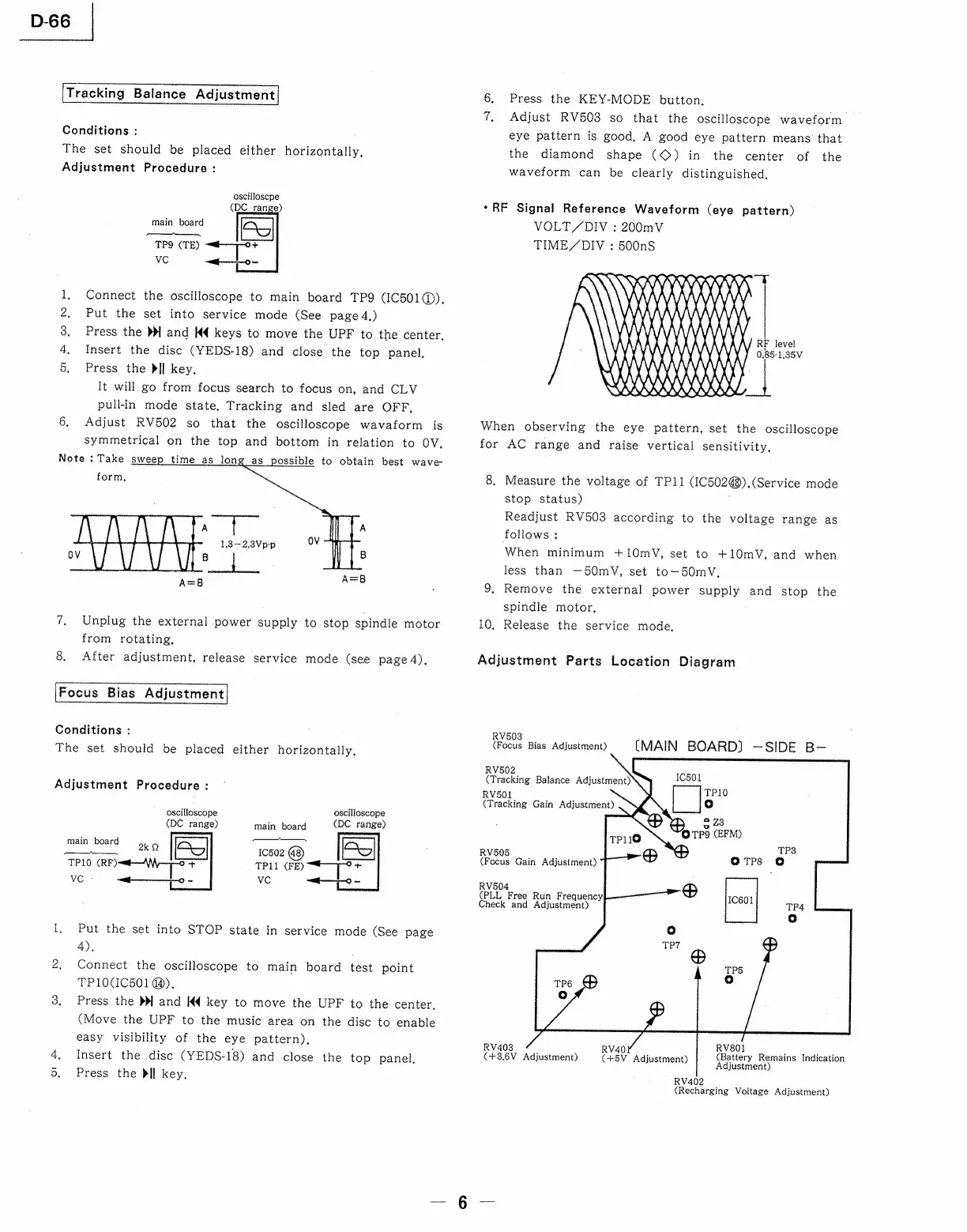
D-66
Tracking
Balance
Adjustment
Conditions
:
The
set
should
be
placed
either
horizontally,
Adjustment
Procedure
:
oscilloscpe
(DC_range)
main
board
—-ee.[__
—--—"~—
TP9
(TE)
VC
Connect
the
oscilloscope
to
main
board
TP9
(IC501@),
Put
the
set
into
service
mode
(See
page
4.)
Press
the
»
and
K4
keys
to
move
the
UPF
to
the
center,
Insert
the
disc
(YEDS-18)
and
close
the
top
panel.
Press
the
>I]
key.
It
will
go
from
focus
search
to
focus
on,
and
CLV
pull-in
mode
state.
Tracking
and
sled
are
OFF,
6,
Adjust
RV502
so
that
the
oscilloscope
wavaform
is
symmetrical
on
the
top
and
bottom
in
relation
to
OV.
oR
ON
Note
:
Take
sweep
time
as
lon
ossible
to
obtain
best
wave-
form
A
|
A
1,3—2,3Vp-p
OV
B
|
B
A=B8
7,
Unplug
the
external
power
supply
to
stop
spindle
motor
from
rotating,
8.
After
adjustment,
release
service
mode
(see
page
4),
Focus
Bias
Adjustment
Conditions
:
The
set
should
be
placed
either
horizontally,
Adjustment
Procedure
:
oscilloscope
(DC
range)
oscilloscope
(DC
range)
main
board
re
peed
st
ee
1C502
TP10
(RF)
TP11
(FE)
ve
-
vc
1,
Put
the
set
into
STOP
state
in
service
mode
(See
page
4).
2,
Connect
the
oscilloscope
to
main
board
test
point
TP1OCIC501
4).
3,
Press
the
3
and
K€
key
to
move
the
UPF
to
the
center,
(Move
the
UPF
to
the
music
area
on
the
disc
to
enable
easy
visibility
of
the
eye
pattern),
.
Insert
the
disc
(YEDS-18)
and
close
the
top
panel,
5.
Press
the
dif
key.
6.
Press
the
KEY-MODE
button.
7,
Adjust
RV503
so
that
the
oscilloscope
waveform
eye
pattern
is
good,
A
good
eye
pattern
means
that
the
diamond
shape
(©)
in
the
center
of
the
waveform
can
be
clearly
distinguished,
*RF
Signal
Reference
Waveform
(eye
pattern)
VOLT/Y/DIV
:
200mV
TIME/DIV
:
500nS
RF
level
AXLE
KKLX
REX)
VER
|
OSS
When
observing
the
eye
pattern,
set
the
oscilloscope
for
AC
range
and
raise
vertical
sensitivity,
8,
Measure
the
voltage
of
TP11
(IC502@).(Service
mode
stop
status)
Readjust
RV503
according
to
the
voltage
range
as
follows
;
When
minimum
+10mV,
set
to
+10mV,
and
when
less
than
—50mV,
set
to-—50mV,
9,
Remove
the
external
power
supply
and
stop
the
spindle
motor,
10,
Release
the
service
mode,
Adjustment
Parts
Location
Diagram
RV503
(Focus
Bias
Adjustment)
(MAIN
BOARD}
—SIDE
B-
RV502
RV501
(Tracking:
Gain
Adjustment)
RV505
(Focus
Gain
Adjustment)
RV504
(PLL
Free
Run
Frequency
Check
and
Adjustment)
RV403
RV40
:
sang
(+3.6V
Adjustment)
(+5V
Adjustment)
(Battery
Remains
Indication
Adjustment)
RV402
(Recharging
Voltage
Adjustment)

Related product manuals