28
GB
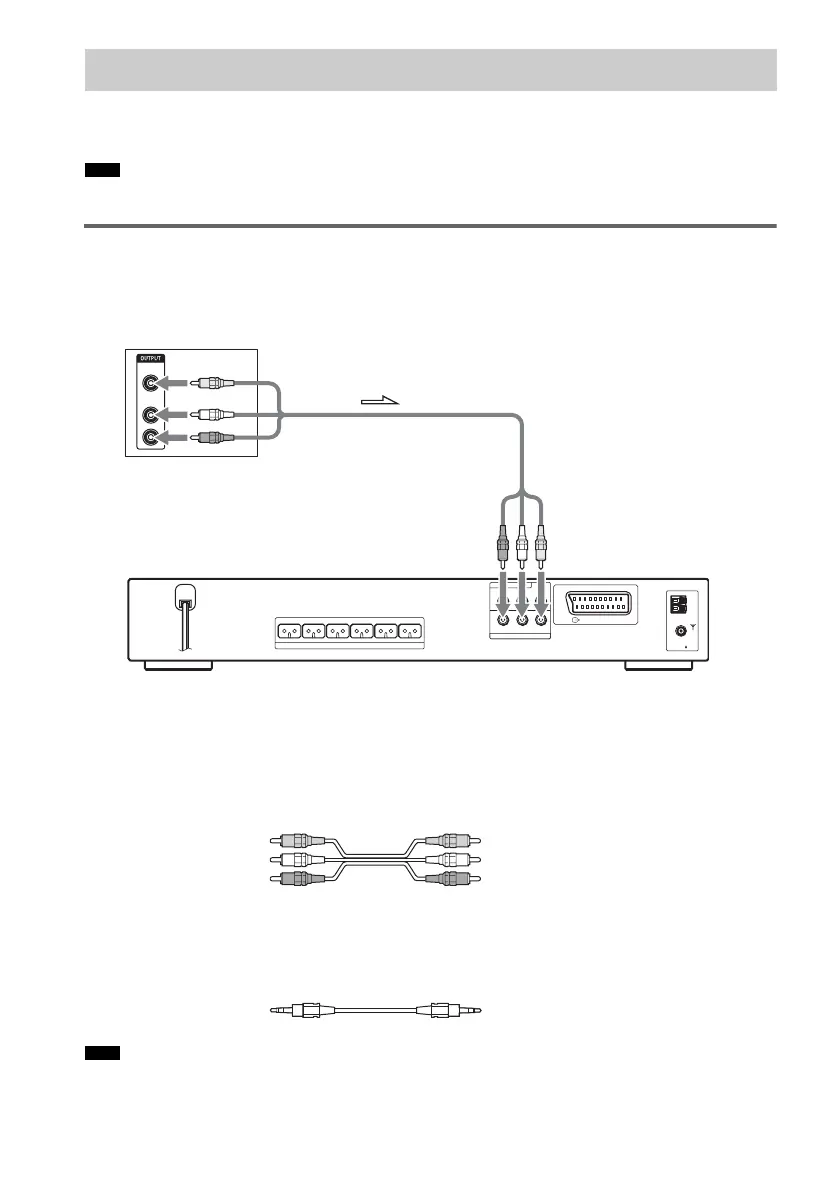
You can enjoy sound using the speakers of this system by connecting the AUDIO OUT jacks of another
component. For video connection of other components, connect directly to the TV.
• If you connect a TV to the SAT jacks in Step 3 (page 24), you cannot connect other components to the system.
Connecting the system and the other component
Outputs the other component through the system.
To connect the VIDEO/AUDIO OUT jacks of other component to the SAT
(VIDEO/AUDIO IN) jacks of this system
Connect the VCR or other components to the SAT (VIDEO/AUDIO IN) jacks using the video/audio
cord (not supplied). When connecting a cord, be sure to match the color-coded sleeves to the
appropriate jacks on the components.
To listen to the portable audio source sound through the system
Connect the audio output jacks of the portable audio source to the AUDIO IN jack on the front panel
of the system with the stereo mini-plug cord (not supplied).
• Be sure to make connections securely to avoid hum and noise.
Step 4: Other Component Hookup
Note
Note
R
AUDIO
OUT
L
VIDEO
OUT
SPEAKER
COAXIAL
FM
75
Y
R AUDIO IN VIDEO INL
P
B
/C
B
P
R
/C
R
DVD ONLY
SAT
COMPONENT VIDEO OUT
EURO AV
OUTPUT(TO TV)
AM
FRONT R FRONT L SURR R SURR L CENTER WOOFER
VCR, digital satellite receiver,
or PlayStation 2, etc.
To SAT
(VIDEO/AUDIO IN)
Yellow (Video)
White (L/audio)
Red (R/audio)


 To Next Page