Getting Started
13
GB
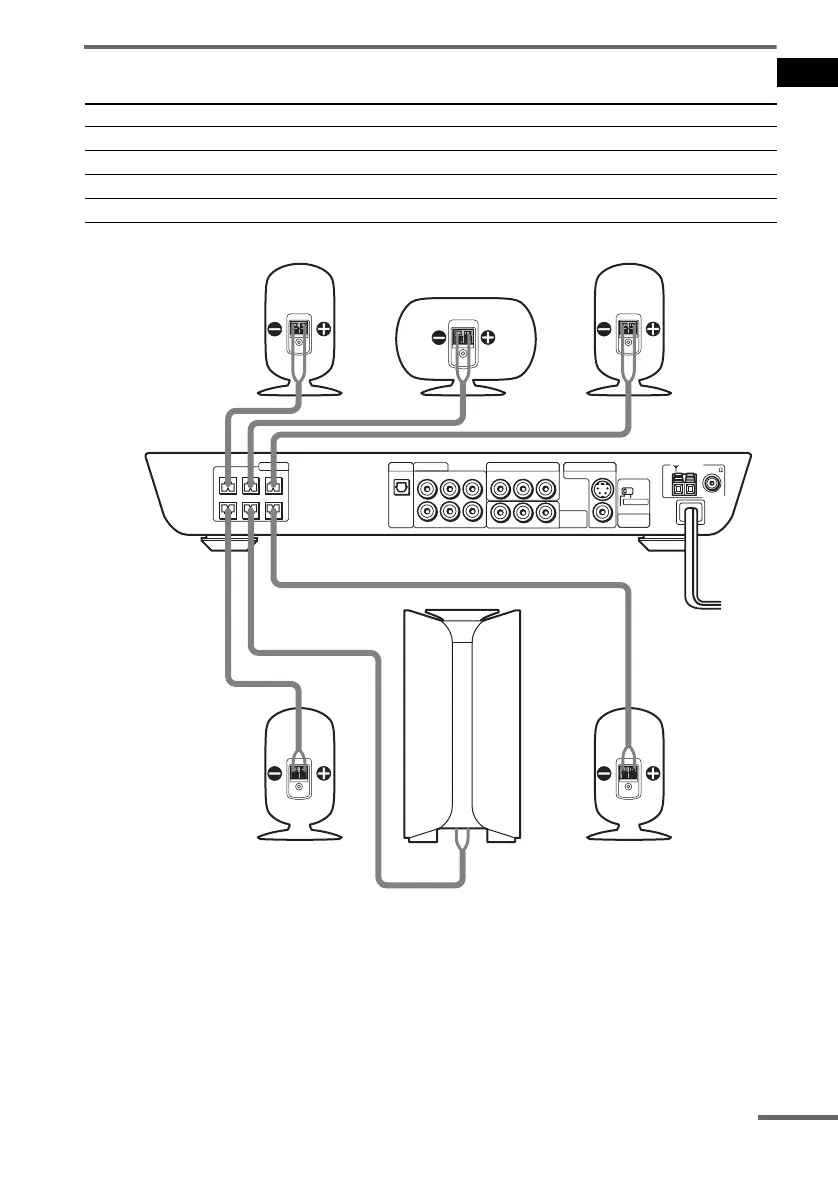
Terminals for connecting the speakers
Note on placing speakers
Use caution when placing the subwoofer or a speaker stand (not supplied) that is attached with the
front/surround speakers on a specially treated (waxed, oiled, polished, etc.) floor, as staining or
discoloration may result.
Connect the To the
Front speakers SPEAKER FRONT L (white) and R (red) jacks
Surround speakers SPEAKER SURR L (blue) and R (grey) jacks
Centre speaker SPEAKER CENTER (green) jack
Subwoofer SPEAKER WOOFER (purple) jack
COAXIAL
FM 75
OPTICAL
DIGITAL
IN
AM
CENTER FRONT LFRONT R
WOOFER SURR LSURR R
SPEAKER
VIDEO OUTAUDIO OUT
VIDEO INAUDIO IN
RL
RL
VIDEO 1
VIDEO 2
VIDEO INAUDIO IN
RL
MONITOR OUT
COMPONENT
VIDEO OUT
YPB/CB PR/CR
VIDEO 2
SCAN SELECT
SELECTABLE
INTERLACE
COMPONENT
VIDEO OUT
VIDEO
S VIDEO (DVD ONLY)
Front speaker (R)
Centre speaker
Front speaker (L)
Surround speaker (R)
Subwoofer
Surround speaker (L)
continued



 To Next Page