Enlarging still images recorded on a
“Memory Stick” -
Memory PB ZOOM
- DCR-IP7BT only
You can enlarge still images recorded on a “Memory Stick.”
Before operation
Insert the “Memory Stick” into your camcorder.
(1)
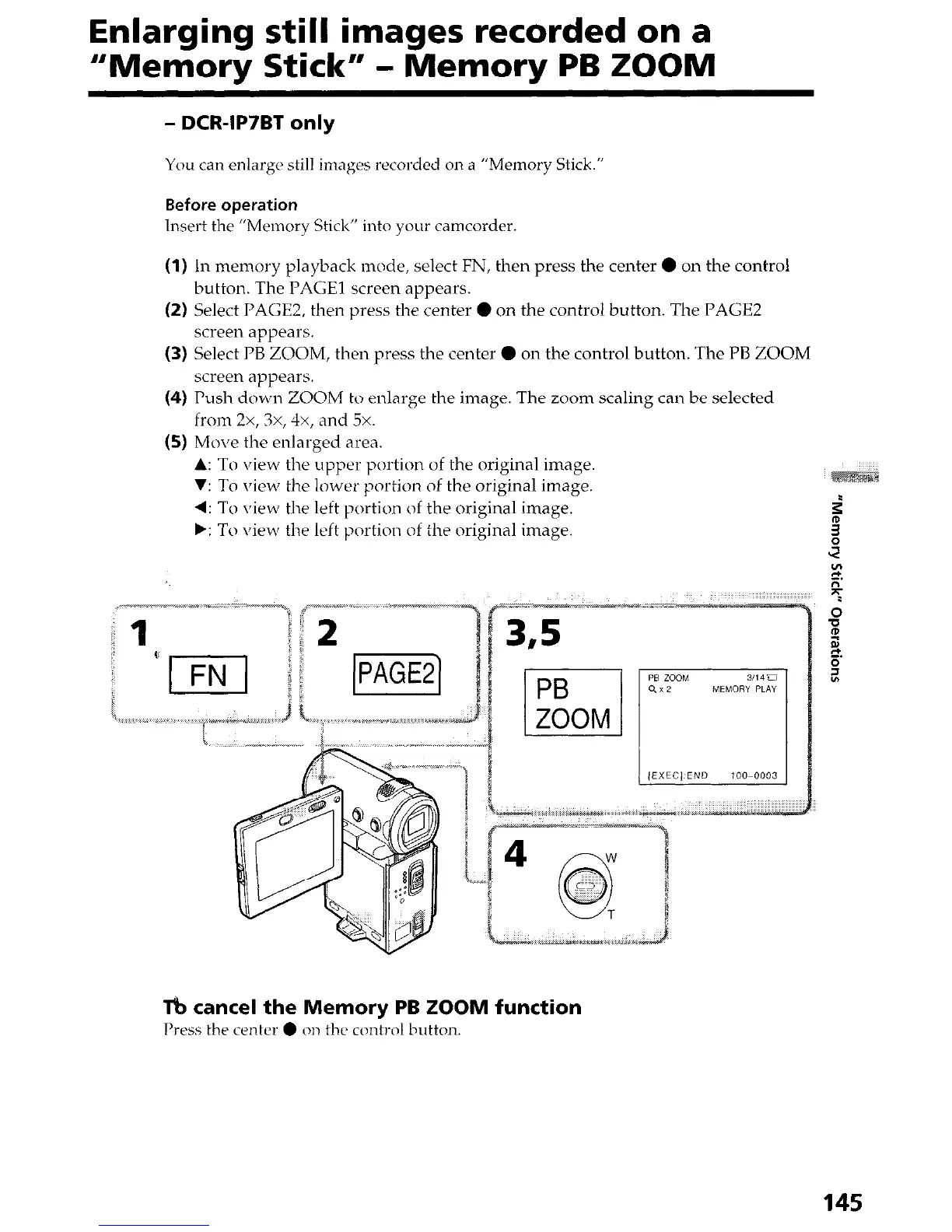
In memory playback mode, select FN, then press the center 0 on the control
button. The PAGE1 screen appears.
(2) Select PAGE2, then press the center 0 on the control button. The PAGE2
screen appears.
(3) Select PB ZOOM, then press the center 0 on the control button. The PB ZOOM
screen appears.
(4) Push down ZOOM to enlarge the image. The zoom scaling can be selected
from 2x, 3x, 4x, and 5x.
(5) Move the enlarged area.
A: To view the upper portion of the original image.
V: To view the lower portion of the original image.
4: To \iew the left portion of the original image.
b: To view the left portion of the original image.
Tb cancel the Memory PB ZOOM function
Press the center 0 on the control button.
145




 To Next Page