Playing b;
- SLIDE St
Ick images in a continuous loop
ow
- DCR-IP7BT only
You can automatically play back images in sequence. This function is useful especially
when checking recorded images or during a presentation.
Before operation
Insert the “Memory Stick” with your images recorded into your camcorder.
(1)
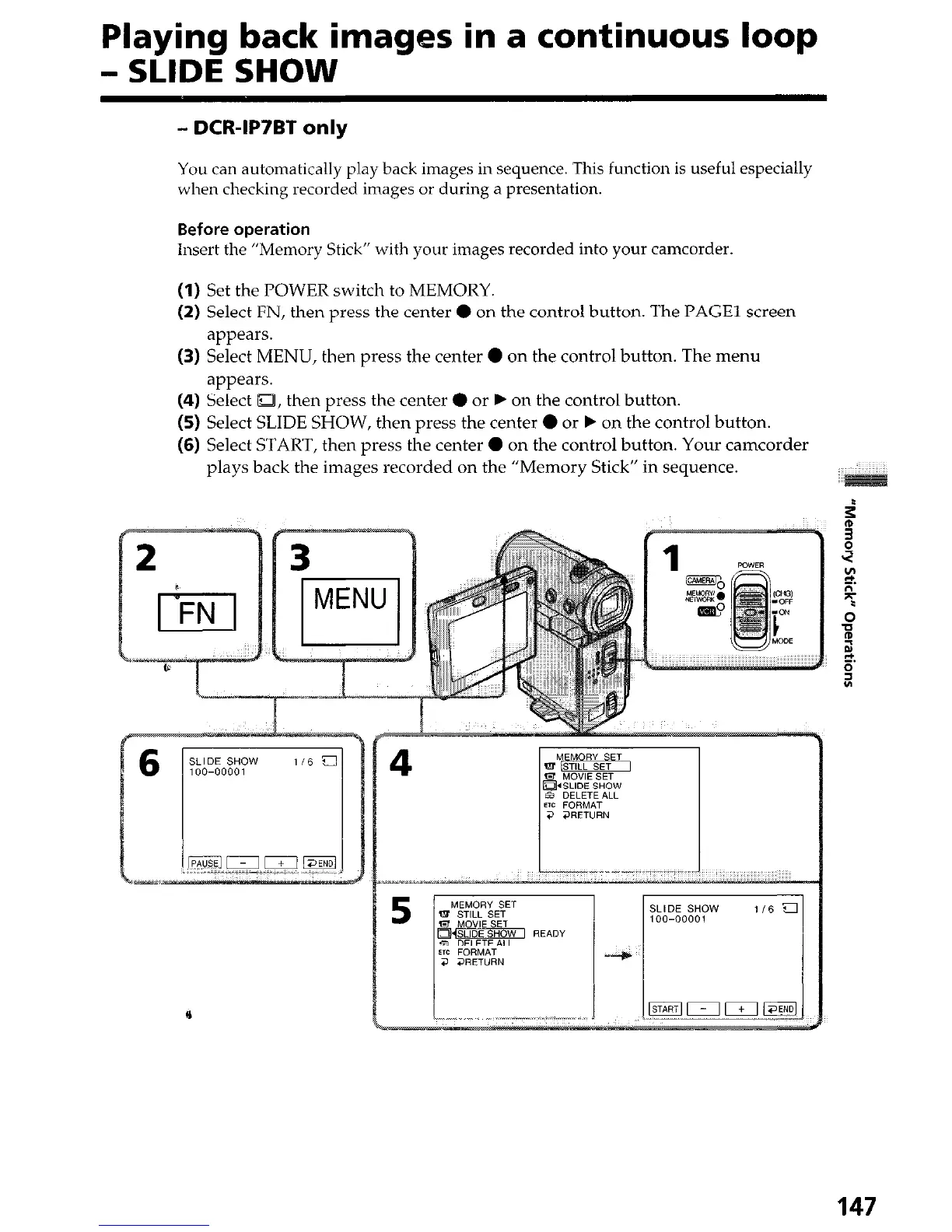
Set the POWER switch to MEMORY.
(2) Select FN, then press the center 0 on the control button. The PAGE1 screen
appears.
(3) Select MENU, then press the center 0 on the control button. The menu
appears.
(4) Select g, then press the center 0 or b on the control button.
(5) Select SLIDE SHOW, then press the center 0 or b on the control button.
(6) Select START, then press the center 0 on the control button. Your camcorder
plays back the images recorded on the “Memory Stick” in sequence.
6
e
147





 To Next Page