Preventing accidental erasure
- Image protection
- DCR-IP7BT only
To prevent accidental erasure of important images, you can protect selected images
Before operation
Insert the “Memory Stick” into your camcorder.
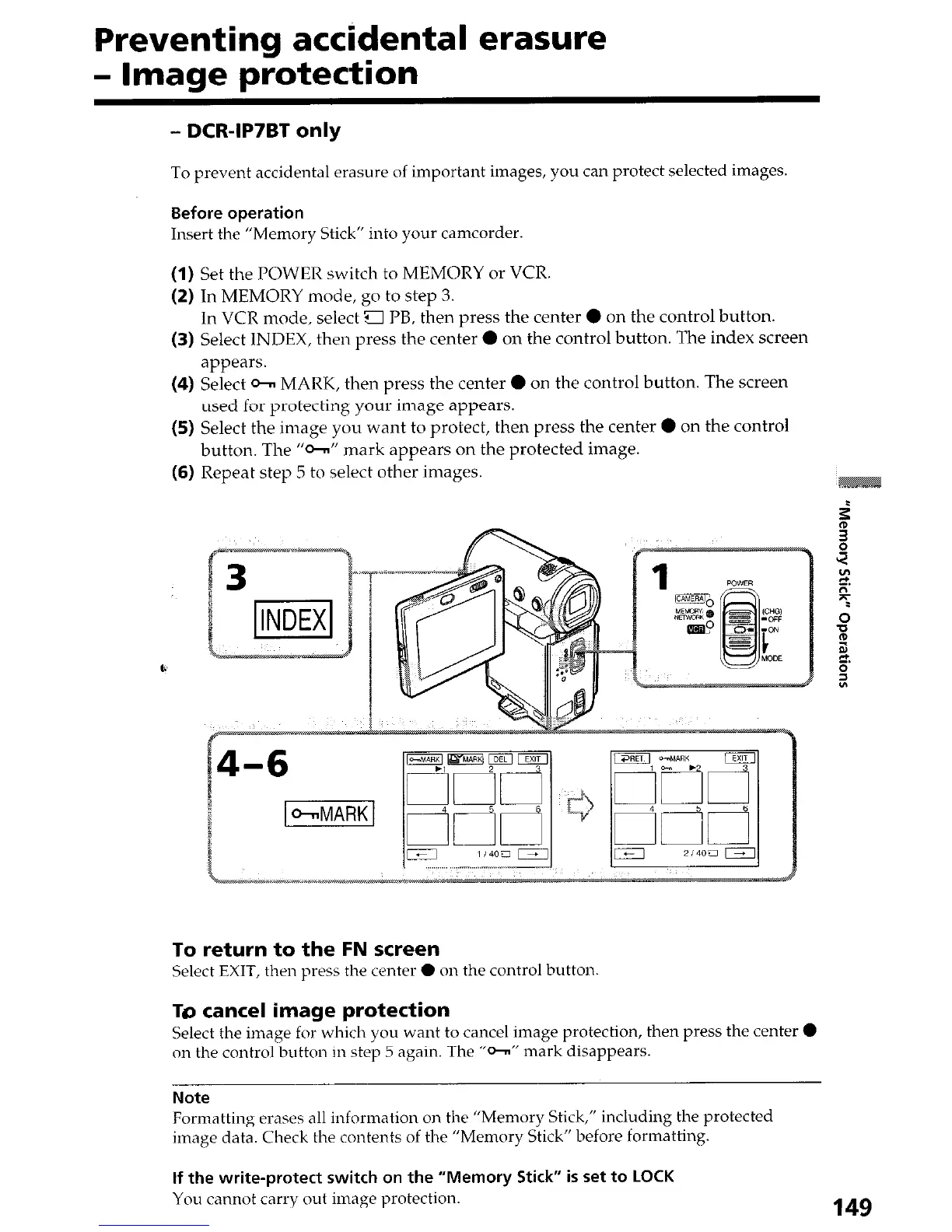
(1)
Set the POWER switch to MEMORY or VCR.
(2) In MEMORY mode, go to step 3.
In VCR mode, select g PB, then press the center 0 on the control button.
(3) Select INDEX, then press the center 0 on the control button. The index screen
appears.
(4) Select Cm MARK, then press the center 0 on the control button. The screen
used for protecting your image appears.
(5) Select the image you want to protect, then press the center 0 on the control
button. The “o-” mark appears on the protected image.
(6) Repeat step 5 to select other images.
To return to the FN screen
Select EXIT, then press the center 0 on the control button
TO cancel image protection
Select the image for which you want to cancel image protection, then press the center 0
on the control button in step 5 again. The “cm” mark disappears.
Note
Formatting erases all information on the “Memory Stick,” including the protected
image data. Check the contents of the “Memory Stick” before formatting.
If the write-protect switch on the “Memory Stick” is set to LOCK
You
cannot carry out image protection.
149






 To Next Page