Searching a recording by date
- Date search
You can automatically search for the point where the recording date changes and start
playback from that point, You can only use this function with the Remote Commander.
Use this function to check where recording dates change or to edit the tape at each
recording date.
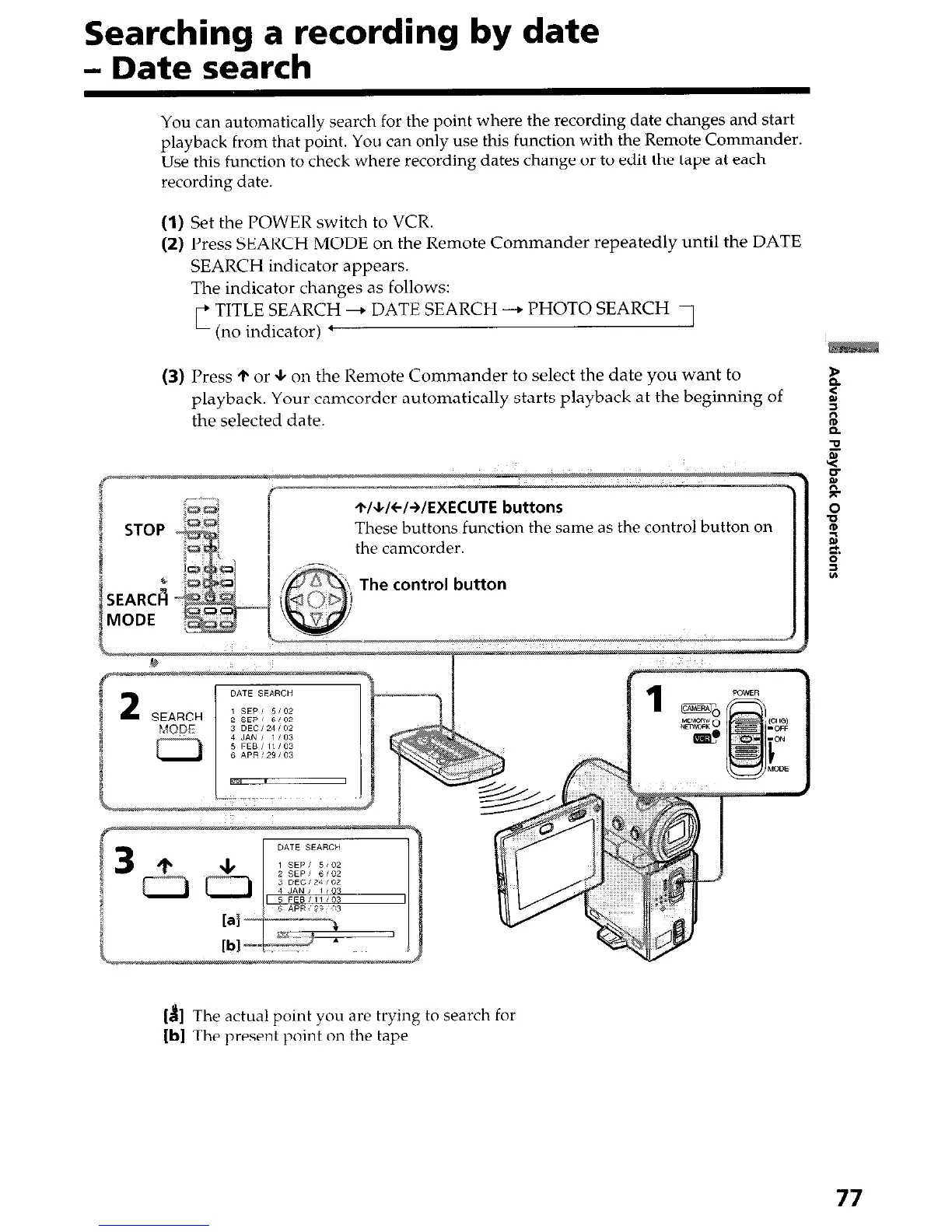
(1) Set the POWER switch to VCR.
(2) Press SEARCH MODE on the Remote Commander repeatedly until the DATE
SEARCH indicator appears.
The indicator changes as follows:
TITLE SEARCH + DATE SEARCH --+ PHOTO SEARCH
’ (no indicator) ’
(3) Press + or + on the Remote Commander to select the date you want to
playback. Your camcorder automatically starts playback at the beginning of
the selected date.
ame as the control button on
The control button
[B] The actual point you are trying to search for
[b] The present point on the tape
77




 To Next Page