Recording a program
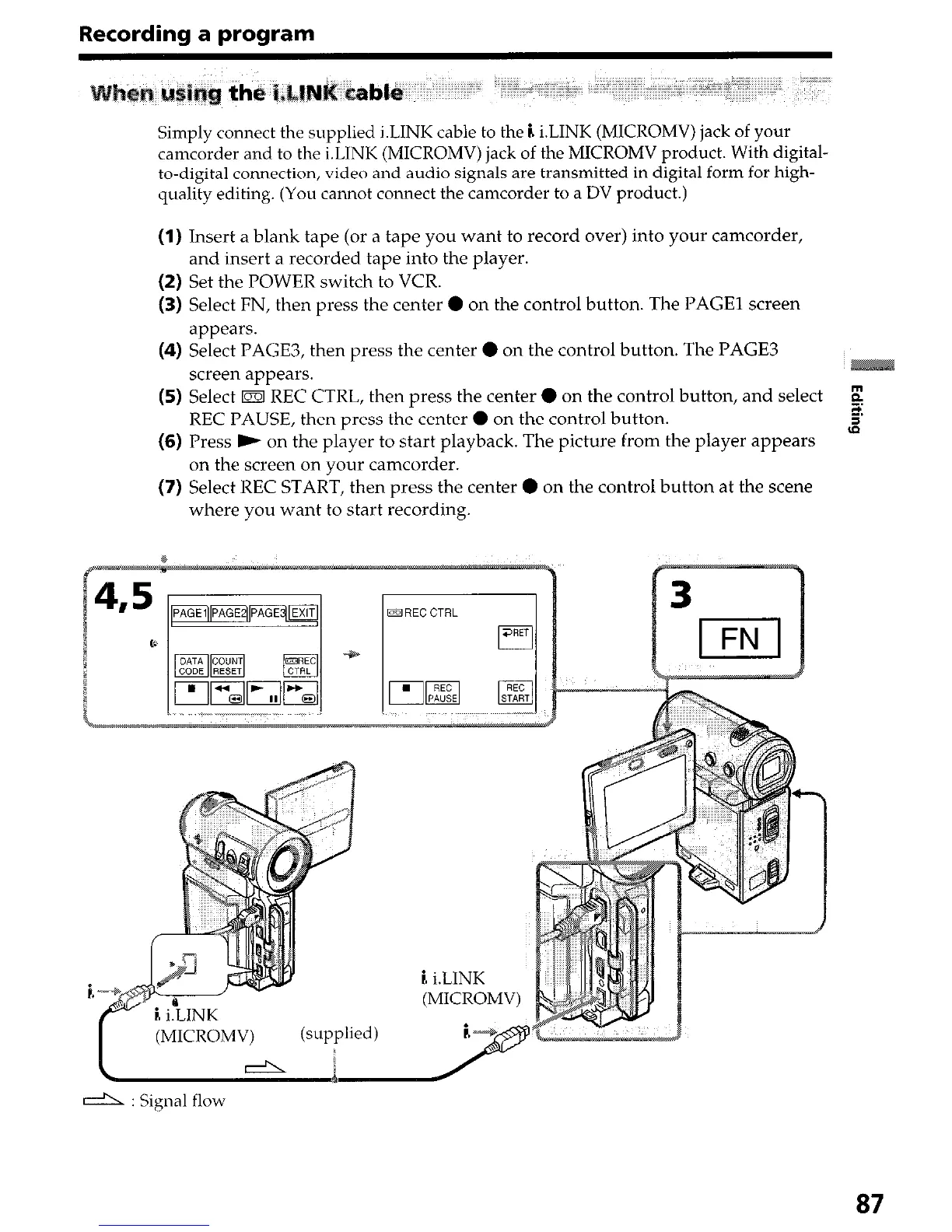
Simply connect the supplied i.LINK cable to the i. i.LINK (MICROMV) jack of your
camcorder and to the i.LINK (MICROMV) jack of the MICROMV product. With digital-
to-digital connection, video and audio signals are transmitted in digital form for high-
quality editing. (You cannot connect the camcorder to a DV product.)
(1) Insert a blank tape (or a tape you want to record over) into your camcorder,
and insert a recorded tape into the player.
(2) Set the POWER switch to VCR.
(3) Select FN, then press the center 0 on the control button. The PAGE1 screen
appears.
(4) Select PAGE3, then press the center 0 on the control button. The PAGE3
screen appears.
(5) Select m REC CTRL, then press the center 0 on the control button, and select
REC PAUSE, then press the center 0 on the control button.
(6) Press ) on the player to start playback. The picture from the player appears
on the screen on your camcorder.
(7) Select REC START, then press the center 0 on the control button at the scene
where you want to start recording.
d : Signal flow
87




 To Next Page