Superimposing a title
The title is recorded for about 5 seconds from the recording start point.
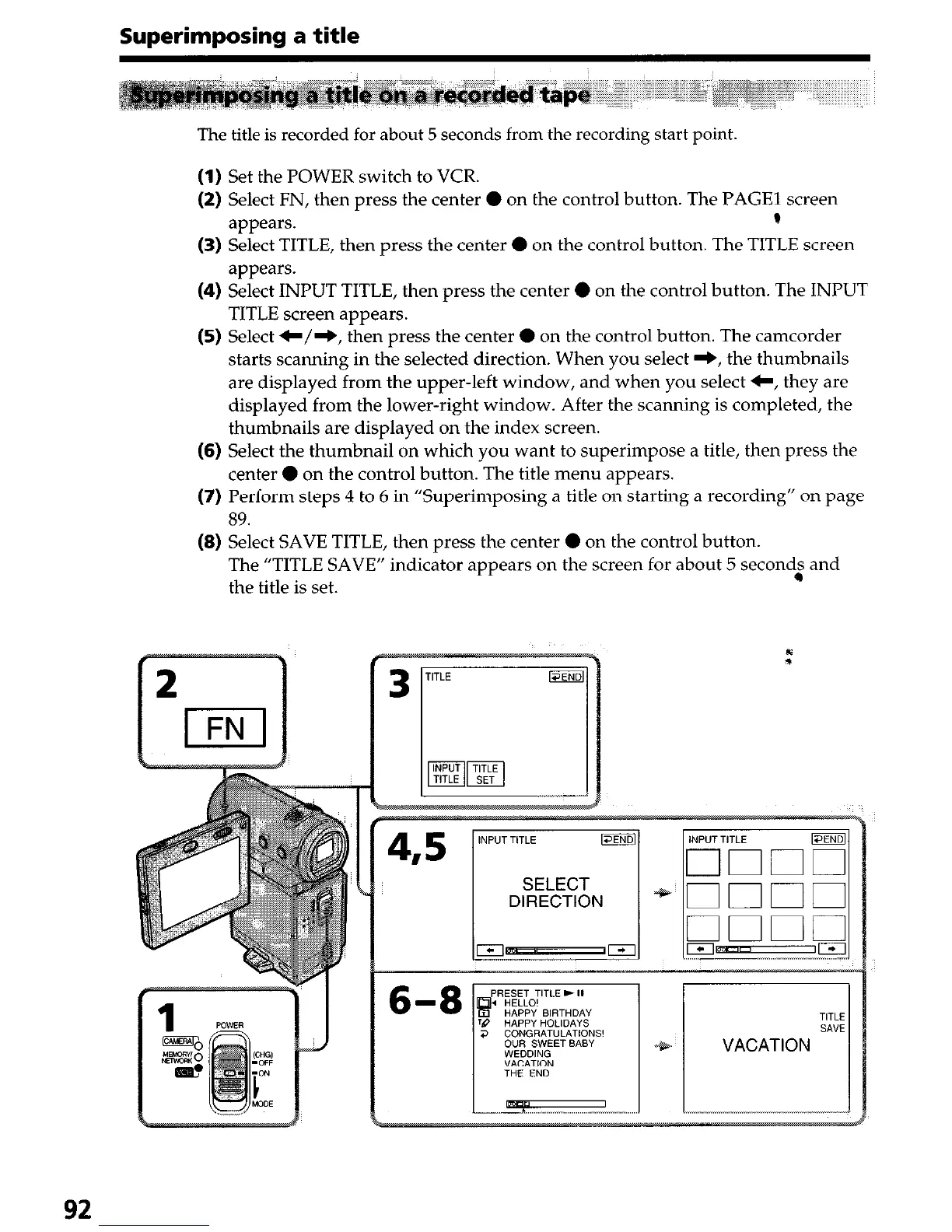
(1) Set the POWER switch to VCR.
(2) Select FN, then press the center 0 on the control button. The PAGE1 screen
appears.
P
(3) Select TITLE, then press the center 0 on the control button. The TITLE screen
appears.
(4) Select INPUT TITLE, then press the center 0 on the control button. The INPUT
TITLE screen appears.
(5) Select C/+, then press the center 0 on the control button. The camcorder
starts scanning in the selected direction. When you select +, the thumbnails
are displayed from the upper-left window, and when you select C, they are
displayed from the lower-right window. After the scanning is completed, the
thumbnails are displayed on the index screen.
(6) Select the thumbnail on which you want to superimpose a title, then press the
center 0 on the control button. The title menu appears.
(7) Perform steps 4 to 6 in “Superimposing a title on starting a recording” on page
89.
(8) Select SAVE TITLE, then press the center 0 on the control button.
The “TITLE SAVE” indicator appears on the screen for about 5 second; and
the title is set.
92





 To Next Page