Making your own titles
You can make up to two titles and store them in the memory of your camcorder. Each
title can have up to 20 characters.
(1)
Set the POWER switch to CAMERA.
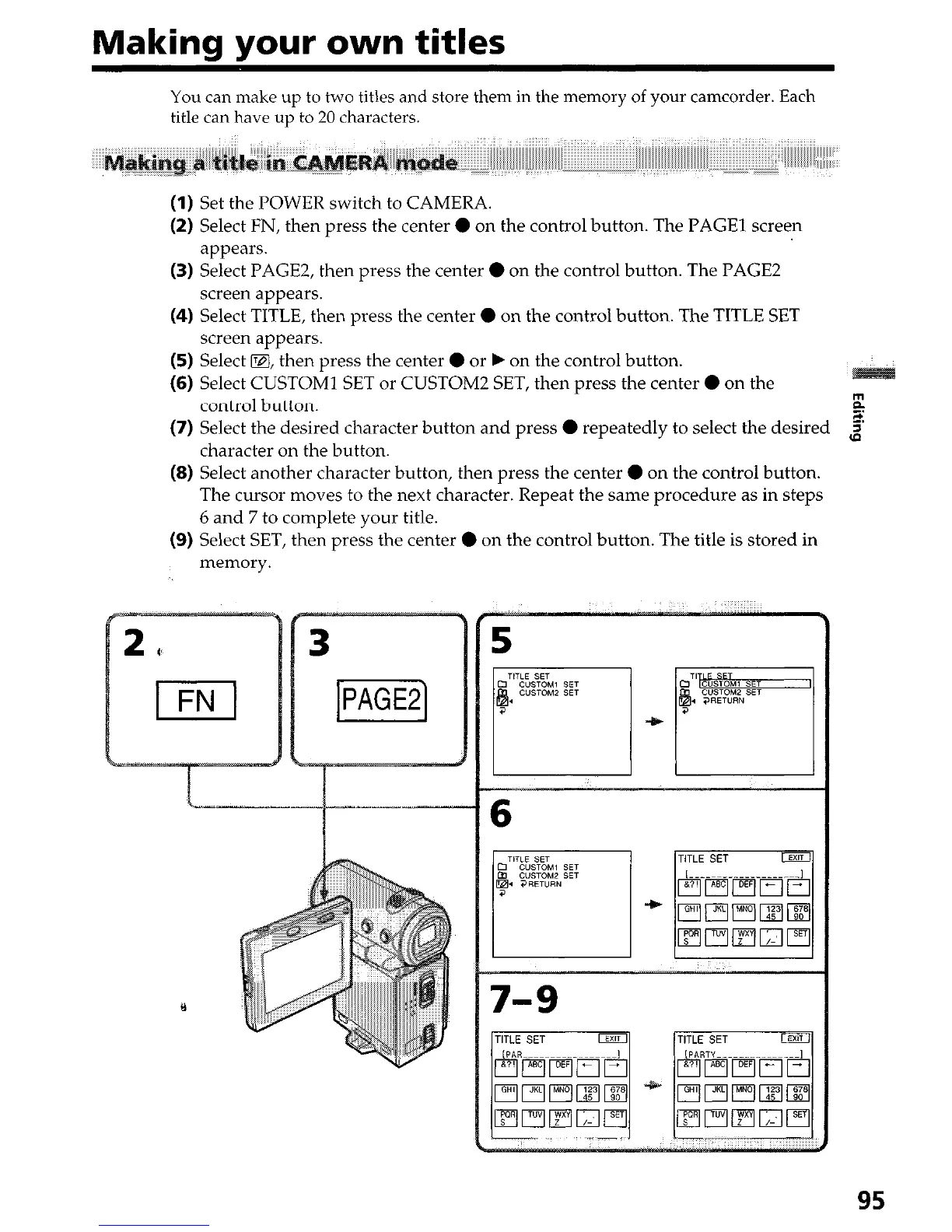
(2) Select FN, then press the center 0 on the control button. The PAGE1 screen
appears.
(3) Select PAGE2, then press the center 0 on the control button. The PAGE2
screen appears.
(4) Select TITLE, then press the center 0 on the control button. The TITLE SET
screen appears.
(5) Select D, then press the center 0 or b on the control button.
(6) Select CUSTOM1 SET or CUSTOM2 SET, then press the center 0 on the
control button.
r?
(7) Select the desired character button and press 0 repeatedly to select the desired
$
character on the button.
(8) Select another character button, then press the center 0 on the control button.
The cursor moves to the next character. Repeat the same procedure as in steps
6 and 7 to complete your title.
(9) Select SET, then press the center 0 on the control button. The title is stored in
memory.
3
Y










 To Next Page