Page 11 of 11 Last Modified: 8/12/03
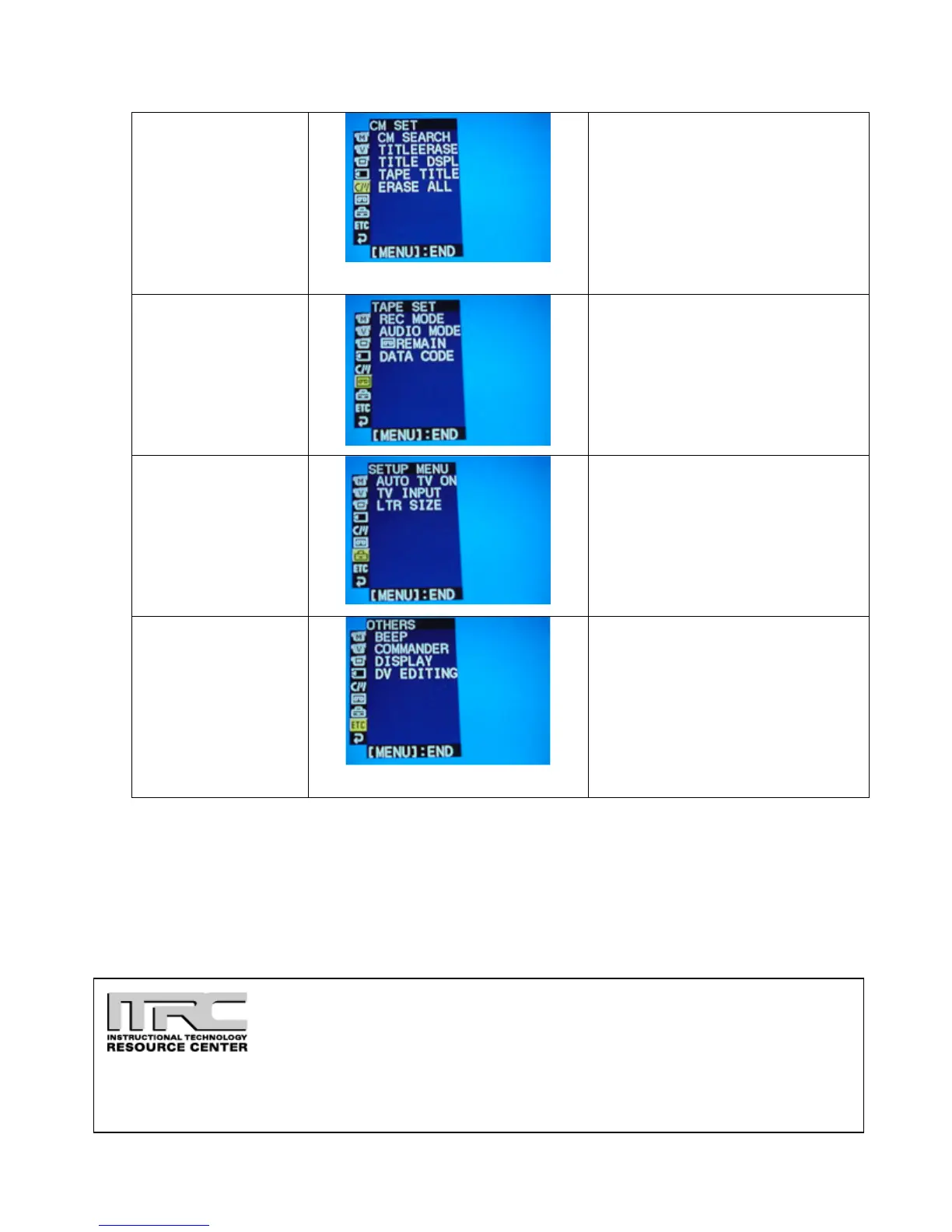
CM Set
(Make sure the
selector switch is set
on VTR)
CM Search: Search using
cassette memory.
TitleErase: To erase the title
you have superimposed.
Title DSPL: To display the
title.
Tape Title: To label the tape.
Erase All: Erases on the
recorded footage.
Tape Set
(Make sure the
selector switch is set
on VTR)
Rec Mode: Mode to record in.
Audio Mode: Record in 12-bit
or 16-bit mode.
Remain: The on-screen
display of remaining tape.
Data Code: To display date,
time, and various settings for
playback
Setup Menu
(Make sure the
selector switch is set
on VTR)
Auto TV ON: To
automatically turn on a Sony
TV with laser link function.
TV Input: To switch the video
input.
LTR Size: To display selected
menu items at normal size or
twice the size.
Others
(Make sure the
selector switch is set
on VTR)
Beep: Sounds to signify
stop/start recording.
Commander: To activate the
remote.
Display: To show the LCD
screen.
DV Editing: Using the iLink
to edit video with other
equipment.
Idaho State University
Campus Box 8064
Pocatello, ID 83209
208.282.5880
Copyright © 2003 by ITRC
This document may be reproduced for individual or nonprofit use. Users acknowledge that the manual, and all
copyright and other intellectual and proprietary rights therein, are and at all times shall remain the valuable property of
the author. Users agree to respect and not to alter, remove or conceal any copyright, trademark, trade name or other
proprietary marking that may appear in the manual. Please send comments to itrc@isu.edu. For more information
about the ITRC, visit our Website at http://www.isu.edu/itrc.








 To Previous Page