173
“Memory Stick
” operations
Работа с “Memory Stick”
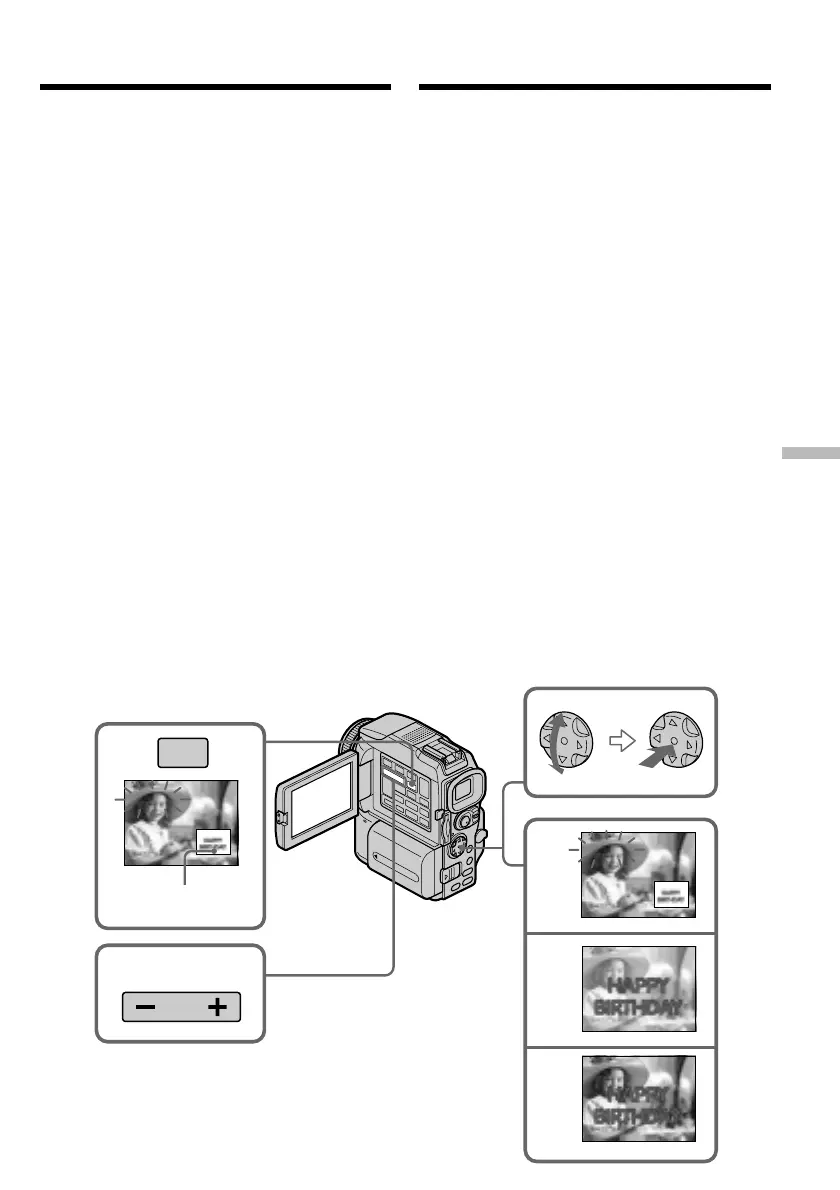
(5)Press z on the control button.
The still image is superimposed on the
moving image.
(6)Press b/B on the control button to adjust the
effect.
M. CHROM – The colour (blue) scheme of
the area in the still image
which is to be swapped with
a moving image
M. LUMI – The colour (bright) scheme
of the area in the still image
which is to be swapped with
a moving image
C. CHROM – The colour (blue) scheme of
the area in the moving
image which is to be
swapped with a still image
M. OVERLAP – No adjustment necessary
The fewer bars there are on the screen, the
stronger the effect.
(7)Press START/STOP to start recording.
Superimposing a still image in
the “Memory Stick” on an image
– MEMORY MIX
4
5
6
M. LUMI
M. LUMI
M. LUMI
III••••
I••••••
100–0021
100–0021
100–0021
2
M. CHROM
100–0021
MEMORY
MIX
3
Still image/
Stilstaand beeld
(5)Нажмите z на управляющей клавише.
Будет выполнено наложение
неподвижного изображения на
движущееся изображение.
(6)Отрегулируйте действие эффекта с
помощью b/B на управляющей клавише.
M. CHROM – Цветовая гамма (голубая)
участка неподвижного
изображения, который
будет заменен
движущимся
изображением.
M. LUMI – Цветовая гамма (яркая)
участка неподвижного
изображения, который
будет заменен
движущимся
изображением.
C. CHROM – Цветовая гамма (голубая)
участка движущегося
изображения, который
будет заменен
неподвижным
изображением.
M. OVERLAP – настройка не требуется
Чем меньше полосок высвечивается на
экране, тем сильнее эффект.
(7)Чтобы начать запись, нажмите кнопку
START/STOP.
Наложение неподвижного
изображения с “Memory Stick” на
изображение — Функция MEMORY MIX



 To Next Page