6-13
8. Picture Frame Setting
Setting method:
1) Adjust the zoom and the camera direction, and set to the specified
position.
2) Mark the position of the picture frame on the monitor display,
and adjust the picture frame to this position in following
adjustments using “color bar chart standard picture frame”.
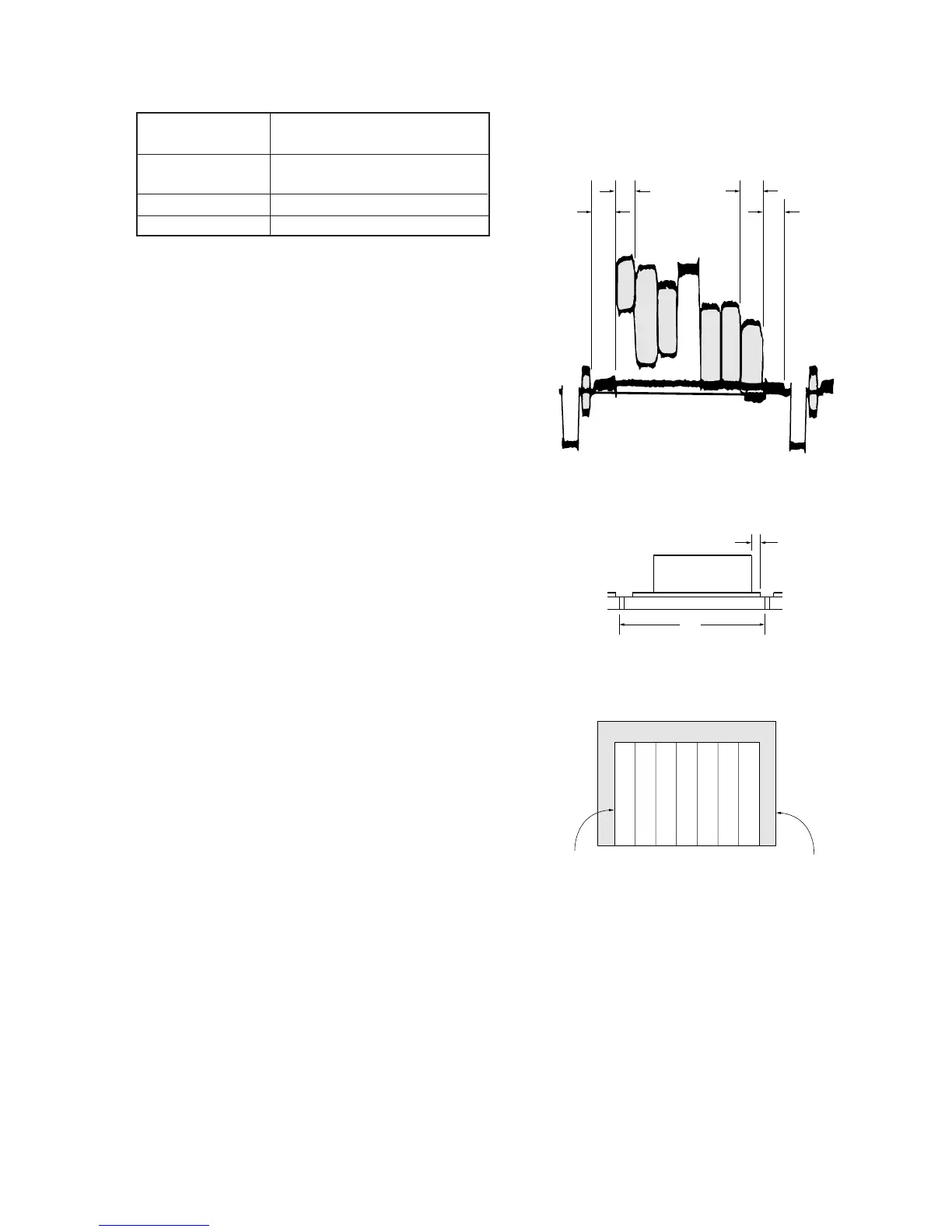
Check on the oscilloscope
1. horizontal period
A = B
A
B
C = D
C
D
Fig. 6-1-6.
2. Vertical period
V
t = 0 ± 0.1 msec
Fig. 6-1-7.
Check on the TV monitor
Color bar chart picture frame
TV monitor picture frame
Color bar chart standard picture frame
(1.5m from the front of the lens)
Subject
Measurement Point
Video output terminal of VIDEO/
AUDIO output jack
Oscilloscope and TV monitor.
A = B, C = D, t = 0 ± 0.1 msec
Measuring Instrument
Specified Value
Fig. 6-1-8.


 To Next Page