EasyManua.ls Logo

Sony DCX-930 - Page 12

Sony DCX-930
158 pages
Print Icon
To Next Page IconTo Next Page
To Previous Page IconTo Previous Page
Loading...
Chapter
1
Locations
and
Functions
of
Parts
@
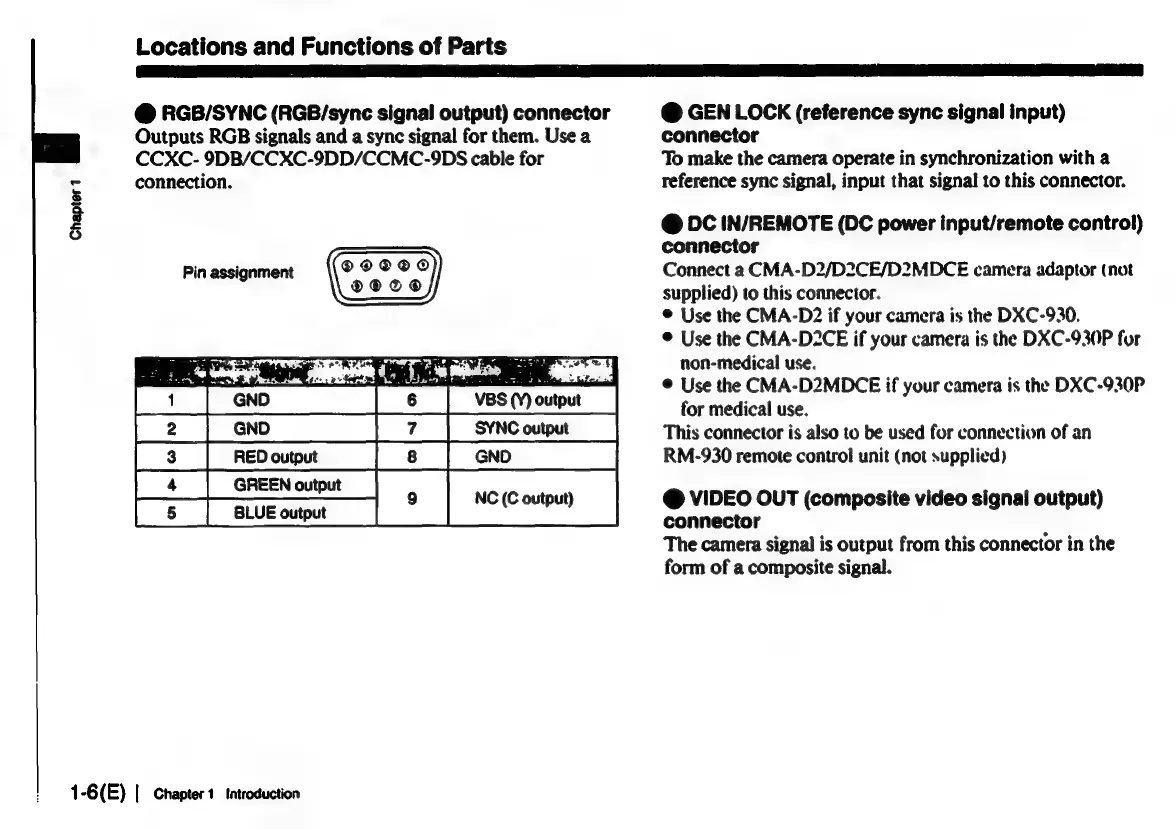
RGB/SYNC
(RGB/sync
signal
output)
connector
Outputs
RGB
signals
and
a
sync
signal
for
them.
Use
a
CCXC-
9DB/CCXC-9DD/CCMC-9DS
cable
for
connection.
Pin
assignment
®©@OOO0
®2OC®@
I
a
|
GND
|
7
|
S¥NCouput__
[a
|
Repowt
|e
|
en
[4
|
GREEN
outpot
|
fs
|
aiveounut
|
1-6(E)
|
Chapter
1
tatroduction
@
GEN
LOCK
(reference
sync
signal
input)
connector
To
make
the
camera
operate
in
synchronization
with
a
reference
sync
signal,
input
that
signal
to
this
connector.
@
DC
IN/REMOTE
(DC
power
input/remote
control)
connector
Connect
a
CMA-D2/D2CE/D2MDCE
camera
adaptor
(not
supplied)
to
this
connector.
©
Use
the
CMA-D2
if
your
camera
is
the
DXC-930.
®
Use
the
CMA-D2CE
if
your
camera
is
the
DXC-930P
for
non-medical
use.
©
Use
the
CMA-D2MDCE
if
your
camera
is
the
DXC-930P
for
medical
use.
This
connector
is
also
to
be
used
for
connection
of
an
RM-930
remote
control
unit
(not
supplied)
@
VIDEO
OUT
(composite
video
signal
output)
connector
The
camera
signal
is
output
from
this
connector
in
the
form
of
a
composite
signal.

Related product manuals