EasyManua.ls Logo

Sony DCX-930 - Page 17

Sony DCX-930
158 pages
Print Icon
To Next Page IconTo Next Page
To Previous Page IconTo Previous Page
Loading...
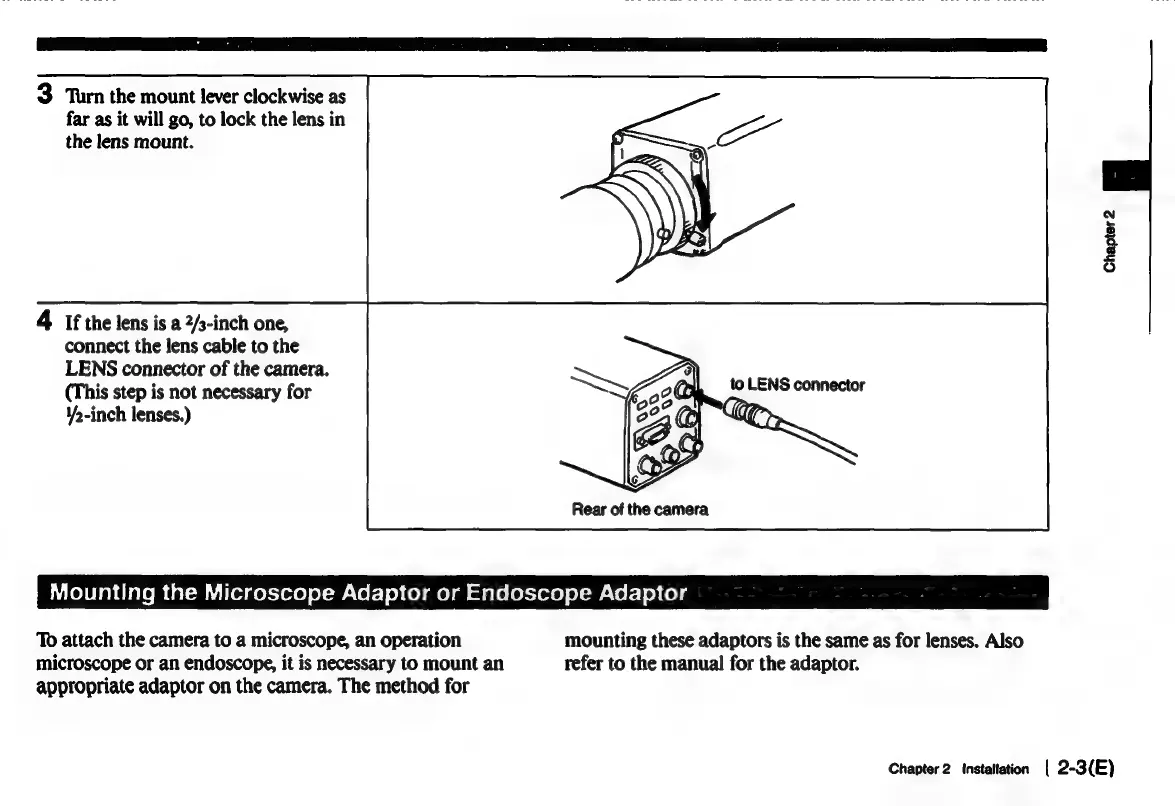
3
Turn
the
mount
lever
clockwise
as
far
as
it
will
go,
to
lock
the
lens
in
the
lens
mount.
Chapter
2
4
If
the
lens
is
a
2/s-inch
one,
connect
the
lens
cable
to
the
LENS
connector
of
the
camera.
(This
step
is
not
necessary
for
¥>-inch
lenses.)
to
LENS
connector
Rear
of
the
camera
Cole
ab
diate
M
tal-muilorges-yezre)
ol-w-Vol-]
op
(ol
mela
at
ale
letter)
ol-m\ol-10)
(eo)
f
To
attach
the
camera
to
a
microscope,
an
operation
mounting
these
adaptors
is
the
same
as
for
lenses.
Also
microscope
or
an
endoscope,
it
is
necessary
to
mount
an
refer
to
the
manual
for
the
adaptor.
appropriate
adaptor
on
the
camera.
The
method
for
Chapter
2
Installation
|
2-3({E)

Related product manuals