EasyManua.ls Logo

Sony DCX-930 - Page 18

Sony DCX-930
158 pages
Print Icon
To Next Page IconTo Next Page
To Previous Page IconTo Previous Page
Loading...
Chapter
2
|
Connecting
to
Video
Equipment
Having
a
Composite
Video
Input
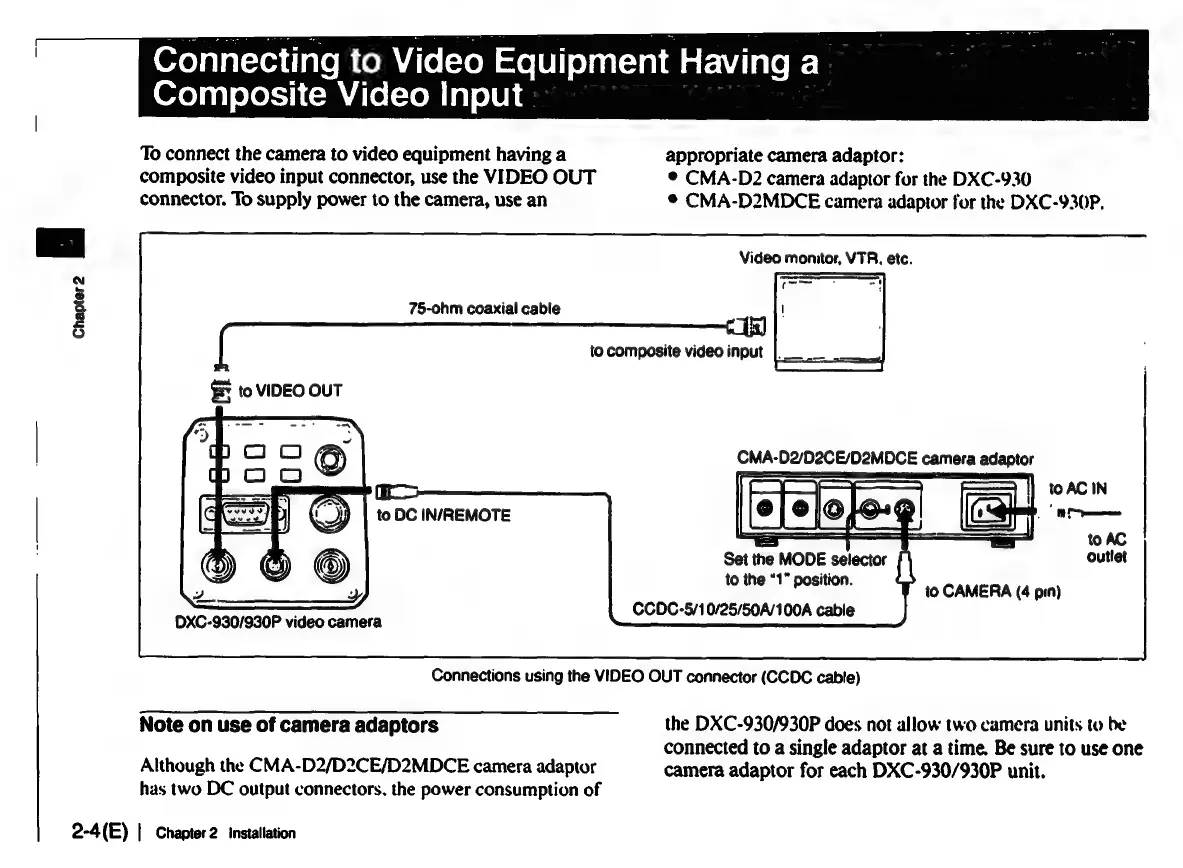
To
connect
the
camera
to
video
equipment
having
a
appropriate
camera
adaptor:
composite
video
input
connector,
use
the
VIDEO
OUT
®
CMA-D2
camera
adaptor
fur
the
DXC-930
connector.
To
supply
power
to
the
camera,
use
an
®
CMA-D2MDCE
camera
adaptor
for
the
DXC-930P,
Video
monitor,
VTR.
etc.
75-ohm
coaxial
cable
to
composite
video
input
|.
|
§
to
VIDEO
OUT
to
DC
IN/REMOTE
=
to
AC
Set
the
MODE
selector
outlet
to
the
“1°
position.
to
CAMERA
(4
pin)
CCDC-5/10/25/50A/100A
cable
ODXC-930/930P
video
camera
Connections
using
the
VIDEO
OUT
connector
(CCDC
cable)
Note
on
use
of
camera
adaptors
the
DXC-930/930P
does
not
allow
two
camera
units
to
be
connected
to
a
single
adaptor
at
a
time.
Be
sure
to
use
one
Although
the
CMA-D2/D2CE/D2MDCE
camera
adaptor
camera
adaptor
for
each
DXC-930/930P
unit.
has
two
DC
output
connectors,
the
power
consumption
of
2-4(E)
|
Chapter
2
installation

Related product manuals