DPF-D95
– 3 –
SAFETY-RELATED COMPONENT WARNING!!
COMPONENTS IDENTIFIED BY MARK 0 OR DOTTED LINE WITH
MARK 0 ON THE SCHEMATIC DIAGRAMS AND IN THE PARTS LIST
ARE CRITICAL TO SAFE OPERATION. REPLACE THESE COMPO-
NENTS WITH SONY PARTS WHOSE PART NUMBERS APPEAR AS
SHOWN IN THIS MANUAL OR IN SUPPLEMENTS PUBLISHED BY
SONY.
ATTENTION AU COMPOSANT AYANT RAPPORT
À LA SÉCURITÉ!
LES COMPOSANTS IDENTIFIÉS PAR UNE MARQUE 0 SUR LES
DIAGRAMMES SCHÉMATIQUES ET LA LISTE DES PIÈCES SONT
CRITIQUES POUR LA SÉCURITÉ DE FONCTIONNEMENT. NE REM-
PLACER CES COMPOSANTS QUE PAR DES PIÈCES SONY DONT
LES NUMÉROS SONT DONNÉS DANS CE MANUEL OU DANS LES
SUPPLÉMENTS PUBLIÉS PAR SONY.
Unleaded solder
Boards requiring use of unleaded solder are printed with the leadfree
mark (LF) indicating the solder contains no lead.
(Caution: Some printed circuit boards may not come printed with the
lead free mark due to their particular size.)
: LEAD FREE MARK
Unleaded solder has the following characteristics.
• Unleaded solder melts at a temperature about 40°C higher than ordi-
nary solder.
Ordinary soldering irons can be used but the iron tip has to be applied
to the solder joint for a slightly longer time.
Soldering irons using a temperature regulator should be set to about
350°C.
Caution: The printed pattern (copper foil) may peel away if the heated
tip is applied for too long, so be careful!
• Strong viscosity
Unleaded solder is more viscous (sticky, less prone to flow) than
ordinary solder so use caution not to let solder bridges occur such as
on IC pins, etc.
• Usable with ordinary solder
It is best to use only unleaded solder but unleaded solder may also be
added to ordinary solder.
SAFETY CHECK-OUT
After correcting the original service problem, perform the following
safety checks before releasing the set to the customer.
1. Check the area of your repair for unsoldered or poorly-soldered
connections. Check the entire board surface for solder splashes and
bridges.
2. Check the interboard wiring to ensure that no wires are “pinched”
or contact high-wattage resistors.
3. Look for unauthorized replacement parts, particularly transistors,
that were installed during a previous repair. Point them out to the
customer and recommend their replacement.
4. Look for parts which, through functioning, show obvious signs of
deterioration. Point them out to the customer and recommend their
replacement.
5. Check the B+ voltage to see it is at the values specified.
6. Flexible Circuit Board Repairing
• Keep the temperature of the soldering iron around 270°C during
repairing.
• Do not touch the soldering iron on the same conductor of the circuit
board (within 3 times).
• Be careful not to apply force on the conductor when soldering or
unsoldering.
1. 注意事項をお守りください。
サービスのとき特に注意を要する個所については,キャビ
ネット,シャーシ,部品などにラベルや捺印で注意事項を
表示しています。これらの注意書き及び取扱説明書等の注
意事項を必ずお守り下さい。
2. 指定部品のご使用を
セットの部品は難燃性や耐電圧など安全上の特性を持った
ものとなっています。従って交換部品は,使用されていた
ものと同じ特性の部品を使用して下さい。特に回路図,部
品表に
0
印で指定されている安全上重要な部品は必ず指定
のものをご使用下さい。
3. 部品の取付けや配線の引きまわしはもとどおりに
安全上,チューブやテープなどの絶縁材料を使用したり,
プリント基板から浮かして取付けた部品があります。また
内部配線は引きまわしやクランパによって発熱部品や高圧
部品に接近しないよう配慮されていますので,これらは必
ずもとどおりにして下さい。
4. サービス後は安全点検を
サービスのために取外したネジ,部品,配線がもとどおり
になっているか,またサービスした個所の周辺を劣化させ
てしまったところがないかなどを点検し,安全性が確保さ
れていることを確認して下さい。
5. チップ部品交換時の注意
・ 取外した部品は再使用しないで下さい。
・ タンタルコンデンサのマイナス側は熱に弱いため交換時
は注意して下さい。
6. フレキシブルプリント基板の取扱いについて
・ コテ先温度を270℃前後にして行なって下さい。
・ 同一パターンに何度もコテ先を当てないで下さい。
(3回以内)
・ パターンに力が加わらないよう注意して下さい。
サービス,点検時には次のことにご注意ください。
無鉛半田について
本機には無鉛半田が使用されています。
無鉛半田を使用している基板には,無鉛(LeadFree)を意味する
レッドフリーマークがプリントされています。
(注意:基板サイズによっては,無鉛半田を使用していてもレッ
ドフリーマークがプリントされていないものがありま
す)
:レッドフリーマーク
無鉛半田には,以下の特性があります。
・
融点が従来の半田よりも約40℃高い。
従来の半田こてをそのまま使用することは可能ですが,少し
長めにこてを当てる必要があります。温度調節機能のついた
半田こてを使用する場合,約350℃に設定して下さい。
注意:半田こてを長く当てすぎると,基板のパターン(銅箔)
がはがれてしまうことがありますので,注意して下さ
い。
・
粘性が強い
従来の半田よりも粘性が強いため,IC端子などが半田ブリッ
ジしないように注意して下さい。
・
従来の半田と混ぜて使用可能
無鉛半田には無鉛半田を追加するのが最適ですが,従来の半
田を追加しても構いません。
– ENGLISH – – JAPANESE –
MAIN FEATURES
主な特長
ソニーデジタルフォトフレームDPF-D95は,デジタルカメラな
どで撮影した画像を,コンピューターを使用せずに簡単にディ
スプレイに表示できるデジタルフォトフレームです。
•様々なメモリーカードに対応
“メモリースティック”,SDメモリーカード,xD-PictureCard
など様々なメモリーカードに対応しています。デジタルカメ
ラなどから抜いたメモリーカードをそのまま差し込むだけ
で,すぐに画像の表示ができます。
•様々な表示機能
スライドショー,時計・カレンダー,一枚表示,インデック
スを色々なスタイルで表示できます。
•多彩なスライドショー
まるでアルバムをめくるように,自動的に画像を切り換えて
表示します。時計やカレンダーをモチーフとしたスライド
ショーを含め,複数のスタイルから選べます。また,再生順
など,再生条件の設定ができます。
•画像を内蔵メモリーに取り込む
メモリーカードの画像を内蔵メモリーに取り込むことができ
ます。
•画像の書き出し
画像の書き出し機能により,内蔵メモリー内の画像をメモ
リーカードに書き出せます。
•絞り込み機能
日付,フォルダー,縦写真/横写真,マークからお好みの画
像を絞り込むことができます。
•縦置き,横置き自由自在
傾斜センサーにより,フレームの置きかた(縦置き,横置き)
に連動して,表示が自動的に回転します。
•壁掛け対応
本機を壁掛けにしてお楽しみいただけます。
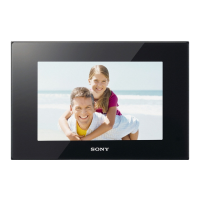
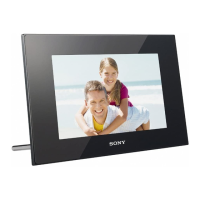
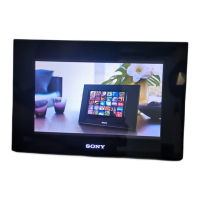
The Sony DPF-D95 is a digital photo frame for easily displaying images
taken with a digital camera or other device, without using a computer.
xSupport for various memory cards
Supports various memory cards, such as a “Memory Stick”, SD memory
card, and xD-Picture Card. Just insert a memory card removed from a
digital camera or other device, and you will be able to view the images
immediately.
xVarious display functions
You can enjoy various viewing modes, such as the slideshow display,
Clock and calendar display, Single view mode, and Index image
display.
xVarious slideshow styles
The displayed image can be switched automatically as though you are
turning the pages of an album yourself. You can select from various
slideshow styles, including the ones displaying a clock or calendar. You
can also change playback settings such as the playback order.
xImporting images to internal memory
You can import and save the images in the internal memory.
xExporting images
You can export images in the internal memory to your memory card.
xSorting function
You can sort images by the date, folder, image direction, and mark.
xAutomatic rotation of images
The photo frame automatically rotates images to their proper orienta-
tion. Images are also automatically rotated when the photo frame is set
in either the portrait or landscape position.
xDisplaying images on a wall
You can hang the photo frame on the wall.


 To Next Page
 Loading...