DSC-H10_L2
HELP
Mountain fold
PL-048 Flexible
Board
FL-179 Flexible Board
FL-179
Flexible
Board
Detect SW Part of the
FL-179 Flexible Board
FL-179
Flexible
Board
Pass the FL-179
Flexible Board
FL Insulating Sheet
ST Assy
ST Assy
ST-193
Flexible Board
Valley fold
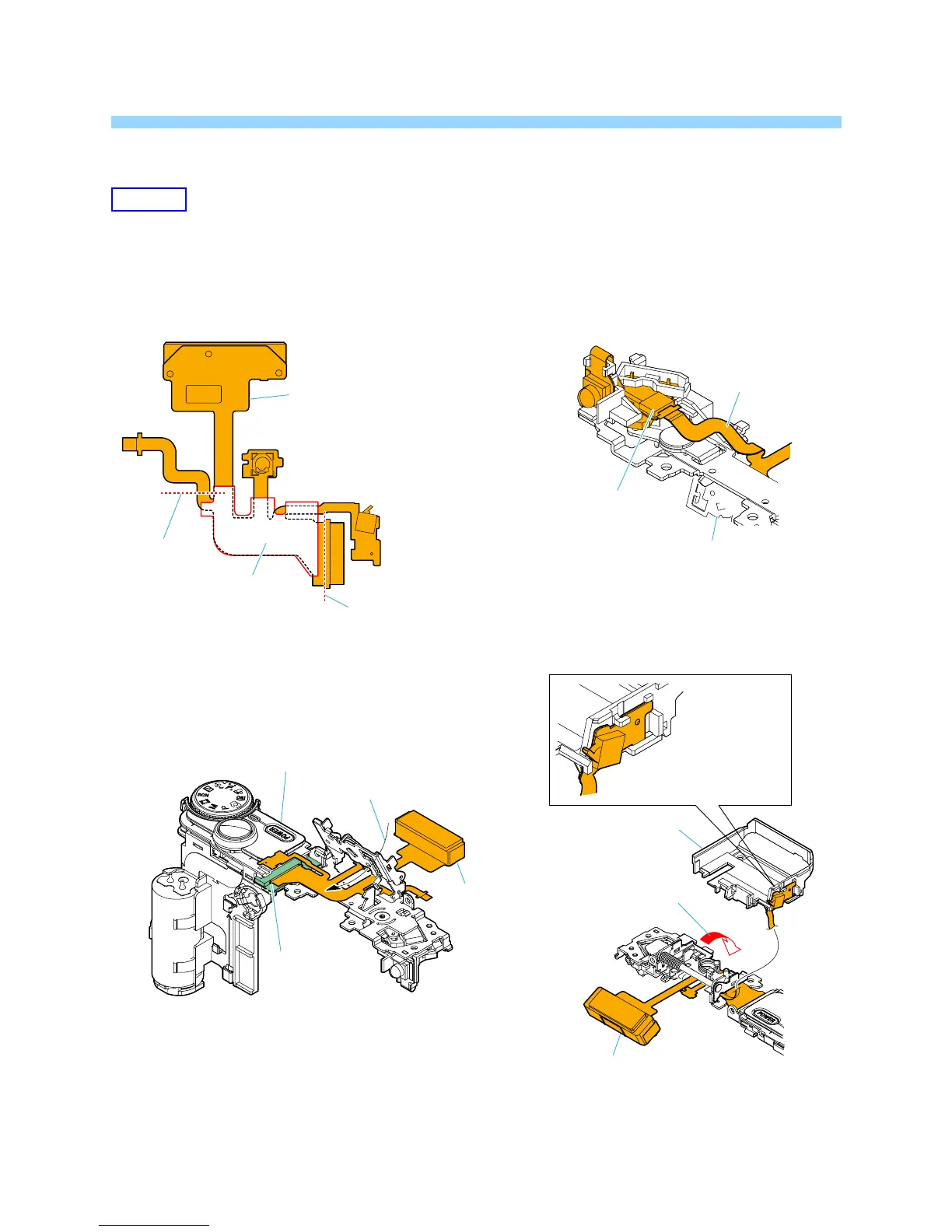
THE METHOD OF ATTACHMENT OF FL-179 FLEXIBLE BOARD
HELP04
1 Fold dotted line parts of the FL-179 flexible board,
and attach the FL insulating sheet as shown in figure.
2 Pass the FL-179 flexible board through the ST assy,
and connect the FL-179 flexible board to the ST-193
flexible board.
3 Connect the FL-179 flexible board to the
PL-048 flexible board.
4 Close the detect ST assy, and set the SW part of
the FL-179 flexible board to the ST base.
FL-179 Flexible
Board
Close the
ST Assy
ST Base









 To Next Page