23
GB
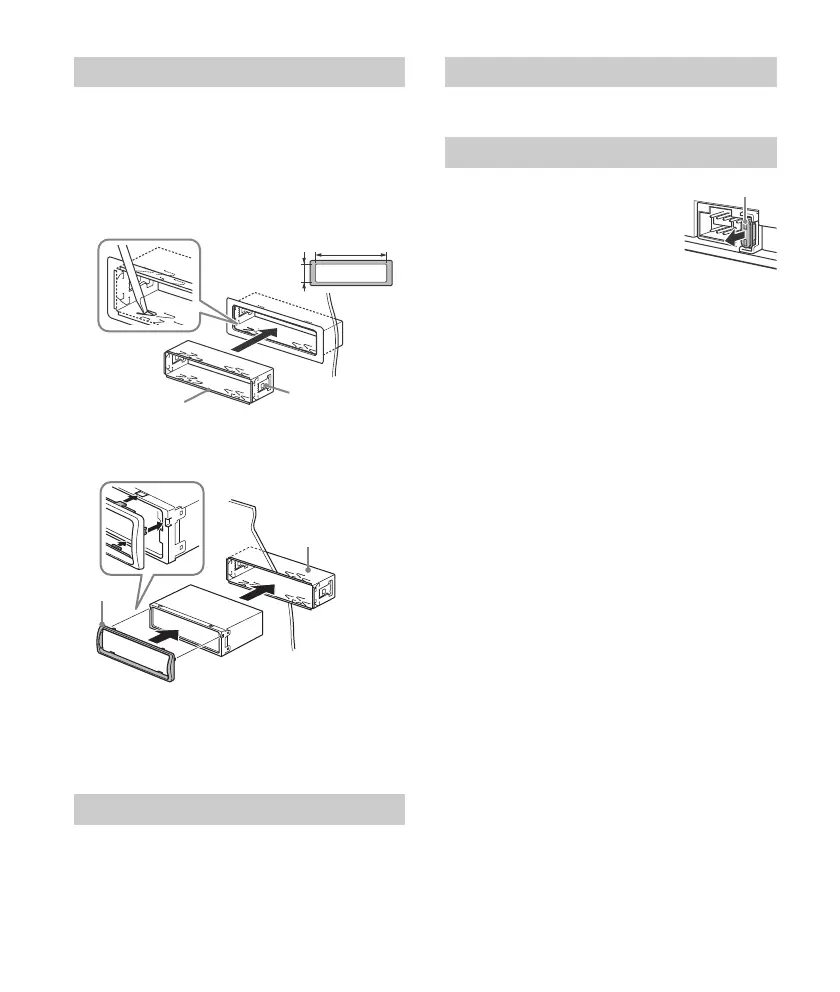
Before installing, make sure the catches on both
sides of the bracket are bent inwards 2 mm (
3
/
32
in).
1
Position the bracket inside the
dashboard, then bend the claws outward
for a tight fit.
2
Mount the unit onto the bracket , then
attach the protection collar .
Notes
If the catches are straight or bent outwards, the unit
will not be installed securely and may spring out.
Make sure the 4 catches on the protection collar
are properly engaged in the slots of the unit.
For details, see “Detaching the Front Panel”
(page 5).
For details, see “Resetting the Unit” (page 6).
When replacing the fuse, be sure
to use one matching the
amperage rating stated on the
original fuse. If the fuse blows,
check the power connection and
replace the fuse. If the fuse blows
again after replacement, there
may be an internal malfunction. In such a case,
consult your nearest Sony dealer.
Mounting the unit in the dashboard
Detaching and attaching the front panel
182 mm (7
1
/
4
in)
53 mm (2
1
/
8
in)
Catch
Resetting the unit
Fuse replacement



 To Next Page