EasyManua.ls Logo

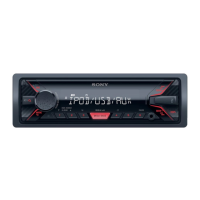
Sony DSX-A405BT - User Manual

Sony DSX-A405BT
42 pages
Print Icon
To Next Page IconTo Next Page
Loading...
4-591-961-11(1)
DSX-A405BT
FM/AM
Digital Media
Player
The warranty for this product is included in this manual
(page 37, 38).
La garantie de ce produit est inclus dans le présent manuel
(page 39).
Owners Record
The model and serial numbers are located on the bottom of the unit.
Record the serial number in the spaces provided below.
Refer to these numbers whenever you call upon your Sony dealer
regarding this product.
Model No. DSX-A405BT
Serial No.
Operating Instructions
GB
Mode d’emploi
FR
To cancel the demonstration (DEMO) display, see page 20.
For the connection/installation, see page 32.
Pour annuler l’affichage de démonstration (DEMO),
reportez-vous à la page 21.
Pour le raccordement/l’installation, reportez-vous à la page 34.
Question and Answer IconNeed help?

Do you have a question about the Sony DSX-A405BT and is the answer not in the manual?

Summary

Guide to Parts and Controls

RM-X231 Remote commander

Details the remote commander and its buttons for operating the unit.

Getting Started

Detaching the Front Panel

Procedure to remove the front panel for theft prevention.

Setting the Clock

How to set the current time on the unit.

Preparing a BLUETOOTH Device

Steps to prepare and connect Bluetooth devices.

Connecting a USB Device

Steps to connect and play audio from a USB device.

Listening to the Radio

Tuning

Manual and automatic methods for tuning radio stations.

Using Radio Data System (RDS)

Utilizing RDS features like program type search.

Listening to the SiriusXM Radio

Activating your SiriusXM Subscription

Guide to activating a SiriusXM subscription.

Selecting channels for SiriusXM

Browsing and selecting channels by name or category.

To set a parental control

Setting up parental controls to restrict channels.

Playback

Playing a USB Device

Instructions for playing audio files from a USB device.

Playing a BLUETOOTH Device

Play audio from a Bluetooth-enabled device.

Searching and Playing Tracks

Methods for finding and playing specific tracks.

Listening to Pandora

Setting up Pandora

Steps to set up the Pandora application on a mobile device.

Streaming Pandora

How to stream Pandora audio via USB or Bluetooth.

Handsfree Calling (via BLUETOOTH only)

Receiving a Call

How to answer and manage incoming calls.

Making a Call

Procedures for initiating calls from the phonebook or history.

Useful Functions

Using Siri Eyes Free

Using Siri voice commands with an iPhone.

Settings

Canceling the DEMO Mode

Disabling the demonstration display mode.

Basic Setting Operation

Overview of accessing and changing unit settings.

General Setup (GENERAL)

DEMO (demonstration)

Enable or disable the demonstration mode.

AUTO OFF

Set automatic shutdown time to prevent battery drain.

PARENTAL

Set parental lock for content restrictions.

Sound Setup (SOUND)

EQ5 PRESET

Select from preset equalizer curves for audio tuning.

BASE

Customize equalizer settings by adjusting frequency bands.

S.WOOFER (subwoofer)

Adjust subwoofer level and phase settings.

Display Setup (DISPLAY)

DIMMER

Adjust the display brightness.

AUTO SCR (auto scroll)

Enable automatic scrolling for long display items.

BLUETOOTH Setup (BT)

PAIRING

Initiate the pairing process with Bluetooth devices.

PHONE BOOK

Access and manage the phonebook for calls.

AUTO ANS (auto answer)

Configure automatic answering for incoming calls.

Additional Information

Precautions

Important precautions for unit operation and care.

About iPod

List of compatible iPod and iPhone models.

Maintenance

Replacing the lithium battery of the remote commander

Guide to replacing the remote control's battery.

Cleaning the connectors

Instructions for cleaning unit and panel connectors.

Troubleshooting

General Issues

Covers common problems like no power, no sound, or memory loss.

Radio reception

Solutions for poor radio reception or noisy sound.

BLUETOOTH function

Solutions for Bluetooth connection and operation errors.

Error displays;Messages

Explanations for various error messages and their solutions.

Connection;Installation

Cautions

Important safety warnings for installation and wiring.

Precautions

Advice on choosing an installation location and unit care.

Making connections

Power Supply and Ground Connections

Steps for connecting power supply, ground, and accessory leads.

Antenna and Amplifier Connections

Connecting power antenna control lead and amplifier remote input.

Installation

Removing the protection collar and the bracket

Guide to removing protective parts before mounting.

Mounting the unit in the dashboard

Step-by-step instructions for mounting the unit into the dashboard.

Mounting the unit in a Japanese car

Fuse replacement

Instructions for replacing the unit's fuse.

LIMITED WARRANTY (U.S. Only)

Labor Warranty

Warranty period for labor services.

Parts Warranty

Warranty period for replacement parts.

Consumer Warranty (Canada Only)

The Warranty Period

Details warranty duration for labor and parts in Canada.

Void or limited warranty

Conditions under which the warranty becomes void.

Support site

Summary

Guide to Parts and Controls

RM-X231 Remote commander

Details the remote commander and its buttons for operating the unit.

Getting Started

Detaching the Front Panel

Procedure to remove the front panel for theft prevention.

Setting the Clock

How to set the current time on the unit.

Preparing a BLUETOOTH Device

Steps to prepare and connect Bluetooth devices.

Connecting a USB Device

Steps to connect and play audio from a USB device.

Listening to the Radio

Tuning

Manual and automatic methods for tuning radio stations.

Using Radio Data System (RDS)

Utilizing RDS features like program type search.

Listening to the SiriusXM Radio

Activating your SiriusXM Subscription

Guide to activating a SiriusXM subscription.

Selecting channels for SiriusXM

Browsing and selecting channels by name or category.

To set a parental control

Setting up parental controls to restrict channels.

Playback

Playing a USB Device

Instructions for playing audio files from a USB device.

Playing a BLUETOOTH Device

Play audio from a Bluetooth-enabled device.

Searching and Playing Tracks

Methods for finding and playing specific tracks.

Listening to Pandora

Setting up Pandora

Steps to set up the Pandora application on a mobile device.

Streaming Pandora

How to stream Pandora audio via USB or Bluetooth.

Handsfree Calling (via BLUETOOTH only)

Receiving a Call

How to answer and manage incoming calls.

Making a Call

Procedures for initiating calls from the phonebook or history.

Useful Functions

Using Siri Eyes Free

Using Siri voice commands with an iPhone.

Settings

Canceling the DEMO Mode

Disabling the demonstration display mode.

Basic Setting Operation

Overview of accessing and changing unit settings.

General Setup (GENERAL)

DEMO (demonstration)

Enable or disable the demonstration mode.

AUTO OFF

Set automatic shutdown time to prevent battery drain.

PARENTAL

Set parental lock for content restrictions.

Sound Setup (SOUND)

EQ5 PRESET

Select from preset equalizer curves for audio tuning.

BASE

Customize equalizer settings by adjusting frequency bands.

S.WOOFER (subwoofer)

Adjust subwoofer level and phase settings.

Display Setup (DISPLAY)

DIMMER

Adjust the display brightness.

AUTO SCR (auto scroll)

Enable automatic scrolling for long display items.

BLUETOOTH Setup (BT)

PAIRING

Initiate the pairing process with Bluetooth devices.

PHONE BOOK

Access and manage the phonebook for calls.

AUTO ANS (auto answer)

Configure automatic answering for incoming calls.

Additional Information

Precautions

Important precautions for unit operation and care.

About iPod

List of compatible iPod and iPhone models.

Maintenance

Replacing the lithium battery of the remote commander

Guide to replacing the remote control's battery.

Cleaning the connectors

Instructions for cleaning unit and panel connectors.

Troubleshooting

General Issues

Covers common problems like no power, no sound, or memory loss.

Radio reception

Solutions for poor radio reception or noisy sound.

BLUETOOTH function

Solutions for Bluetooth connection and operation errors.

Error displays;Messages

Explanations for various error messages and their solutions.

Connection;Installation

Cautions

Important safety warnings for installation and wiring.

Precautions

Advice on choosing an installation location and unit care.

Making connections

Power Supply and Ground Connections

Steps for connecting power supply, ground, and accessory leads.

Antenna and Amplifier Connections

Connecting power antenna control lead and amplifier remote input.

Installation

Removing the protection collar and the bracket

Guide to removing protective parts before mounting.

Mounting the unit in the dashboard

Step-by-step instructions for mounting the unit into the dashboard.

Mounting the unit in a Japanese car

Fuse replacement

Instructions for replacing the unit's fuse.

LIMITED WARRANTY (U.S. Only)

Labor Warranty

Warranty period for labor services.

Parts Warranty

Warranty period for replacement parts.

Consumer Warranty (Canada Only)

The Warranty Period

Details warranty duration for labor and parts in Canada.

Void or limited warranty

Conditions under which the warranty becomes void.

Support site

Sony DSX-A405BT Specifications

General IconGeneral
BrandSony
ModelDSX-A405BT
CategoryMedia Player
LanguageEnglish

Related product manuals