7GB
Switching the FM/AM
Tuning Step (for non-
Argentine models)
Set the FM/AM tuning step of your country.
This setting appears when this unit is turned
off.
1 Press and hold SELECT.
The setup display appears.
2 Rotate the control dial to select
[TUNER-STP], then press it.
3 Rotate the control dial to select
from [50K/9K], [100K/10K] or
[200K/10K], then press it.
Setting the Clock
1 Press and hold SELECT.
The setup display appears.
2 Rotate the control dial to select
[CLOCK-ADJ], then press it.
The hour indication flashes.
3 Rotate the control dial to set the
hour and minute.
To move the digital indication, press SEEK
+/–.
4 After setting the minute, press
SELECT.
The setup is complete and the clock
starts.
To display the clock, press DSPL.
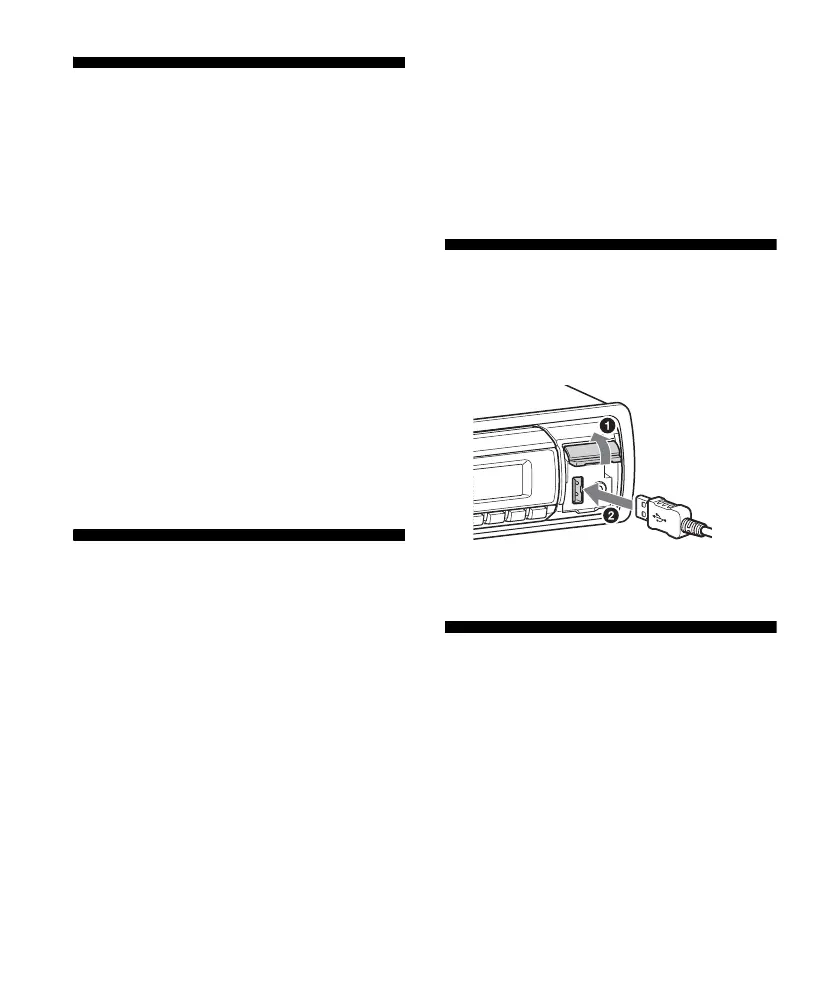
Connecting a USB Device
1 Turn down the volume on the unit.
2 Connect the USB device to the unit.
Connecting Other Portable
Audio Device
1 Turn off the portable audio device.
2 Turn down the volume on the unit.


 To Next Page