32GB
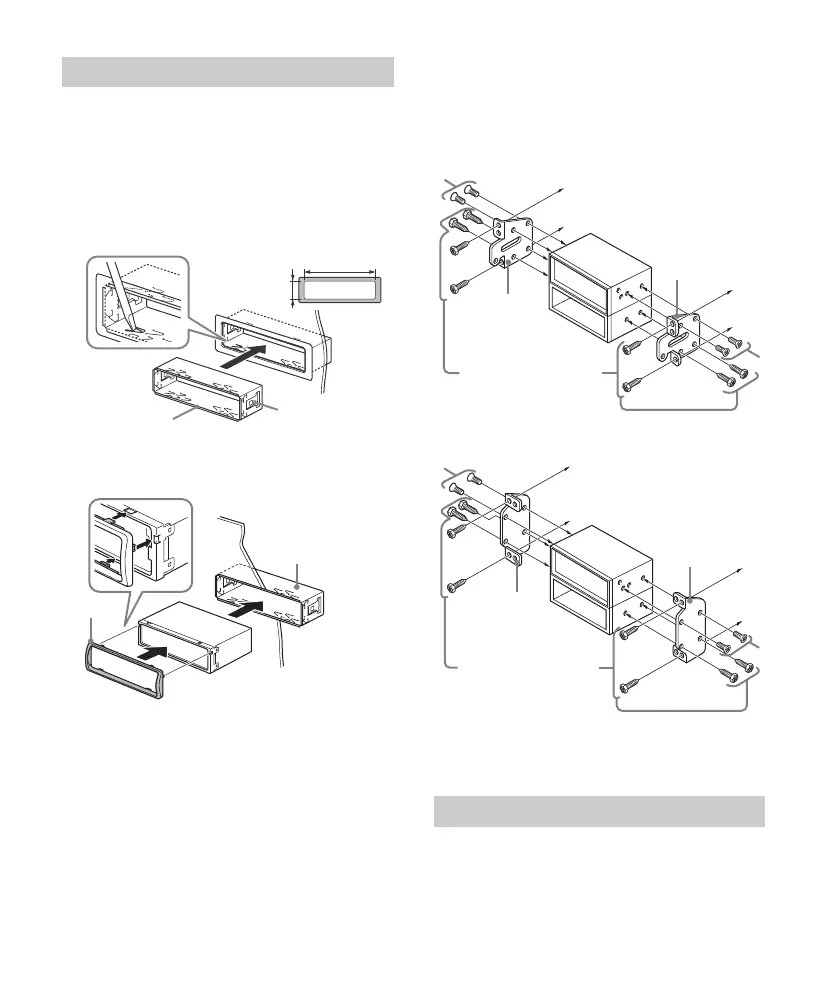
Before installing, make sure the catches on both
sides of the bracket are bent inwards 2 mm (
3
/32
in). When mounting in a Japanese car, see
“Mounting the unit in a Japanese car” (page 32).
1 Position the bracket inside the
dashboard, then bend the claws outward
for a tight fit.
2 Mount the unit onto the bracket , then
attach the protection collar .
Notes
If the catches are straight or bent outwards, the unit
will not be installed securely and may spring out.
Make sure the 4 catches on the protection collar
are properly engaged in the slots of the unit.
Mounting the unit in a Japanese car
You may not be able to install this unit in some
makes of Japanese cars. In such a case, consult your
Sony dealer.
TOYOTA
NISSAN
Note
To prevent malfunction, install only with the supplied
screws .
For details, see “Detaching the Front Panel”
(page 6).
Mounting the unit in the dashboard
182 mm (7
1
/4 in)
53 mm (2
1
/8 in)
Catch
Detaching and attaching the front panel
to dashboard/center console
Existing parts supplied with
your car
Bracket
Bracket
to dashboard/center console
Existing parts supplied with
your car
Bracket
Bracket


 To Next Page