33GB
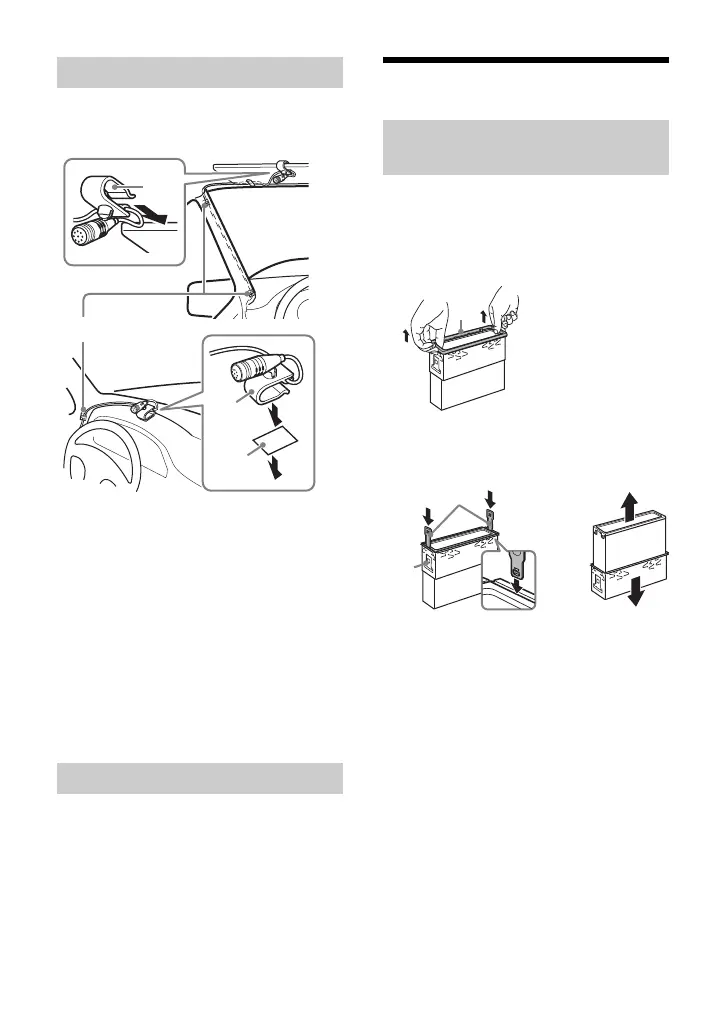
To capture your voice during handsfree
calling, you need to install the microphone
.
Cautions
• It is extremely dangerous if the cord
becomes wound around the steering
column or gearstick. Be sure to keep it and
other parts from interfering with your
driving operations.
• If airbags or any other shock-absorbing
equipment is in your car, contact the store
where you purchased this unit, or the car
dealer, before installation.
Note
Before attaching the double-sided tape , clean
the surface of the dashboard with a dry cloth.
1 To enable the wired remote control,
set [STR CONTROL] in [SET STEERING]
to [PRESET] (page 18).
Installation
Before installing the unit, remove the
protection collar and the bracket from
the unit.
1 Pinch both edges of the protection
collar , then pull it out.
2 Insert both release keys until they
click, and pull down the bracket ,
then pull up the unit to separate.
Installing the microphone
Using the wired remote control
Removing the protection collar
and the bracket
Face the hook inwards.


 To Next Page