EasyManua.ls Logo

Sony DSX-M5511BT - User Manual

Sony DSX-M5511BT
60 pages
Print Icon
To Next Page IconTo Next Page
Loading...
4-588-324-11(1)
DSX-M55BT
FM/AM
Digital Media Player
The warranty for this product is included in this manual
(page 38, 39).
La garantie de ce produit est inclus dans le présent manuel
(page 40).
Owner’s Record
The model and serial numbers are located on the bottom of the unit.
Record the serial number in the spaces provided below.
Refer to these numbers whenever you call upon your Sony dealer
regarding this product.
Model No. DSX-M55BT Serial No.
Operating Instructions
GB
Mode d’emploi
FR
Manual de instrucciones
ES
To cancel the demonstration (DEMO) display, see page 21.
To switch the FM/AM tuning step, see page 9.
For the connection/installation, see page 33.
Pour annuler l’affichage de démonstration (DEMO),
reportez-vous à la page 22.
Pour commuter l’intervalle de syntonisation FM/AM, reportez-
vous à la page 9.
Pour le raccordement/l’installation, reportez-vous à la page 35.
Para cancelar la pantalla de demostración (DEMO), consulte
la página 22.
Para cambiar el paso de sintonización de FM/AM, consulte la
página 9.
Para la conexión/instalación, consulte la página 35.
Question and Answer IconNeed help?

Do you have a question about the Sony DSX-M5511BT and is the answer not in the manual?

Overview

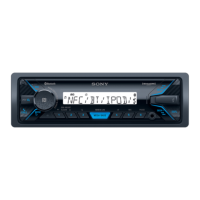
This document describes the Sony DSX-M55BT FM/AM Digital Media Player, a marine audio unit designed for use in boats. It supports various audio sources, including FM/AM radio, USB devices, Bluetooth audio streaming, and SiriusXM Radio (US/Canada only). The unit also offers hands-free calling via Bluetooth and Siri Eyes Free functionality for iPhones.

Function Description:

The DSX-M55BT serves as a central audio hub for boats, providing entertainment and communication features. It allows users to listen to radio broadcasts, play music from USB devices, stream audio wirelessly via Bluetooth, and access SiriusXM satellite radio. The integrated Bluetooth functionality enables hands-free phone calls, enhancing safety and convenience while on the water. Siri Eyes Free provides voice control for iPhone users, allowing them to interact with their device without taking their hands off the wheel.

Important Technical Specifications:

  • Power Amplifier Section:
    • Output: Speaker outputs
    • Speaker Impedance: 4 – 8 ohms
    • Maximum Power Output: 55 W × 4 (at 4 ohms)
  • Tuner Section (FM):
    • Tuning Range: 87.5 – 108.0 MHz (at 50 kHz step), 87.5 – 108.0 MHz (at 100 kHz step), 87.5 – 107.9 MHz (at 200 kHz step)
    • FM Tuning Step: 50 kHz/100 kHz/200 kHz switchable
    • Antenna (aerial) terminal: External antenna (aerial) connector
    • Usable Sensitivity: 7 dBf
    • Selectivity: 75 dB at 400 kHz
    • Signal-to-Noise Ratio: 73 dB
    • Separation: 50 dB at 1 kHz
    • Frequency Response: 20 – 15,000 Hz
  • Tuner Section (AM):
    • Tuning Range: 531 – 1,602 kHz (at 9 kHz step), 530 – 1,710 kHz (at 10 kHz step)
    • AM Tuning Step: 9 kHz/10 kHz switchable
    • Antenna (aerial) terminal: External antenna (aerial) connector
    • Sensitivity: 26 μV
  • USB Player Section:
    • Interface: USB (Full-speed)
    • Maximum Current: 1 A
    • Maximum Number of Recognizable Tracks: 256 folders (albums), 256 files (tracks) per folder
    • Corresponding Codec: MP3 (.mp3) (Bit rate: 8 – 320 kbps, Sampling rate: 16 – 48 kHz), WMA (.wma) (Bit rate: 32 – 192 kbps, Sampling rate: 32 kHz, 44.1 kHz, 48 kHz), FLAC (.flac) (Bit depth: 16 bit, 24 bit, Sampling rate: 44.1 kHz, 48 kHz)
  • Wireless Communication (Bluetooth):
    • Communication System: BLUETOOTH Standard version 3.0
    • Output: BLUETOOTH Standard Power Class 2 (Max. +4 dBm)
    • Maximum Communication Range: Line of sight approx. 10 m (33 ft)
    • Frequency Band: 2.4 GHz band (2.4000 – 2.4835 GHz)
    • Modulation Method: FHSS
    • Compatible BLUETOOTH Profiles: A2DP 1.3, AVRCP 1.3, HFP 1.6, PBAP
    • Corresponding Codec: SBC (.sbc)
  • General:
    • Outputs: Audio outputs terminal (REAR, SUB), Power antenna (aerial)/Power amplifier control terminal (REM OUT)
    • Inputs: SiriusXM input terminal (US/Canada only), Remote controller input terminal, Antenna (aerial) input terminal, AUX input jack (stereo mini jack), USB port
    • Power Requirements: 12 V DC boat battery (negative ground (earth))
    • Rated Current Consumption: 10 A
    • Dimensions: Approx. 178 mm × 50 mm × 120 mm (7 1/8 in × 2 in × 4 3/4 in) (w/h/d)
    • Mounting Dimensions: Approx. 182 mm × 53 mm × 102 mm (7 1/4 in × 2 1/8 in × 4 1/8 in) (w/h/d)
    • Mass: Approx. 0.7 kg (1 lb 9 oz)
    • Package Contents: Main unit (1), Remote commander (1): RM-X231, Parts for installation and connections (1 set)
    • Optional Accessories/Equipment: SiriusXM Connect Vehicle Tuner: SXV100, Marine remote commander: RM-X11M (Note: Accessories/equipment other than the marine remote commander RM-X11M are not waterproof.)

Usage Features:

  • Detachable Front Panel: The front panel can be detached to prevent theft. A caution alarm sounds if the ignition is turned off without detaching the panel.
  • FM/AM Tuning Step: The tuning step can be adjusted according to the user's country, a setting accessible when the unit is off and the clock is displayed.
  • Clock Setting: The clock can be manually adjusted, with hour indication flashing during adjustment.
  • Bluetooth Connectivity:
    • NFC One-touch Connection: Compatible smartphones can be paired and connected by simply touching the N-Mark on the unit's control dial.
    • Manual Pairing: For devices without NFC, pairing is done through a menu, requiring a passkey (default 0000).
    • Auto Pairing (AUTOPAIR): Automatically starts Bluetooth pairing when an iOS device (version 5.0 or later) is connected via USB.
    • Bluetooth Signal (BT SIGNL): Activates/deactivates the Bluetooth function.
    • Bluetooth Initialize (BT INIT): Resets all Bluetooth-related settings, including pairing information and preset numbers.
  • USB Device Playback: Supports MSC and MTP type USB devices, including USB flash drives, digital media players, and Android smartphones. Playback starts automatically upon connection or can be manually selected.
  • iPod/iPhone Playback: Connects via USB for audio playback. Offers "Passenger control" mode, allowing direct operation of the iPod.
  • Bluetooth Audio Playback: Streams audio from connected Bluetooth A2DP devices.
  • Searching and Playing Tracks:
    • Repeat and Shuffle Play: Various play modes are available, depending on the sound source.
    • Quick-BrowZer™: Allows searching for tracks by name through categories during USB playback.
    • Jump Mode: Skips through items in 10% increments of the total number of items.
  • Pandora® Streaming: Supports streaming from iPhone (via USB) or Android smartphone (via Bluetooth). Features "Thumbs" feedback for station personalization and a station list for easy selection. Bookmarking of currently playing tracks is also available.
  • SiriusXM Radio (US/Canada only): Requires a SiriusXM Connect Vehicle Tuner and subscription. Features parental control for mature content channels and allows changing display items like channel number, artist name, and song title.
  • Hands-free Calling (via Bluetooth):
    • Receiving/Making Calls: Answer/end calls, dial numbers, and access call history.
    • Phonebook: Stores up to 6 contacts for quick dialing.
    • Voice Tags: Make calls by saying stored voice tags from a connected cellular phone.
    • Call Operations: Adjust ringtone and talker's voice volume, mic gain, and reduce echo/noise (EC/NC mode). Switch between hands-free and handheld modes during a call.
  • Siri Eyes Free: Allows hands-free use of Siri on iPhone 4s or later models via voice commands through the unit's microphone.
  • Sound Settings (SOUND):
    • EQ5 PRESET: Selects from 10 equalizer curves or custom settings.
    • EQ5 SETTING: Customizes bass, mid-low, mid, mid-high, and high frequencies.
    • BALANCE/FADER: Adjusts sound balance and relative levels between front/rear speakers.
    • S.WOOFER (subwoofer): Adjusts subwoofer volume, phase, and low pass filter frequency.
    • AUX VOL/BTA VOL: Adjusts volume levels for auxiliary and Bluetooth audio devices to match other sources.
  • Display Settings (DISPLAY):
    • DIMMER: Changes display brightness.
    • SND SYNC: Activates illumination synchronization with sound.
    • AUTO SCR: Automatically scrolls long display items.
  • Auto OFF: Shuts off automatically after a set time (30 seconds, 30 minutes, or 60 minutes) when the unit is turned off.
  • BEEP: Activates/deactivates beep sounds for operations.
  • CAUT ALM (caution alarm): Activates/deactivates the caution alarm.
  • CT (clock time): Activates/deactivates the CT function (clock set by RDS transmission).
  • BTM (best tuning memory): Automatically stores the strongest radio stations.

Maintenance Features:

  • Lithium Battery Replacement (Remote Commander): Instructions for replacing the remote commander's lithium battery, with warnings about correct polarity and avoiding metallic tweezers.
  • Cleaning Connectors: Advised to clean the connectors between the unit and the front panel with a cotton swab to ensure proper function.
  • Fuse Replacement: Instructions for replacing the fuse with a matching amperage rating.
  • General Precautions:
    • Cool off the unit if the boat has been moored in direct sunlight.
    • Avoid leaving the front panel or audio devices inside the boat in high temperatures.
    • Do not splash liquid onto the unit to maintain sound quality.
    • Ensure proper installation in the dashboard or cutout hole on the boat, with correct bracket and collar engagement.
    • Adjust mounting angle to less than 45°.
    • Run all ground (earth) leads to a common ground point.
    • Insulate any loose unconnected leads with electrical tape.
    • Choose an installation location that avoids dust, dirt, excessive vibration, high temperature, direct sunlight, or water splashes. A Waterproof Car Stereo Cover is recommended.
    • Use only supplied mounting hardware.
    • For Japanese cars, specific mounting instructions are provided.

Sony DSX-M5511BT Specifications

General IconGeneral
BrandSony
ModelDSX-M5511BT
CategoryMedia Player
LanguageEnglish

Related product manuals