DSX-GS80/M80
7
Sony CONFIDENTIAL
For Authorized Servicer
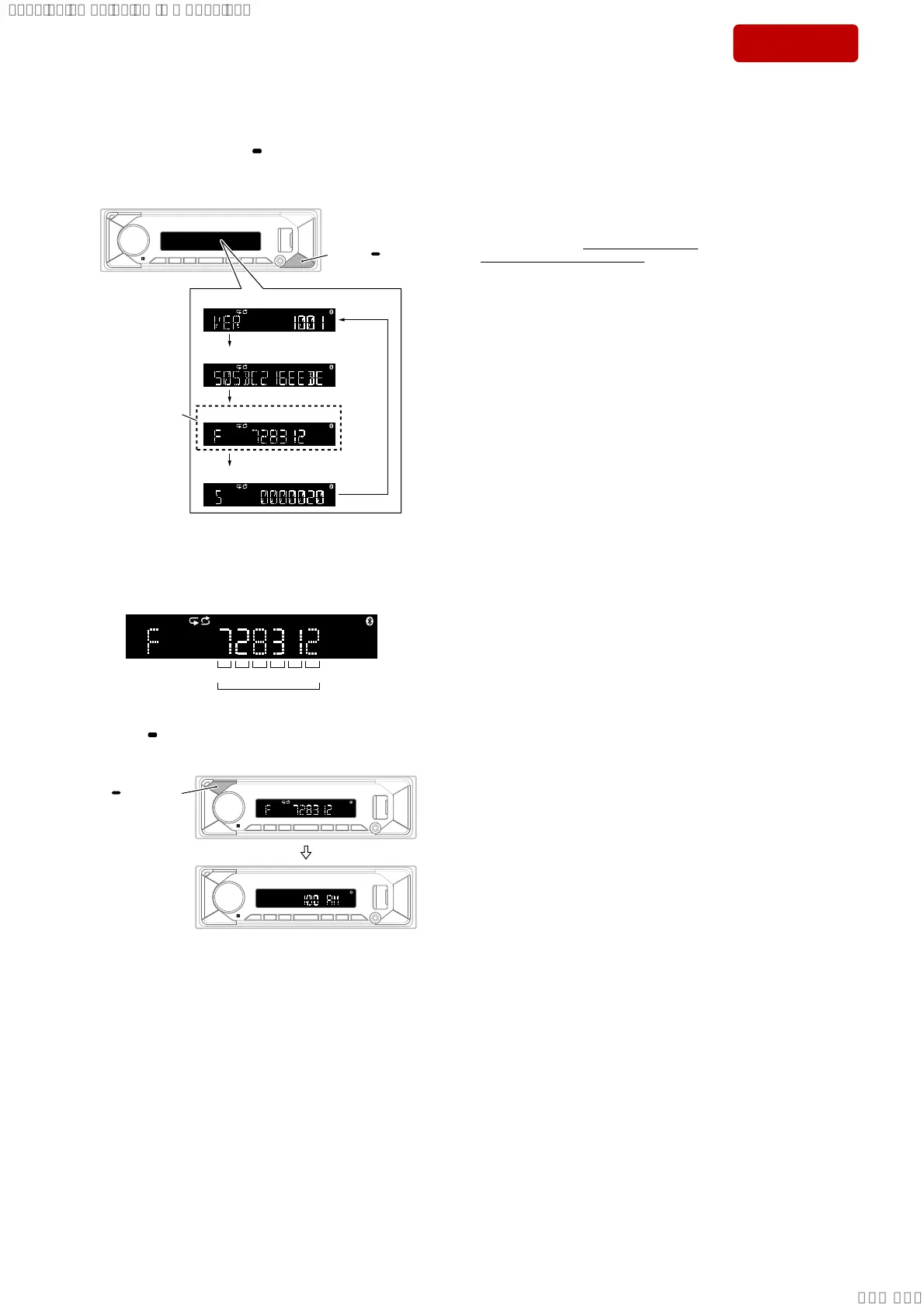
7. In the state in which the software main version is displayed
on the liquid crystal display, enter the destination code display
mode by pressing the [DSPL
SCRL] button 2 times.
(Displayed characters/values in the following fi gure are exam-
ple)
Software main version
Set to this state
of display.
Destination code
(Not used for the servicing)
Bluetooth address (BD_ADDR)
[DSPL SCRL
press
8. Confi rm the alphanumeric character of 6 digits on the liquid
crystal display is a value set in step 4.
Note 7: If the setting is incorrect, start from step 2 again.
Destination code (example: US, CND of GS80)
OP0OP1OP2OP3OP4OP5
6 digits
9. Press the [ OFF SRC] button for 1 second or more to execute
reset and return to the normal condition.
[ OFF SRC]
press for
1 second or more
Note 8: There is not displayed “AM”, depending on the destination.
10. This completes the destination setting work.
SETTING THE AREA/REGION (GS80: AEP, UK only)
If changing the area/region setting, set the area/region according to
the procedure below.
Procedure:
Initializing the unit will erase the clock
settings and all your settings stored in the
backup memory.
[INITIALIZE] appears only while the source
is off and the clock is displayed.
1 Press MENU, rotate the control dial to
select [GENERAL], then press it.
2 Rotate the control dial to select
[INITIALIZE], then press it.
3 Rotate the control dial to select
[INIT-YES], then press it.
Note
Initialize the unit before discarding the unit to
prevent the leakage of phone information.
Setting the area/region
After initializing the unit, the area/region
setting display appears.
1 Press ENTER while [AREA] is
displayed.
The area/region currently set appears.
2 Rotate the control dial to select
[EUROPE] or [RUSSIA], then press it.
3 Rotate the control dial to select [YES]
or [NO], then press it.
If the setting area/region is changed, the
unit will initialize, then the clock is
displayed.
This setting can be configured in the general
setup menu.
SYSSET
2019/10/1721:47:35(GMT+09:00)


 To Next Page