DSX-GS80/M80
8
Sony CONFIDENTIAL
For Authorized Servicer
INITIALIZATION METHOD
Refer to the following procedure when initializing this unit.
When this unit is initialized, the clock settings and some saved con-
tents can be deleted.
Note 1: After this unit has been repaired, perform this unit initialization
before installing this unit in the car.
Note 2: After performing a BLUETOOTH connection, be sure to initial-
ize this unit and clear the connection history.
Note 3: The liquid crystal display is an example of DSX-GS80. The liquid
crystal display of DSX-M80 will be black characters on a white
background.
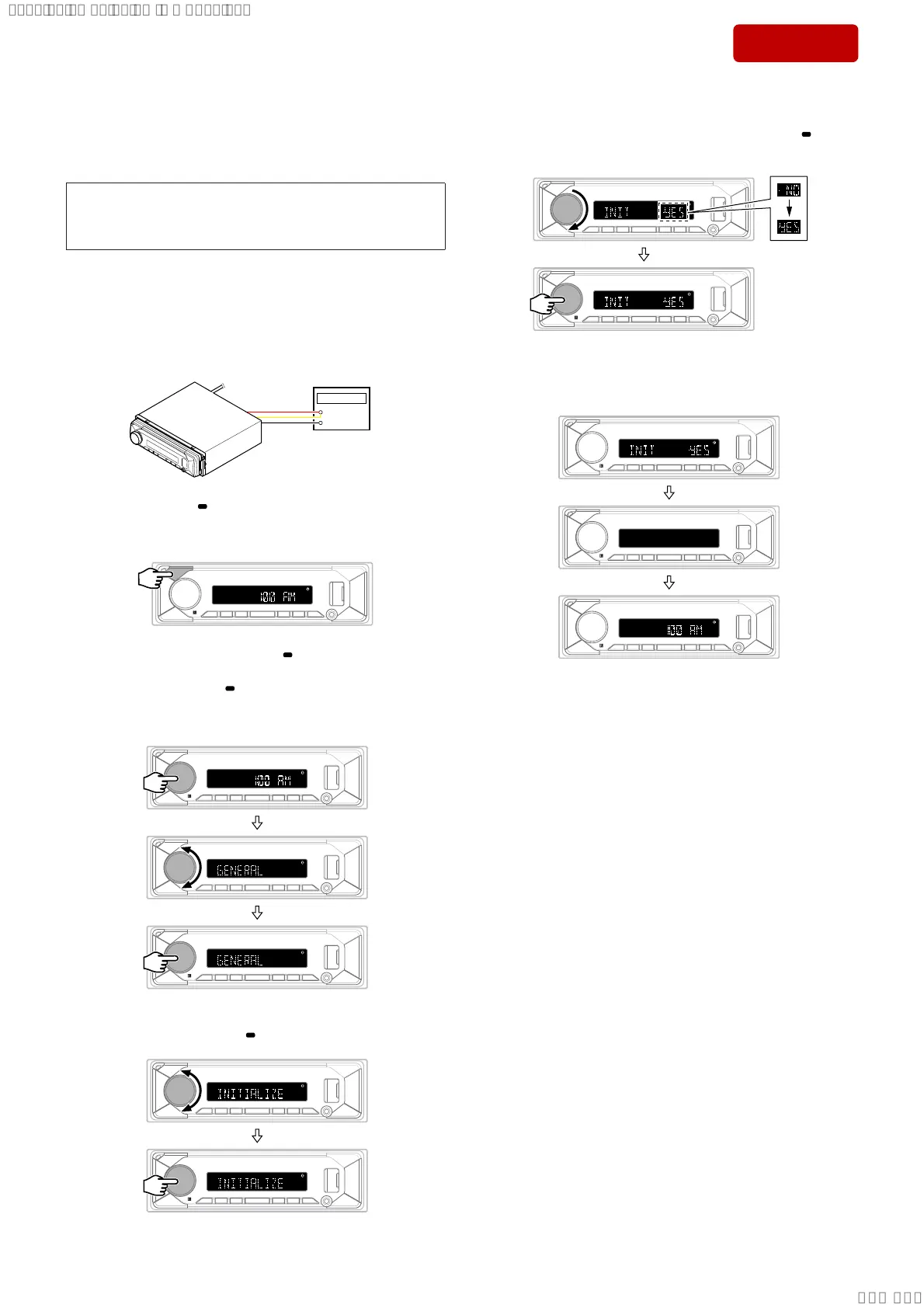
Initialization procedure:
1. Connect the power cord to the regulated DC power supply, and
turn the power on of this unit.
+
–
Regulated DC
power supply
2. Press and hold the [ OFF SRC] button to the state of source off
(the clock is displayed on the liquid crystal display).
Note 4: There is not displayed “AM”, depending on the destination.
3. Press the [PUSH ENTER MENU/ VOICE] button, and rotate
the control dial to display the “GENERAL”. Then press the
[PUSH ENTER MENU/ VOICE] button again.
(Displayed characters/values in the following fi gure are exam-
ple)
4. Rotate the control dial to display the “INITIALIZE” and press
the [PUSH ENTER MENU/
VOICE] button.
5. Rotate the control dial clockwise and switch “INIT -NO” to
“INIT -YES”, then press the [PUSH ENTER MENU/
VOICE]
button.
6. This unit automatically restarts, the clock is displayed and ini-
tialization is complete.
Note 5: There is not displayed “AM”, depending on the destination.
SYSSET
2019/10/1721:47:35(GMT+09:00)


 To Next Page