EasyManua.ls Logo

Sony DTC-55ES - Page 5

Sony DTC-55ES
56 pages
Print Icon
To Next Page IconTo Next Page
To Previous Page IconTo Previous Page
Loading...
PT Oa
ee
[is]
oor
ose
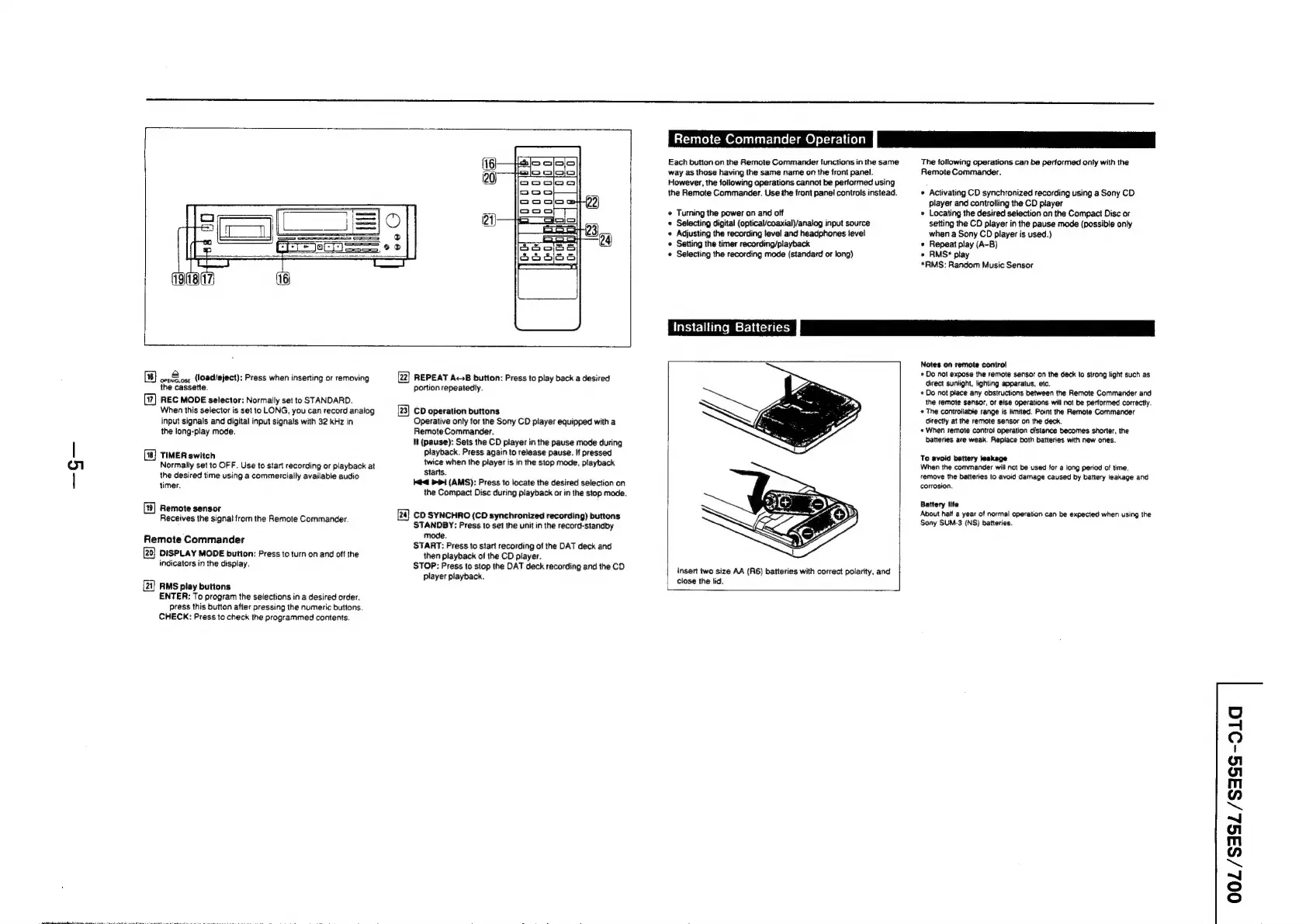
(load/eject):
Press
when
inserting
or
removing
the
cassette.
(7)
REC
MODE
selector:
Normally
set
to
STANDARD.
When
this
selector
is
set
to
LONG,
you
can
record
analog
input
signals
and
digital
input
signals
with
32
kHz
in
the
long-play
mode.
TIMER
switch
Normally
set
to
OFF.
Use
to
start
recording
or
playback
at
the
desired
time
using
a
commercially
available
audio
timer.
Remote
sensor
Receives
the
signa!
from
the
Remote
Commander.
Remote
Commander
DISPLAY
MODE
button:
Press
to
turn
on
and
off
the
indicators
in
the
display.
(24)
RMS
play
buttons
ENTER:
To
program
the
selections
in
a
desired
order.
press
this
button
after
pressing
the
numeric
buttons.
CHECK:
Press
to
check
the
programmed
contents.
[22]
REPEAT
AcB
button:
Press
to
play
back
a
desired
portion
repeatedly.
[23]
CD
operation
buttons
Operative
only
for
the
Sony
CD
player
equipped
with
a
Remote
Commander.
ll
(pause):
Sets
the
CD
player
in
the
pause
mode
during
playback.
Press
again
to
release
pause.
if
pressed
twice
when
the
player
is
in
the
stop
mode,
playback
Starts.
id
PPI
(AMS):
Press
to
locate
the
desired
selection
on
the
Compact
Disc
during
playback
or
in
the
stop
mode.
[2a}
CD
SYNCHRO
(CD
synchronized
recording)
buttons
STANDBY:
Press
to
set
the
unit
in
the
record-standby
mode.
START:
Press
to
start
recording
of
the
DAT
deck
and
then
playback
of
the
CD
player.
STOP:
Press
to
stop
the
DAT
deck
recording
and
the
CD
player
playback.
Remote
Commander
Operation}
Each
button
on
the
Remote
Commander
functions
in
the
same
way
as
those
having
the
same
name
on
the
front
panel.
However,
the
following
operations
cannot
be
performed
using
the
Remote
Commander.
Use
the
front
panei
controls instead.
¢
Turning
the
power
on
and
off
«
Selecting
digital
(optical/coaxial)/analog
input
source
«
Adjusting
the
recording
level
and
headphones
ievel
«
Setting
the
timer
recording/playback
«
Selecting
the
recording
mode
(standard
or
long}
The
following
operations
can
be
performed
only
with
the
Remote
Commander.
¢
Activating
CD
synchronized
recording
using
a
Sony
CD
player
and
controlling
the
CD
player
Locating
the
desired
selection
on
the
Compact
Disc
or
setting
the
CD
player
in
the
pause
mode
(possible
only
when
a
Sony
CD
player
is
used.)
«
Repeat
play
(A-B)
e
RMS*
play
*RMS:
Random
Music
Sensor
Installing
Batteries
P|
insert
two
size
AA
(R6)
batteries
with
correct
polarity,
and
close
the
lid.
Notes
on
remote
control
¢
Do
not
expose
the
remote
sensor
on
the
deck
to
strong
light
such
as
direct
sunlight,
lighting
apparatus,
etc.
«
Do
not
place
any
obstructions
between
the
Remote
Commander
and
the
remote
sensor,
or
else
operations
will
not
be
performed
correctly.
The
controllable
range
is
limited.
Point
the
Remote
Commander
directly
at
the
remote
sensor
on
the
deck.
«
When
remote
control
operation
distance
becomes
shorter,
the
batteries
are
weak.
Replace
both
batteries
with
new
ones.
To
avoid
battery
leakage
When
the
commander
will
not
be
used
for
a
long
period
of
time,
remove
the
batteries
to
avoid
damage
caused
by
battery
leakage
and
corrosion.
Battery
life
About
haif
a
year
of
normal
operation
can
be
expected
when
using
the
Sony
SUM-3
(NS)
batteries.
Oo
=|
©
o1
gl
m
7]
™~
~J
gl
m
”
™~
~J
oS
o