EasyManua.ls Logo

Sony DTC-60ES - Section 1 General; Location and Function of Controls

Sony DTC-60ES
74 pages
Print Icon
To Next Page IconTo Next Page
To Previous Page IconTo Previous Page
Loading...
1
Weofor-htrelaW-latoM
alejaleiiolame)
m@xelalige)
(-)
Front
Panel
Remote
Commander
(Side
panels
are
provided
only
on
the
Canadian
model.)
|
1
2
3
4i15)(6}(7}18
Seer
r-)
OMB
Gi
11
A
Pull
this
knob
to
open
the
control
panel.
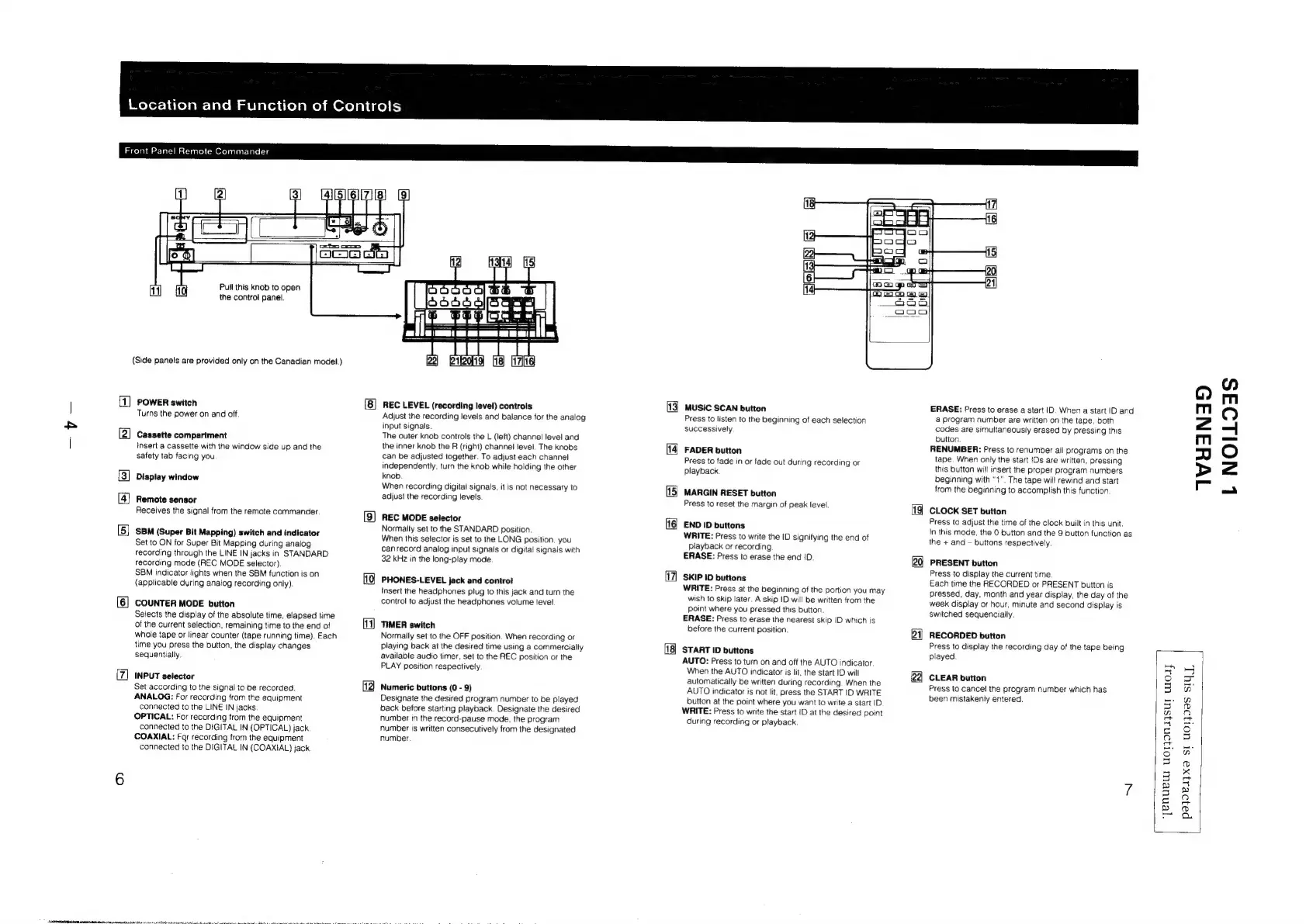
POWER
switch
Turns
the
power
on
and
off.
Cassette
compartment
insert
a
Cassette
with
the
window
side
up
and
the
safety
tab
facing
you
Display
window
Remote
sensor
Receives
the
signal
from
the
remote
commander.
SBM
(Super
Bit
Mapping)
switch
and
indicator
Set
to
ON
for
Super
Bit
Mapping
during
analog
recording
through
the
LINE
IN
jacks
in
STANDARD
recording
mode
(REC
MODE
selector)
SBM
indicator
lights
when
the
SBM
function
is
on
(applicable
during
analog
recording
only)
COUNTER
MODE
button
Selects
the
display
of
the
absolute
time,
elapsed
time
of
the
current
selection,
remaining
time
to
the
end
of
whole
tape
or
linear
counter
(tape
running
time).
Each
time
you
press
the button, the
display
changes
sequentially.
INPUT
selector
Set
according
to
the
signal
to
be
recorded.
ANALOG:
For
recording
from
the
equipment
connected
to
the
LINE
IN
jacks
OPTICAL:
For
recording
from
the
equipment
connected
to
the
DIGITAL
IN
(OPTICAL)
jack.
COAXIAL:
Far
recording
from
the
equipment
connected
to
the
DIGITAL
IN
(COAXIAL)
jack
12)
REC
LEVEL
(recording
level)
controls
Adjust
the
recording
levels
and
balance
for
the
analog
input
signals.
The
outer
knob
controls
the
L
(left)
channel
level
and
the
inner
knob
the
R
(right)
channel
level.
The
knobs
can
be
adjusted
together.
To
adjust
each
channel
independently,
turn
the
knob
while
hoiding
the
other
knob
When
recording
digitai
signais,
it
is
not
necessary
to
adjust
the
recording
levels
REC
MODE
selector
Normally
set
to
the
STANDARD
position.
When
this
selector
is
set
to
the
LONG
position,
you
canrecord
analog
input
signals
or
digital
signals
with
32
kHz
in
the
long-play
mode
PHONES-LEVEL
jack
and
contro!
insert
the
headphones
plug
to
this
jack
and
turn
the
control
to
adjust
the
headphones
volume
level
11)
TIMER
switch
Normaily
set
to
the
OFF
position.
When
recording
or
playing
back
at
the
desired
time
using
a
commercially
available
audio
timer,
set
to
the
REC
position
or
the
PLAY
position
respectively.
Numeric
buttons
(0
-
9)
Designate
the
desired
program
number
to
be
played
back
before
starting
playback.
Designate
the
desired
number
in
the
record-pause
mode,
the
program
number
is
written
consecutively
from
the
designated
number
3
MUSIC
SCAN
button
Press
to
listen
to
the
beginning
of
each
selection
successively
FADER
button
Press
to
fade
in
or
fade
out
during
recording
or
playback
MARGIN
RESET
button
Press
to
reset
the
margin
of
peak
level
END
ID
buttons
WRITE:
Press
to
write
the
ID
signifying
the
end
of
Playback
or
recording
ERASE:
Press
to
erase
the
end
!D.
SKIP
ID
buttons
WRITE:
Press
at
the
beginning
of
the
portion
you
may
wish
to
skip
later.
A
skip
ID
will
be
written
from
the
point
where
you
pressed
this
button
ERASE:
Press
to
erase
the
nearest
skip
|D
which
is
before
the
current
position
START
ID
buttons
AUTO:
Press
to
turn
on
and
off
the
AUTO
indicator.
When
the
AUTO
indicator
is
lit,
the
start
ID
will
automatically
be
written
during
recording.
When
the
AUTO
indicator
is
not
lit,
press
the
START
ID
WRITE
button
at
the
point
where
you
want
to
write
a
start
ID
WRITE:
Press
to
write
the
start
iD
at
the
desired
point
during
recording
or
playback.
ERASE:
Press
to
erase
a
start
ID.
When
a
start
ID
and
a
program
number
are
written
on
the
tape,
both
codes
are
simultaneously
erased
by
pressing
this
button
RENUMBER:
Press
to
renumber
all
programs
on
the
tape.
When
only
the
start
IDs
are
written,
pressing
this
button
will
insert
the
proper
program
numbers
beginning
with
“1”.
The
tape
will
rewind
and
start
from
the
beginning
to
accomplish
this
function
CLOCK
SET
button
Press
to
adjust
the
time
of
the
clock
built
in
this
unit.
In
this
mode,
the
0
button
and
the
9
button
function
as
the
+
and
buttons
respectively
PRESENT
button
Press
to
display
the
current
time
Each
time
the
RECORDED
or
PRESENT
button
is
pressed,
day,
month
and
year
display,
the
day
of
the
week
display
or
hour,
minute
and
second
display
is
switched
sequencially.
RECORDED
button
Press
to
display
the
recording
day
of
the
tape
being
played
CLEAR
button
Press
to
cancel
the
program
number
which
has
been
mistakenly
entered.
‘yenuew
uorjonajsur
woay
TWHANID
L
NOILOAS
|
pa}e1yx9
st
UOT}I—S
SIYT,

Other manuals for Sony DTC-60ES

Related product manuals