EasyManua.ls Logo

Sony DTC-60ES - Connections; Rear Panel Jacks and Notes

Sony DTC-60ES
74 pages
Print Icon
To Next Page IconTo Next Page
To Previous Page IconTo Previous Page
Loading...
Moyer:
ecelaWe-lalemmeravoiicelame)
merelalice)
{-
Display
Window
TONG]
[DATE]
REMAINING
-—
FADE
DIGITALIN
REPEAT!
|
DISPLAY
|
MUSICSCAN
CAUTION
PGM
TIME
|
Qo
gy
|
SE
OFF
AUTO
|
SKIP
PLAY
START
0
TOC
ABS
TIME
a
SHIFT
AUTO
o
M
AM
32kHz
RMS_AMS
RENUMBER
a g g
a] ‘|
“owe
=
eres?
H
M
SPM
48kHz
=
SKIP
ID
21/22
8
WRITE
ERASE
2
ee
ee
ee
ee
ee
y—
ENDIO
TOP.
MID
4
ENO
WRITE
ERASE
(19
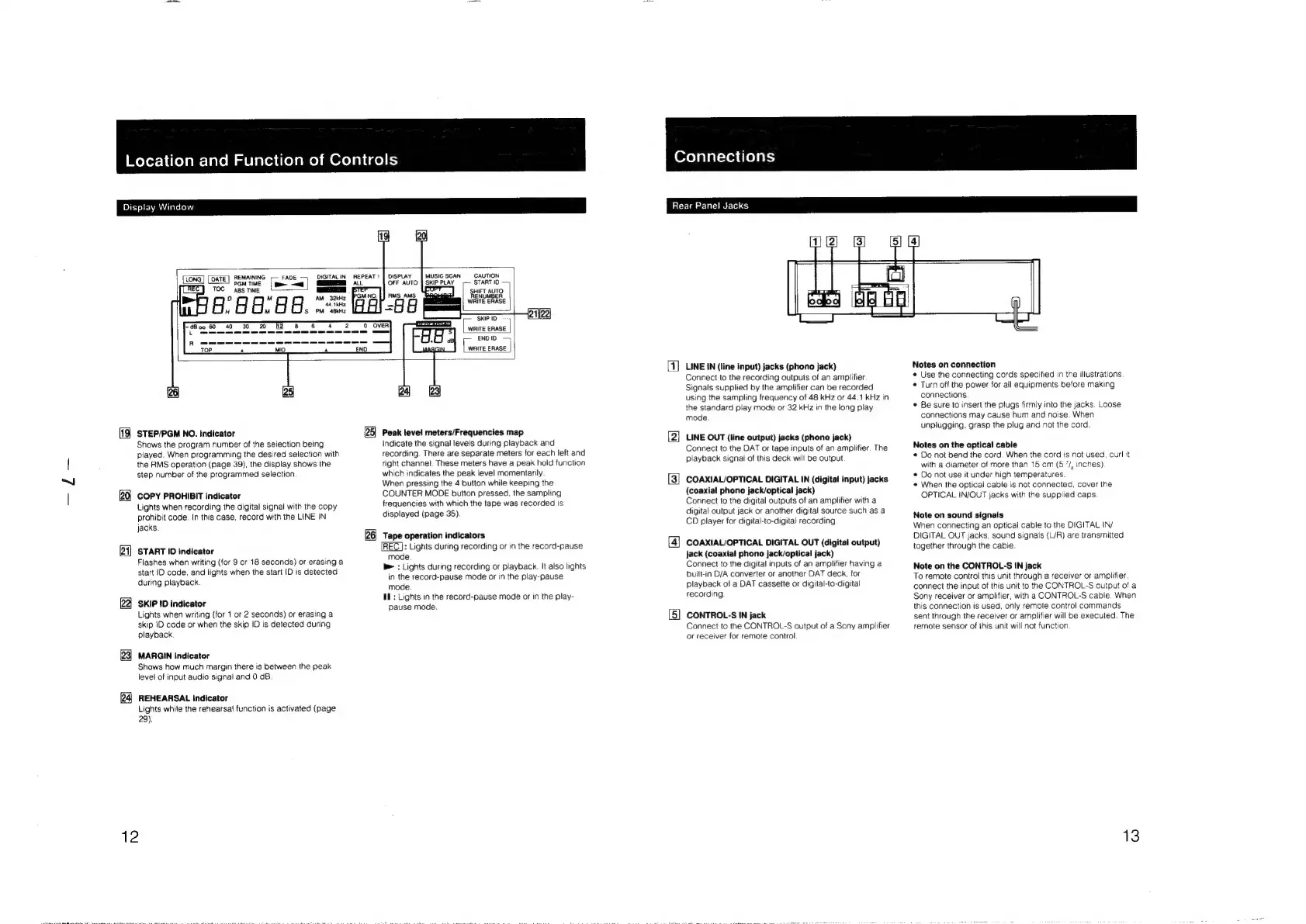
STEP/PGM
NO.
indicator
Shows
the
program
number
of
the
selection
being
played.
When
programming
the
desired
selection
with
the
RMS
operation
(page
39),
the
display
shows
the
step
number
of
the
programmed
selection
20
COPY
PROHIBIT
indicator
Lights
when
recording
the
digital
signal
with
the
copy
prohibit
code.
In
this
case,
record
with
the
LINE
IN
jacks.
21]
START
ID
indicator
Flashes
when
writing
(for
9
or
18
seconds)
or
erasing
a
start
ID
code,
and
lights
when
the
start
ID
is
detected
during
playback
22]
SKIP
!D
indicator
Lights
when
writing
(for
1
or
2
seconds)
or
erasing
a
skip
ID
code
or
when
the
skip
ID
is
detected
during
playback
23]
MARGIN
indicator
Shows
how
much
margin
there
is
between
the
peak
level
of
input
audio
signal
and
0
dB
24,
REHEARSAL
Indicator
Lights
while
the
rehearsal
function
is
activated
(page
29).
12
25]
Peak
level
meters/Frequencies
map
Indicate
the
signal
leveis
during
playback
and
recording.
There
are
separate
meters
for
each
left
and
right
channel.
These
meters
have
a
peak
hold
function
which
indicates
the
peak
level
momentarily
When
pressing
the
4
button
while
keeping
the
COUNTER
MODE
button
pressed,
the
sampling
frequencies
with
which
the
tape
was
recorded
is
displayed
(page
35).
[26]
Tape
operation
indicators
REC}:
Lights
during
recording
or
in
the
record-pause
mode
b>
:
Lights
during
recording
or
playback.
It
also
lights
in
the
record-pause
mode
or
in
the
play-pause
mode
UL:
Lights
in
the
record-pause
mode
or
in
the
play-
pause
mode.
Oxeyayar=xeutlel
ays)
Rear
Panel
Jacks
{]
LINE
IN
(line
input)
jacks
(phono
jack)
Connect
to
the
recording
outputs
of
an
amplifier
Signals
supplied
by
the
amplifier
can
be
recorded
using
the
sampling
frequency
of
48
kHz
or
44.1
kHz
in
the
standard
play
mode
or
32
kHz
in
the
long
play
mode
{2}
LINE
OUT
(line
output)
jacks
(phono
jack)
Connect
to
the
DAT
or
tape
inputs
of
an
amplifier.
The
playback
signal
of
this
deck
will
be
output
(3)
COAXIAL/OPTICAL
DIGITAL
IN
(digital
input)
jacks
(coaxial
phono
jack/optical
jack)
Connect
to
the
digital
outputs
of
an
amplifier
with
a
digital
output
jack
or
another
digital
source
such
as
a
CD
player
for
digital-to-digital
recording
[4]
COAXIAL/OPTICAL
DIGITAL
OUT
(digital
output)
jack
(coaxial
phono
jack/optical
jack)
Connect
to
the
digital
inputs
of
an
amplifier
having
a
built-in
D/A
converter
or
another
DAT
deck,
for
playback
of
a
DAT
cassette
or
digital-to-digital
recording
[5]
CONTROL-S
IN
jack
Connect
to
the
CONTROL-S
output
of
a
Sony
amplifier
or
receiver
for
remote
control
Notes
on
connection
¢
Use
the
connecting
cords
specified
in
the
illustrations
¢
Turn
off
the
power
for
all
equipments
before
making
connections.
*
Be
sure
to
insert
the
plugs
firmly
into
the
jacks,
Loose
connections
may
cause
hum
and
noise.
When
unplugging,
grasp
the
plug
and
not
the
cord
Notes
on
the
optical
cable
*
Do
not
bend
the
cord.
When
the
cord
is
not
used,
curl
it
with
a
diameter
of
more
than
15
cm
(5
’/,
inches)
©
Do
not
use
it
under
high
temperatures.
*
When
the
optical
cable
is
not
connected,
cover
the
OPTICAL
IN/OUT
jacks
with
the
supplied
caps.
Note
on
sound
signals
When
connecting
an
optical
cable
to
the
DIGITAL
IN/
DIGITAL
OUT
jacks,
sound
signals
(L/R)
are
transmitted
together
through
the
cable.
Note
on
the
CONTROL-S
IN
jack
To
remote
control
this
unit
through
a
receiver
or
amplifier,
connect
the
input
of
this
unit
to
the
CONTROL-S
output
of
a
Sony
receiver
or
amplifier,
with
a
CONTROL-S
cable.
When
this
connection
is
used,
only
remote
control
commands
sent
through
the
receiver
or
amplifier
will
be
executed.
The
remote
sensor
of
this
unit
will
not
function
13

Other manuals for Sony DTC-60ES

Related product manuals