EasyManua.ls Logo

Sony DTC-700 - Writing Start IDs; Methods for Writing Start IDs; Automatic Start ID Writing Process

Sony DTC-700
56 pages
Print Icon
To Next Page IconTo Next Page
To Previous Page IconTo Previous Page
Loading...
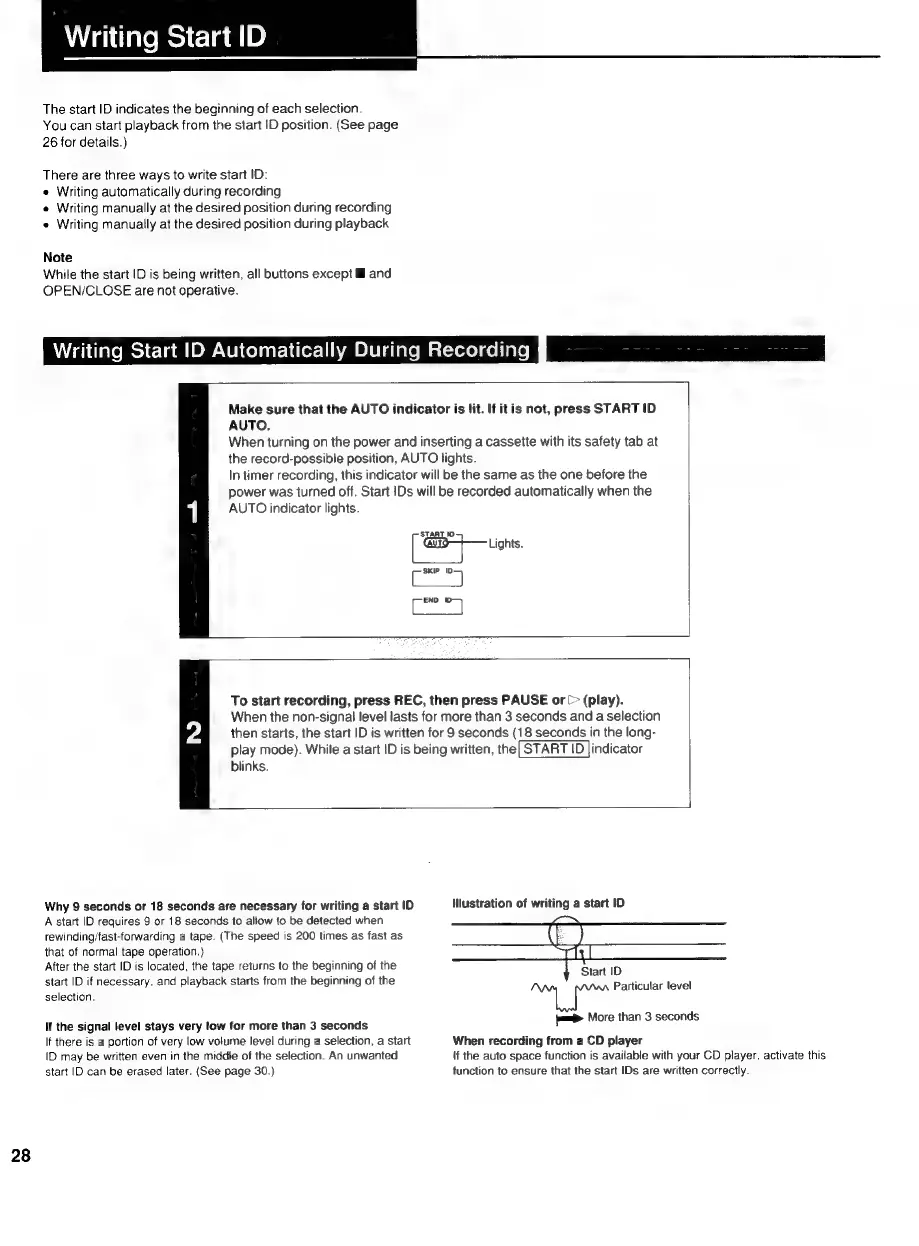
Writing
Start
ID
The
start
ID
indicates
the
beginning
of
each
selection.
You
can
start
playback
from
the
start
ID
position.
(See
page
26
for
details.)
There
are
three
ways
to
write
start
ID:
¢
Writing
automatically
during
recording
e
Writing
manually
at
the
desired
position
during
recording
e
Writing
manually
at
the
desired
position
during
playback
Note
While
the
start
ID
is
being
written,
all
buttons
except
and
OPEN/CLOSE
are
not
operative.
Writing
Start
ID
Automatically
During
Recordingf
ssid
Make
sure
that
the
AUTO
indicator
is
lit.
If
it
is
not,
press
START
ID
AUTO.
When
turning
on
the
power
and
inserting
a
cassette
with
its
safety
tab
at
the
record-possible
position,
AUTO
lights.
In
timer
recording,
this
indicator
will
be
the
same
as
the
one
before
the
power
was
turned
off.
Start
Ds
will
be
recorded
automatically
when
the
AUTO
indicator
lights.
START
10
C
SKIP
oa)
C
END
7
To
start
recording,
press
REC,
then
press
PAUSE
or
[>
(play).
When
the
non-signal
level
lasts
for
more
than
3
seconds
and
a
selection
then
starts,
the
start
ID
is
written
for
9
seconds
(18
seconds
in
the
long-
play
mode).
While
a
start
ID
is
being
written,
the|
START
ID
|indicator
blinks.
Why
9
seconds
or
18
seconds
are
necessary
for
writing
a
start
ID
Mlustration
of
writing
a
start
ID
A
start
ID
requires
9
or
18
seconds
to
allow
to
be
detected
when
rewinding/fast-forwarding
a
tape.
(The
speed
is
200
times
as
fast
as
that
of
normal
tape
operation.)
After
the
start
ID
is
located,
the
tape
returns
to
the
beginning
of
the
start
ID
if
necessary,
and
playback
starts
from
the
beginning
of
the
selection.
Start
ID
Particular
level
nds
If
the
signal
level
stays
very
low
for
more
than
3
seconds
yas
More
than
3
seco
28
If
there
is
a
portion
of
very
low
volume
level
during
a
selection,
a
start
|D
may
be
written
even
in
the
middle
of
the
selection.
An
unwanted
start
ID
can
be
erased
later.
(See
page
30.)
When
recording
from
a
CD
player
if
the
auto
space
function
is
available
with
your
CD
player.
activate
this
function
to
ensure
that
the
start
IDs
are
written
correctly.

Related product manuals