EasyManua.ls Logo

Sony DTC-700 - Writing and Erasing End IDs; End ID Writing During Playback; Erasing End IDs

Sony DTC-700
56 pages
Print Icon
To Next Page IconTo Next Page
To Previous Page IconTo Previous Page
Loading...
Writing
End
ID
During
Playback
J
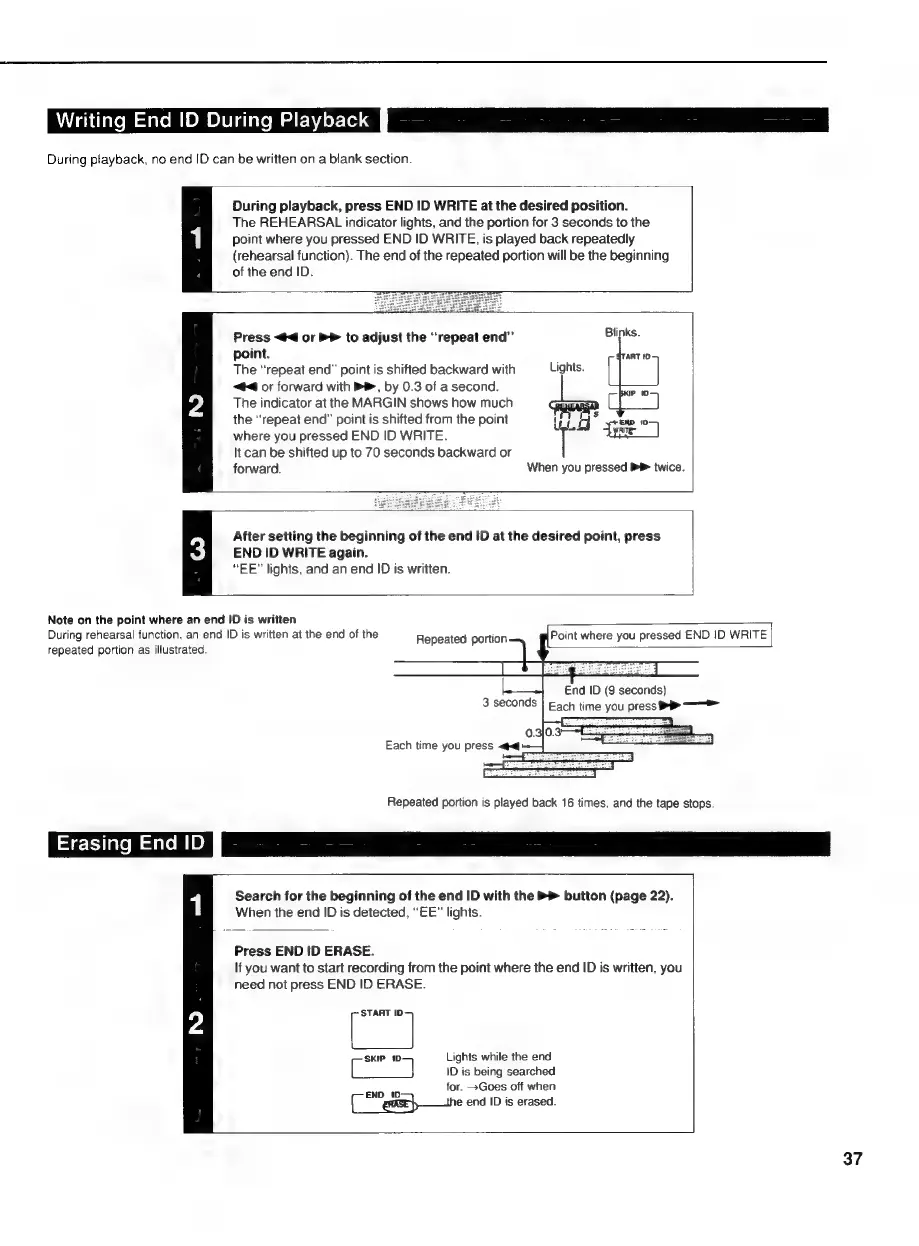
During
playback,
no
end
ID
can
be
written
on
a
blank
section.
During
playback,
press
END
ID
WRITE
at
the
desired
position.
The
REHEARSAL
indicator
lights,
and
the
portion
for
3
seconds
to
the
point
where
you
pressed
END
ID
WRITE,
is
played
back
repeatedly
(rehearsal
function).
The
end
of
the
repeated
portion
will
be
the
beginning
of
the
end
ID.
ad
Press
<4
or
PP
to
adjust
the
“repeat
end”
point.
The
“repeat
end”
point
is
shifted
backward
with
Lights.
44
or
forward
with
B®,
by
0.3
of
a
second.
The
indicator
at
the
MARGIN
shows
how
much
the
“repeat
end”
point
is
shifted
from
the
point
y
oz
5
END
10
me
Sane
where
you
pressed
END
ID
WRITE.
It
can
be
shifted
up
to
70
seconds
backward
or
forward.
When
you
pressed
P
twice.
After
setting
the
beginning
of
the
end
ID
at
the
desired
point,
press
END
ID
WRITE
again.
“EE"
lights,
and
an
end
ID
is
written.
Note
on
the
point
where
an
end
ID
is
written
During
rehearsal
function,
an
end
ID
is
written
at
the
end
of
the
repeated
portion
as
illustrated.
Repeated
portion
Point
where
you
pressed
END
ID
WRITE
Repeated
portion
is
played
back
16
times,
and
the
tape
stops.
Erasing
ENGI
Search
for
the
beginning
of
the
end
ID
with
the
>
button
(page
22).
When
the
end
ID
is
detected,
“EE”
lights.
Press
END
!D
ERASE.
If
you
want
to
start
recording
from
the
point
where
the
end
ID
is
written,
you
need
not
press
END
ID
ERASE.
i
7
SKIP
1D
Lights
while
the
end
ID
is
being
searched
for.
>Goes
off
when
Ce
eense}
—the
end
ID
is
erased.
37