EasyManua.ls Logo

Sony DTC-700 - Maintenance and System Diagram; Cleaning the Unit and Head

Sony DTC-700
56 pages
Print Icon
To Next Page IconTo Next Page
To Previous Page IconTo Previous Page
Loading...
Maintenance
Cleaning
the
Cabinet
Po
Clean
the
cabinet,
panels,
and
controls
with
a
soft
cloth
slightly
moistened
with
a
mild
detergent
solution.
Do
not
use
any
type
of
abrasive
pad,
scouring
powder
or
solvent
such
as
alcohol
or
benzine.
Cleaningthe
Head
Be
Prolonged
operation
will
cause
contamination
of
the
head.
To
make
the
best
possible
recording
and
playback,
we
recommend
cleaning
the
head
periodically,
using
the
DT-10CL
cleaning
cassette
(not
supplied).
How
to
use
the
cleaning
cassette
Notes
on
the
cleaning
cassette
1
Insert
the
cleaning
cassette
as
you
would
a
normal
DAT
e
The
cleaning
cassette
cannot
be
used
for
recording
and
cassette.
playback.
2
Press».
Press
@
after
about
10
seconds.
¢
Do
not
clean
the
head
with
the
cleaning
cassette
more
than
3
Remove
the
cleaning
cassette
without
rewinding
it.
five
times
over
a
short
period.
4
Proceed
with
recording
and
playback
with
a
normal
DAT
Cleaning
the
head
continuously
for
too
long
a
period
of
time
cassette
and
check
the
sound
quality.
may
cause
wear
to
the
head.
¢
Do
not
rewind
the
cleaning
cassette
each
time
you
use
it.
When
the
cleaning
cassette
tape
is
taken
up
completely,
rewind
it
to
the
beginning
and
re-use
it.
The
cleaning
cassette
can
be
used
a
hundred
times,
with
10
seconds
of
cleaning
each
time.
The
DT-10CL
cleaning
cassette
is
available.
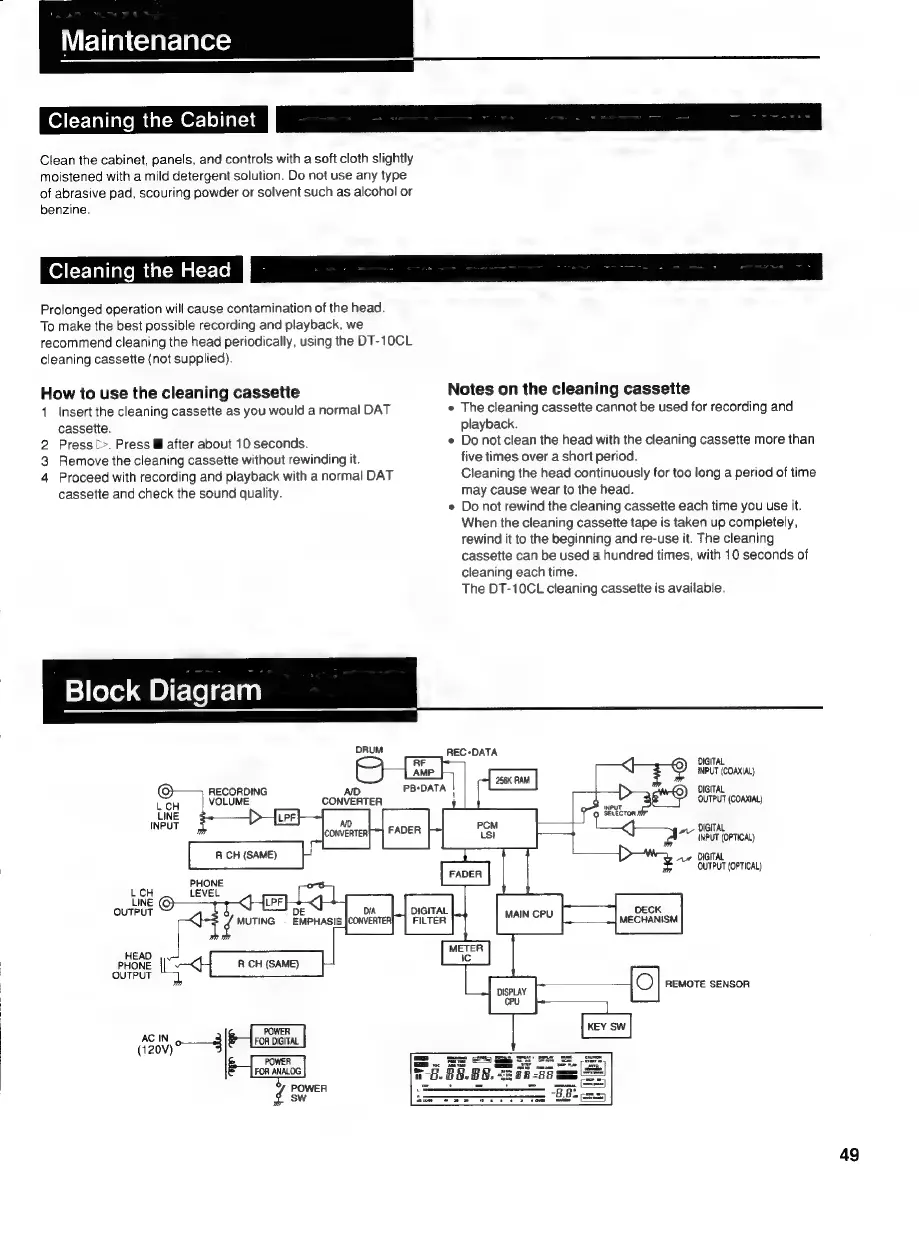
Block
Diagram
ORUM
REC-DATA
DIGITAL
INPUT
(COAXIAL}
RECORDING
PB:DATA
|
DIGITAL
L
CH
VOLUME
CONVERTER
or
OUTPUT
(COAXIAL)
UNE
SELECTOR
INPUT
DIGITAL
mn
A
7"
INPUT
(OPTICAL)
ACH
(SAME)
vue
DIGITAL
OUTPUT
(OPTICAL)
PHONE
LCH
LEVEL
LINE
LPF
<]
OUTPUT
is
DECK
MECHANISM
of
REMOTE
SENSOR
DE
¢
MUTING
EMPHASI
HEAD
PHONE
<I
RCH
(SAME)
|
OUTPUT
|
|
|
2
POWER
AC
IN
—*
FOR
DIGITAL.
3
FOR
ANALOG
POWER
sw
49

Related product manuals