
 Need help?
Do you have a question about the Sony DualSense CFI-ZCT1W and is the answer not in the manual?
Avoid high volume to prevent hearing loss. Consult a doctor if you experience ear discomfort or muffled speech.
Handle damaged or leaking batteries with care. Rinse skin or eyes immediately with water and consult a physician.
Radio waves may affect medical devices like pacemakers. Consult your doctor before using wireless features.
Magnets can interfere with pacemakers and other medical devices. Keep product away from them.
Follow guidelines to ensure accident-free operation and prevent fire, shock, or injury from electrical devices.
Avoid using vibration function if you have hand/arm ailments. Be cautious of controller movement causing falls.
Keep product away from small children to prevent accidental ingestion of small parts or cable entanglement.
Limit high volume use for hearing protection. Avoid raising volume to mask noise. Lower volume if others cannot be heard.
Take regular breaks. Stop use if feeling tired or experiencing pain. Discontinue if symptoms like dizziness occur.
Small static shocks may occur with headsets in dry air due to static electricity, not product malfunction.
Ensure adequate space for motion sensor use. Grip controller firmly to prevent slips and potential injury.
Avoid staring at the blinking light bar. Discontinue use if light stimulation causes discomfort or pain.
Do not place on unstable surfaces or floors. Keep away from liquids, wet hands, electrical storms, and impacts.
Wipe with a soft, dry cloth. Avoid using solvents, chemicals, or treated cloths.
Store away from heat, humidity, direct sunlight, dust, smoke, and steam. Do not leave in a hot vehicle.
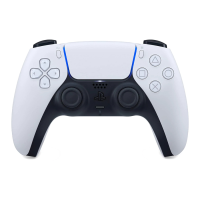
Diagram and labels identifying front-facing buttons, sticks, touch pad, and ports.
Diagram and labels identifying top-facing buttons, trigger buttons, and USB port.
Steps to connect and pair the controller with your PS5 console for initial use.
Instructions for charging the controller via USB cable, including charging in rest mode.
Handle the lithium-ion battery with care. Never attempt to open, crush, heat, or set fire to the battery.
Battery lifespan decreases with age. Charge in optimal temperature range for best results.
For extended periods of non-use, charge the battery at least once a year to maintain its functionality.
 General
| Type | Wireless Controller |
|---|---|
| Product Name | DualSense Wireless Controller |
| Connectivity | Bluetooth, USB Type-C |
| Battery | Built-in rechargeable lithium-ion battery |
| Charging Time | Approximately 3 hours |
| Haptic Feedback | Yes |
| Adaptive Triggers | Yes |
| Built-in Microphone | Yes |
| Audio Output | 3.5 mm audio jack |
| Touchpad | Yes |
| Speaker | Yes |
| Analog Sticks | 2 |
| Color | White |
| Compatibility | PlayStation 5, PC |
| Battery Life | Approximately 12 hours |
| Dimensions | 160mm x 66mm x 106mm |
| Weight | 280 g |
| Motion Sensor | Six-axis motion sensing system (three-axis gyroscope, three-axis accelerometer) |
| Buttons | Create button, Options button |
| Trigger Buttons | R2/L2 |













 To Next Page