8
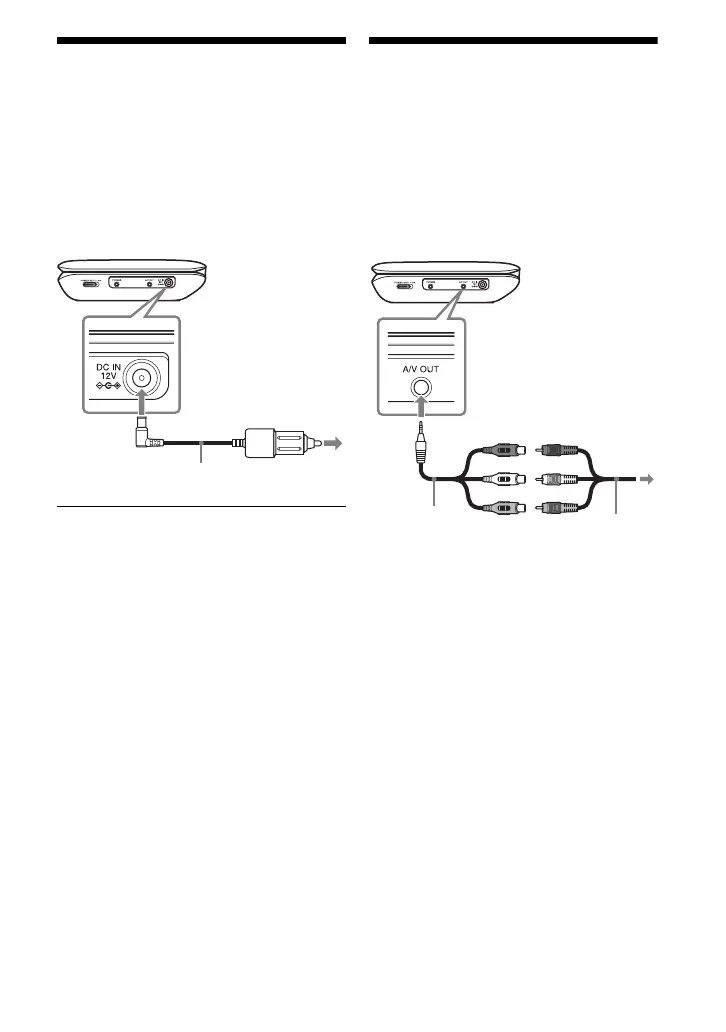
Using the Car Battery
Adaptor
The car battery adaptor (supplied) is for a
12 V car battery, negative earth (do not use
it with a 24 V car battery, positive earth).
1 Connect the car battery adaptor.
After using the player in a car
Disconnect the car battery adaptor from a
cigarette lighter socket.
b
• The driver should not connect or disconnect
the car battery adaptor while driving.
• Arrange the cord so as not to interfere with the
driver. Also, do not place the LCD panel where
the driver can watch.
• Clean the cigarette lighter socket. If it is dirty,
it may cause contact failure or malfunction.
• Use the car battery adaptor with the car engine
running. If it is used with the car engine off, the
car battery may become depleted.
• Do not leave the player or accessories in the
car.
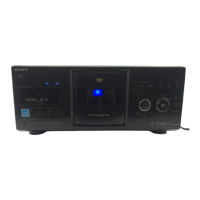
Connecting to a TV
You can enjoy images on your TV or
monitor.
1 Connect the player to your TV or
monitor using the audio/video
adaptor (supplied).
b
• Refer to the instructions supplied with the
equipment to be connected.
• Before connecting, turn off the player and the
equipment to be connected, then unplug from
their wall sockets.
To cigarette
lighter socket
Car battery adaptor (supplied)
To AUDIO/
VIDEO input
jacks of a TV
or monitor
Audio/video
adaptor
(supplied)
Audio/video
cable (not
supplied)



 To Next Page