master page=Left_2
DVP-FX930
4-126-488-51(1)
E:\DTP\20090324\3_Target_FX930_EA4_EN_20090211\01US02WAR-CEK.fm
4
GB
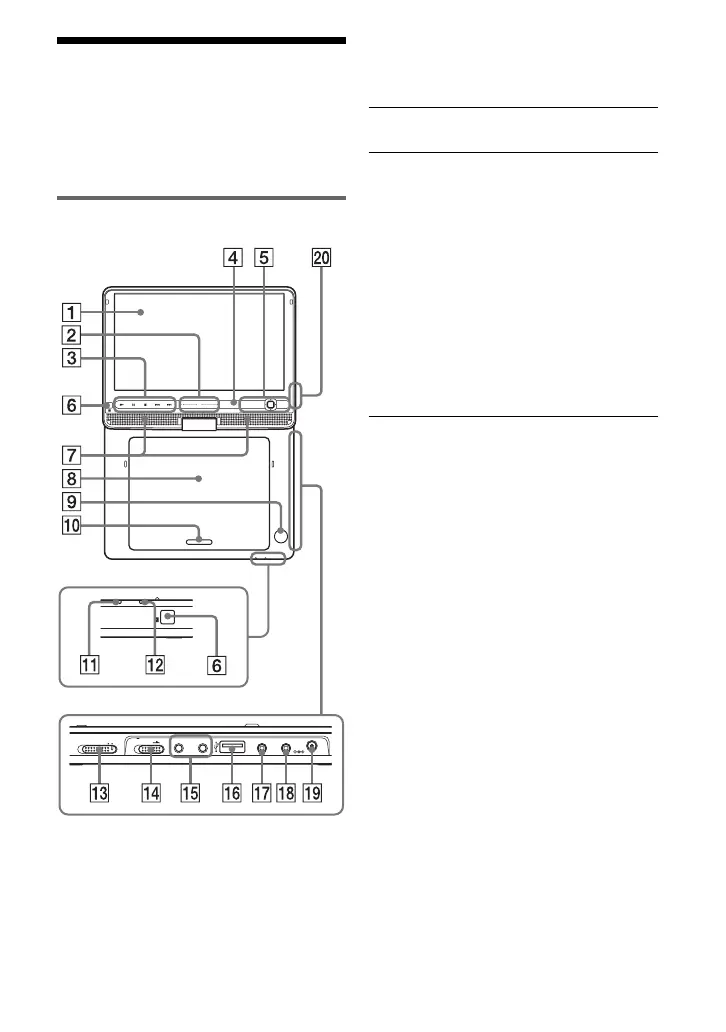
Guide to Parts and
Controls
For more information, see the pages
indicated in parentheses.
Player
Buttons B C D and E are also on the
remote.
Buttons B C D and E (but not C/X/x/
c/ENTER) can be operated with a single
touch.
The VOL+ and N (play) buttons have a
tactile dot. Use the tactile dot as a reference
when operating the player.
A LCD panel (page 8)
B VOL (sound volume) +/–
Operate with a single touch of + or –.
You can also adjust the volume by
sliding your finger along the touch
slider. Sliding toward + from centre
increases volume; sliding toward –
from centre decreases volume. (The
same operation in “LCD Mode” can be
used to adjust the picture quality level.
See page 18.)
Buttons on the remote adjust the
volume only.
C N (play) (page 13)
Starts or re-starts playback.
X (pause) (page 13)
Pauses or re-starts playback.
x (stop) (page 13)
Stops playback.
. (previous)
Skips to the beginning of the current
chapter/track/scene.
To go to the beginning of the previous
chapter/track/scene, press twice.
> (next)
Skips to the next chapter/track/scene.
CHARGEPOWER
HOLD
PHONES AUDIO VIDEO DC IN
9.5V
AB
POWER OFF ON
IN/
OUT
IN/
OUT
PUSH CLOSE
OPEN
OPTIONSDISPLAY
VOL
RETURNMENU
01US01COV.book Page 4 Tuesday, March 24, 2009 1:29 PM



 To Next Page