12
Step 4: Quick Setup
Follow the steps below to make the minimum number of basic adjustments for using the player.
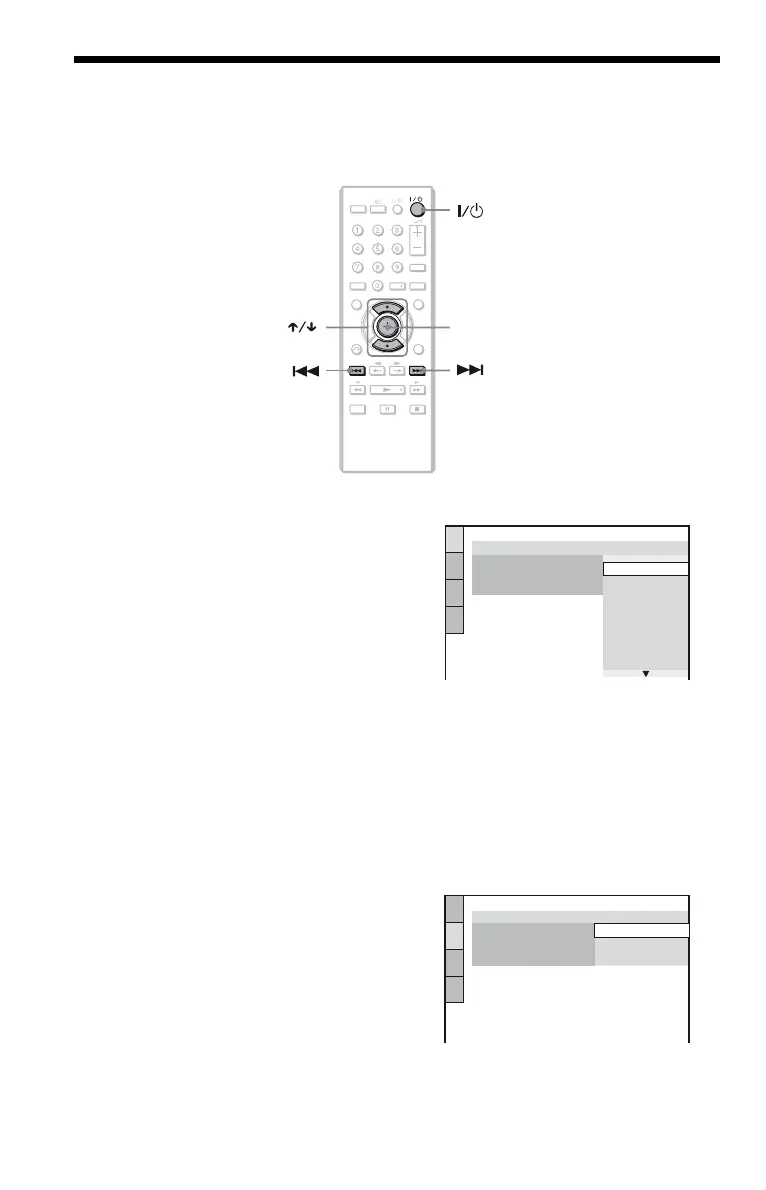
To skip an adjustment, press >. To return to the previous adjustment, press ..
1 Turn on the TV.
2 Press [/1.
The player turns on and the [/1 indicator
lights up.
3 Switch the input selector on your
TV so that the signal from the
player appears on the TV screen.
“Press [ENTER] to run QUICK SETUP”
appears at the bottom of the screen. If this
message does not appear, select
“QUICK” under “SETUP” in the Control
Menu to run Quick Setup (page 17).
4 Press ENTER without inserting a
disc.
The Setup Display for selecting the
language used in the on-screen display
appears.
5 Press X/x to select a language.
The player displays the menu and
subtitles in the selected language.
6 Press ENTER.
The Setup Display for selecting the
aspect ratio of the TV to be connected
appears.
TIME/TEXT
PICTURE
NAVI
CLEAR
DISPLAY
FAS T/ SLO W
PLAY
AUDIO SUBTITLE
TOP MENU MENU
RETURN
TVTV
ENTER
LANGUAGE SETUP
OSD:
MENU:
AUDIO:
SUBTITLE:
ITALIANO
ESPAÑOL
NEDERLANDS
DANSK
SVENSKA
FRANÇAIS
ENGLISH
ENGLISH
DEUTSCH
SCREEN SETUP
TV TYPE:
16:9
4:3 LETTER BOX
4:3 PAN SCAN
SCREEN SAVER:
LINE:
BACKGROUND:
16:9








 To Next Page