16
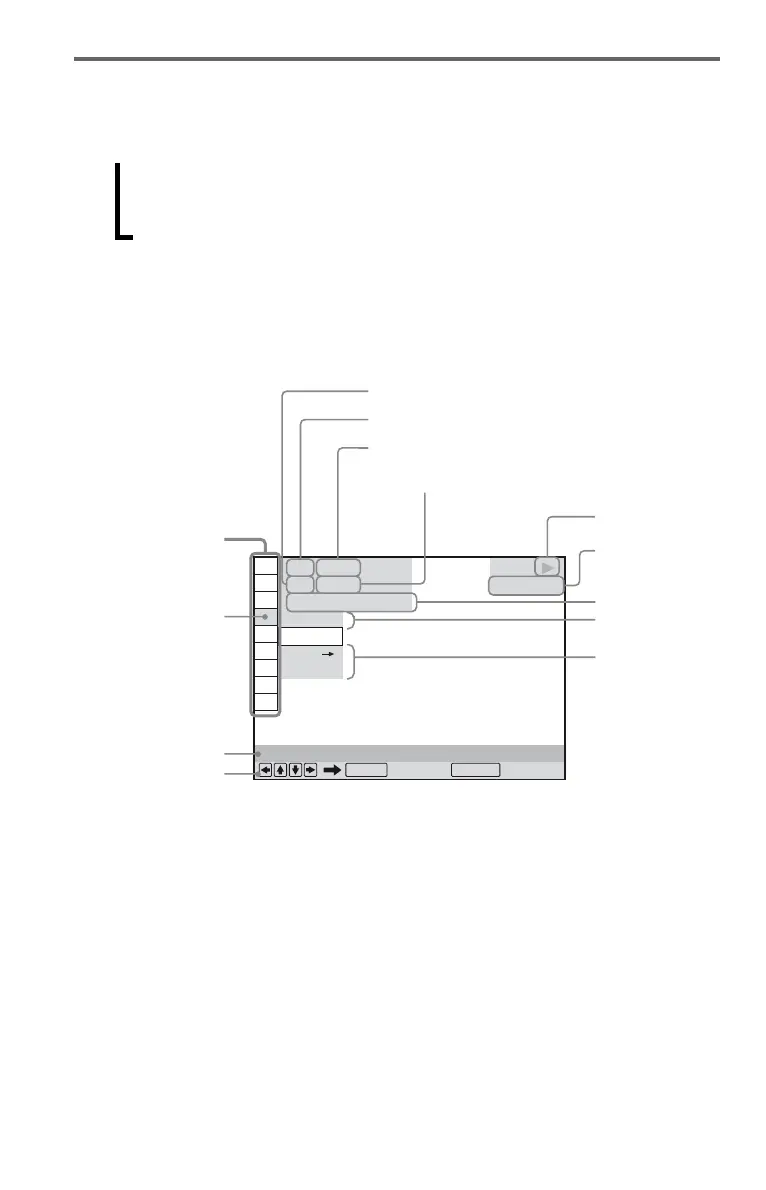
Control Menu display (Magic Pad)
Use the Control Menu to select a function and to view related information. Press DISPLAY
repeatedly to turn on or change the Control Menu display as follows:
The Control Menu display 1 and 2 will show different items depending on the disc type.
Example: Control Menu display 1 when playing a DVD VIDEO.
Press X/x to select the Control Menu item, then press ENTER.
For details about the item, see “List of Control Menu items” (page 17, 18).
*
1
Displays the scene number for VIDEO CDs
(PBC is on), track number for VIDEO CDs/CDs,
album number for DATA discs.
*
2
Displays the index number for VIDEO CDs,
MP3 audio track number, or JPEG image file
number for DATA discs. DivX video file
number for DATA discs.
*
3
Displays Super VCD as “SVCD.”
*
4
Displays the date for JPEG files.
Control Menu display 1
m
Control Menu display 2 (Except CD)
m
Control Menu display off
,
OFF
OFF
SET
ON
PLAY
1 8
(
3 4
)
1 2
(
2 7
)
T
1 : 3 2 : 5 5
DVD VIDEO
Quit:
PROGRAM
ENTER DISPLAY
Currently playing chapter number*
2
Playing time*
4
Total number of chapters*
2
Options
Current setting
Total number of titles*
1
Playback status
(N Playback,
X Pause,
x Stop, etc.)
Function name of
selected Control
Menu item
Operation message
Selected item
Control Menu items
Type of disc
being played*
3
Currently playing title number*
1








 To Next Page