3
Region code
Your player has a region code printed on the back of the
unit and only will play commercial DVDs labelled with
an identical region cord or .
Copyrights, trademarks and software license
information
• Manufactured under license from Dolby
Laboratories. Dolby and the double-D symbol are
trademarks of Dolby Laboratories.
• “DVD Logo” is a trademark of DVD Format/Logo
Licensing Corporation.
• MPEG Layer-3 audio coding technology and patents
licensed from Fraunhofer IIS and Thomson.
• Windows Media is either a registered trademark or
trademark of Microsoft Corporation in the United
States and/or other countries.
This product contains technology subject to certain
intellectual property rights of Microsoft.
Use or distribution of this technology outside of this
product is prohibited without the appropriate
license(s) from Microsoft.
• All other trademarks are trademarks of their
respective owners.
• THIS PRODUCT IS LICENSED UNDER THE
MPEG-4 VISUAL PATENT PORTFOLIO
LICENSE FOR THE PERSONAL AND
NONCOMMERCIAL USE OF A CONSUMER
FOR DECODING VIDEO IN COMPLIANCE
WITH THE MPEG-4 VISUAL STANDARD
(“MPEG-4 VIDEO”) THAT WAS ENCODED BY A
CONSUMER ENGAGED IN A PERSONAL AND
NONCOMMERCIAL ACTIVITY AND/OR WAS
OBTAINED FROM A VIDEO PROVIDER
LICENSED BY MPEG LA TO PROVIDE MPEG-4
VIDEO. NO LICENSE IS GRANTED OR SHALL
BE IMPLIED FOR ANY OTHER USE.
ADDITIONAL INFORMATION INCLUDING
THAT RELATING TO PROMOTIONAL,
INTERNAL AND COMMERCIAL USES AND
LICENSING MAY BE OBTAINED FROM MPEG
LA, LLC. SEE HTTP://WWW.MPEGLA.COM
About this manual
Descriptions with “*” in this manual are for DVP-
SR370 only.
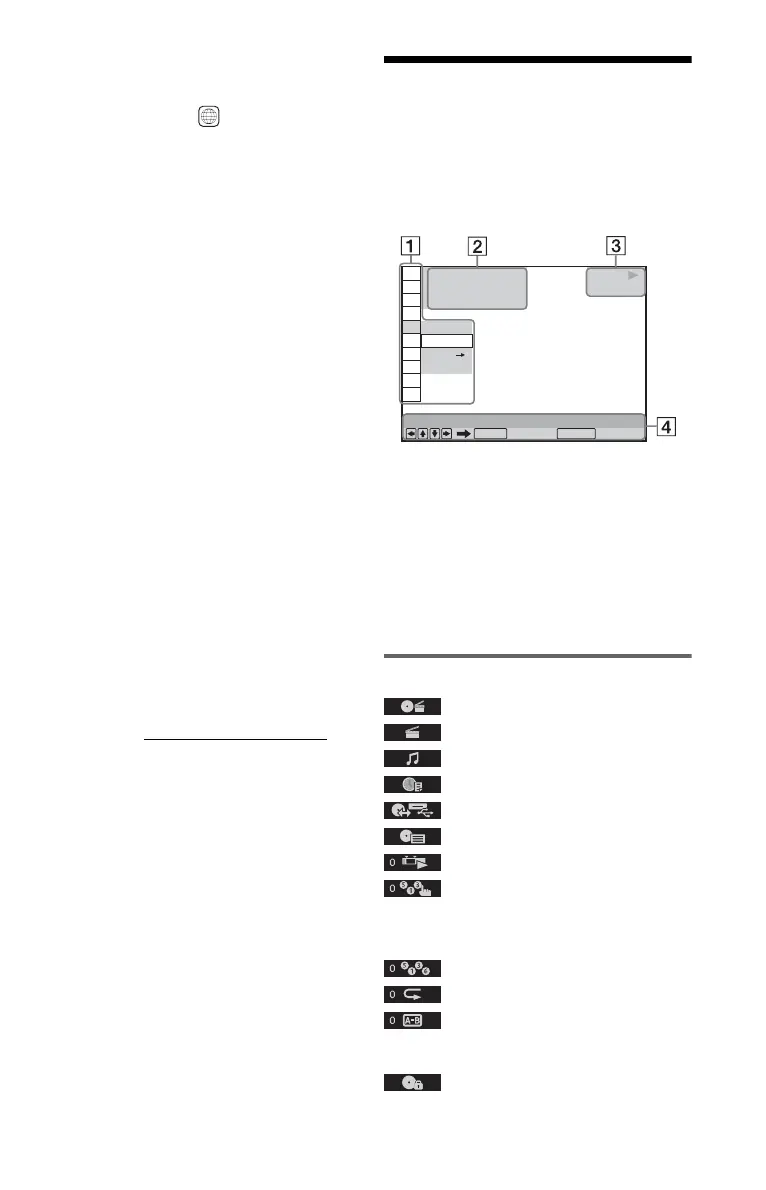
Control Menu Display
Press DISPLAY.
To change the Control Menu display, press
DISPLAY again.
The available items differ depending on the
disc/file or the situation.
A Control Menu items: 1 “Menu list”
Selected item options
B Number of titles
Number of chapters
Playing time
C Playback status
Media type
D Selected Control Menu item
Operation message
Menu list
TITLE/SCENE/TRACK
CHAPTER/INDEX
TRACK
TIME/TEXT
DISC/USB*
TOP MENU/MENU
ORIGINAL/PLAY LIST
PROGRAM
Select “SET t,” then press ENTER and select
the title (T), chapter (C), or track (T) you want to
programme, and press ENTER. Press N.
SHUFFLE
REPEAT
A-B REPEAT
Select “SET t,” then press ENTER. Select
point A and point B by pressing ENTER.
PARENTAL CONTROL
Playback of some DVD VIDEOs can be limited
according to a predetermined level such as the
ALL
OFF
OFF
SET
ON
PLAY
1 8
(
3 4
)
1 2
(
2 7
)
T
1 : 3 2 : 5 5
DVD VIDEO
Quit:
PROGRAM
ENTER DISPLAY
,continued



 To Next Page