22
Various Play Mode
Functions
You can set the following play modes:
• Programme Play (page 22)
• Shuffle Play (page 23)
• Repeat Play (page 24)
• A-B Repeat Play (page 24)
b
The play mode is cancelled when:
– you open the disc tray.
– you remove the USB device.
– you press [/1 and the player enters standby mode.
– you change the setting of “DISC/USB.”
Creating your own
programme (Programme Play)
You can play the contents in the order you
want. You can programme up to 99 titles,
chapters, and tracks.
1 After selecting (PROGRAM)
on the Control Menu (page 19), press
X/x to select “SET t,” then press
ENTER.
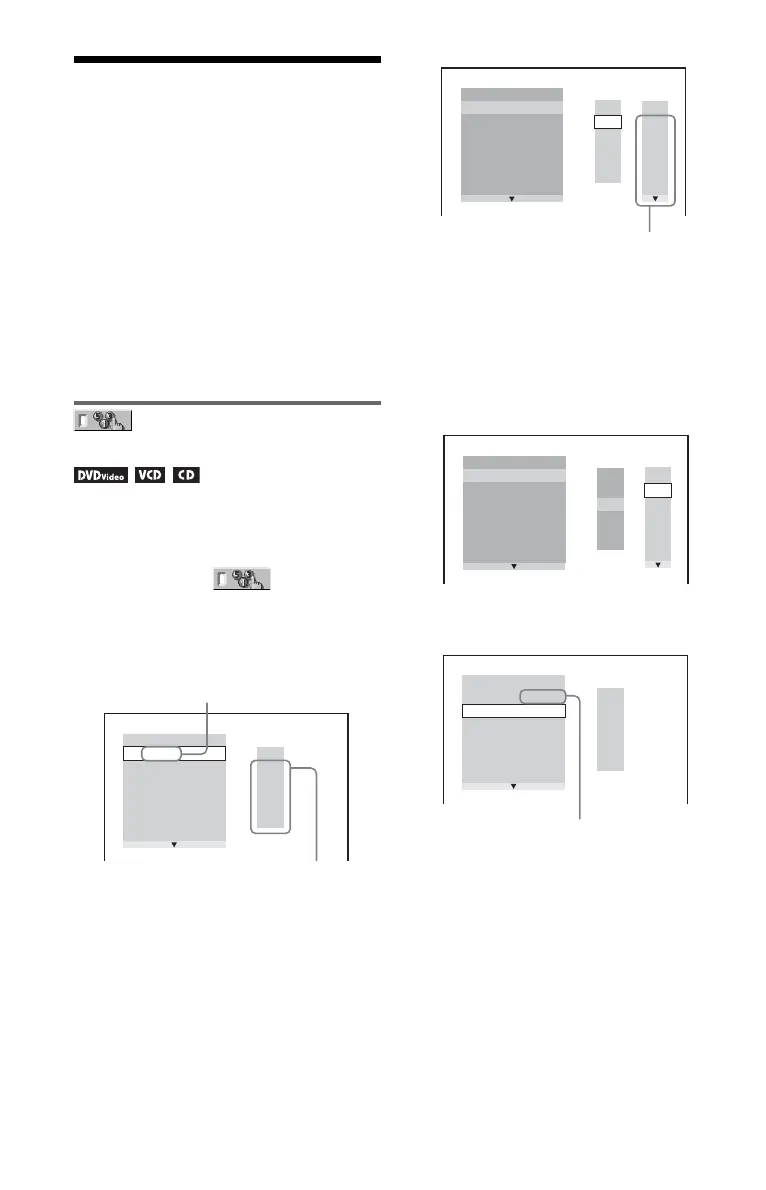
2 Press c.
The cursor moves to the title or track row
“T” (in this case, “01”).
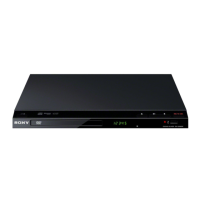
3 Select the title, chapter, or track you
want to programme.
◆ When playing a DVD VIDEO
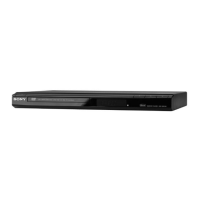
For example, select chapter “03” of title
“02.”
Press X/x to select “02” under “T,” then
press ENTER.
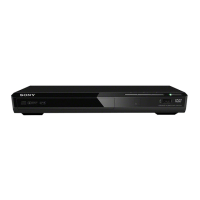
Next, press X/x to select “03” under “C,”
then press ENTER.
◆ When playing a VIDEO CD or CD
For example, select track “02.”
Press X/x to select “02” under “T,” then
press ENTER.
PROGRAM
1. TITLE
ALL CLEAR
2. TITLE
– –
3. TITLE
– –
4. TITLE
– –
5. TITLE
– –
6. TITLE
– –
7. TITLE
– –
T
– –
01
02
03
04
05
“TRACK” is displayed when you play
a VIDEO CD or CD.
Recorded titles or tracks
PROGRAM
1. TITLE
– –
ALL CLEAR
2. TITLE
– –
3. TITLE
– –
4. TITLE
– –
5. TITLE
– –
6. TITLE
– –
7. TITLE
– –
T
C
ALL
01
02
03
04
05
06
– –
02
03
04
05
01
Recorded chapters
PROGRAM
1. TITLE
– –
ALL CLEAR
2. TITLE
– –
3. TITLE
– –
4. TITLE
– –
5. TITLE
– –
6. TITLE
– –
7. TITLE
– –
C
ALL
03
04
05
06
T
– –
01
02
03
04
05
02
01
T
– –
01
02
03
04
05
PROGRAM
1. TITLE 0 2
–
0 3
ALL CLEAR
2. TITLE
– –
3. TITLE
– –
4. TITLE
– –
5. TITLE
– –
6. TITLE
– –
7. TITLE
– –
Selected title and chapter


 To Next Page