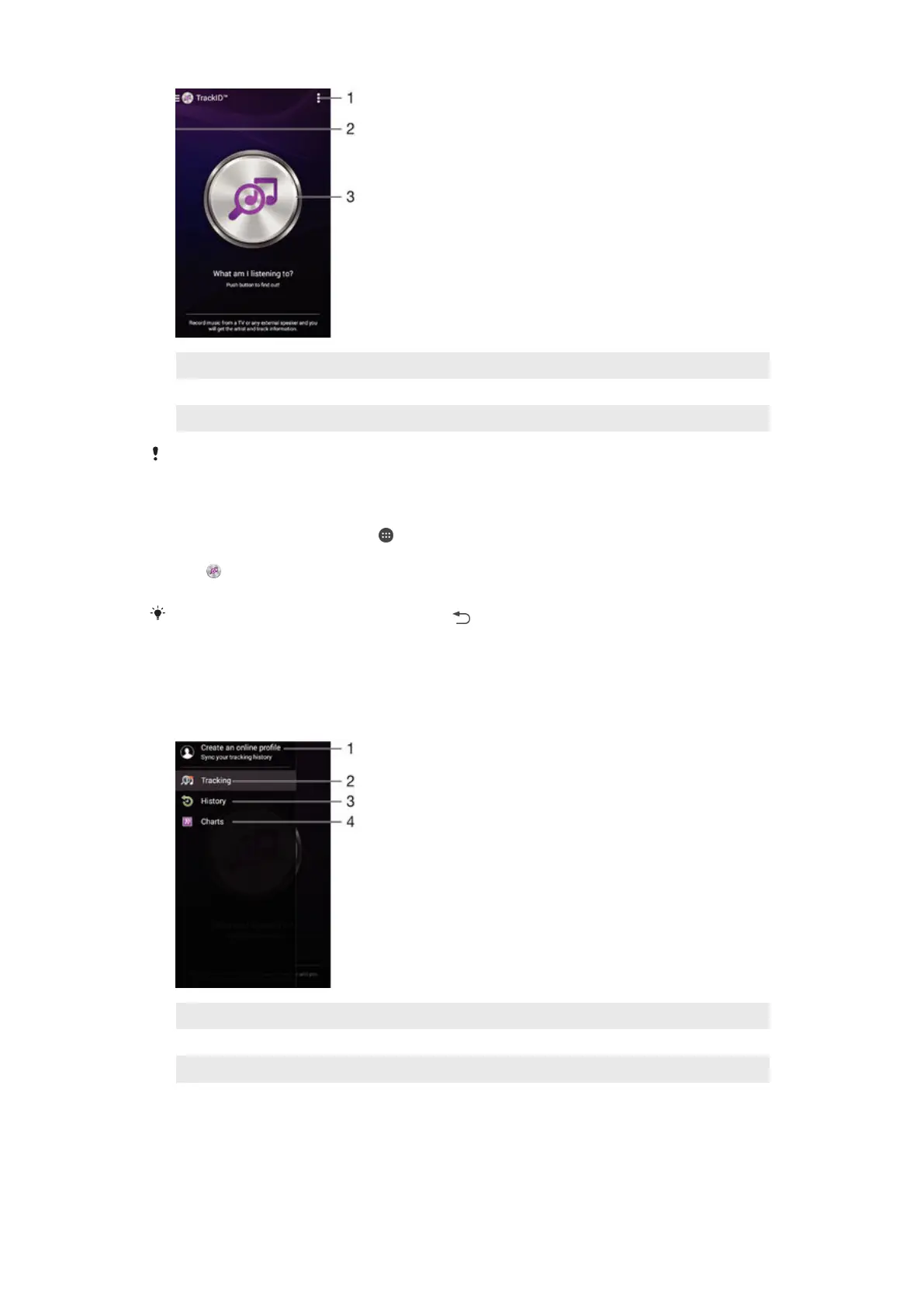
1 View TrackID™ options
2 Drag the left edge of the screen to the right to open the TrackID™ home screen menu
3 Identify the music that you are listening to
The TrackID™ application and the TrackID™ service are not supported in all countries/regions
or by all networks and/or service providers in all areas.
To identify music using TrackID™ technology
1
From your Home screen, tap .
2
Find and tap TrackID™, then hold your device close to the music source.
3
Tap . If the song is recognised by the TrackID™ service, the results appear
on the screen.
To return to the
TrackID™ start screen, tap .
TrackID™ home screen menu
The TrackID™ home screen menu gives you an overview of all the songs that you
have recorded and identified using the TrackID™ service. From here you can also
view your songs based on current music charts and search history.
1 Create an online TrackID™ profile
2 Open the TrackID™ application
3 View the search result history
4 View current music charts
To view artist information for a song
•
After a song has been recognised by the TrackID™ application, tap Artist info.
70
This is an Internet version of this publication. © Print only for private use.









 To Next Page