EasyManua.ls Logo

Sony ECM-B1M - User Manual

Sony ECM-B1M
14 pages
Print Icon
To Next Page IconTo Next Page
Loading...
Help Guide
Shotgun Microphone
ECM-B1M
Use this Help Guide when you have issues or questions on how to use your shotgun microphone.
5-007-783-11(1) Copyright 2019 Sony Corporation
Supported camera models
Identifying the parts
Preparations
Unpacking
Attaching/removing to/from the camera
About the pickup pattern and the frequency response
About this unit
Notes on use
Specifications
Trademarks
1
Question and Answer IconNeed help?

Do you have a question about the Sony ECM-B1M and is the answer not in the manual?

Summary

Supported Camera Models

Identifying the Parts

Top, Side, and Bottom

Details the physical components and controls on the top, side, and bottom of the unit.

Back

Details the physical components and controls on the back of the unit.

Preparations and Usage

Unpacking

Lists the items included in the product package and advises contacting the dealer if anything is missing.

Attaching and Removing the Microphone

Instructions on how to securely mount and dismount the microphone from a camera.

About the Wind Screen

Explains how to fit the wind screen to minimize wind or breath noise during recording.

Pickup Patterns and Frequency Response

Super-directional Pickup Pattern

Illustrates the pickup pattern for directional sound capture from the front.

Super-directional Frequency Response

Displays the frequency response characteristics for the super-directional pickup pattern.

Unidirectional Pickup Pattern

Illustrates the pickup pattern for sound capture from a single direction.

Unidirectional Frequency Response

Displays the frequency response characteristics for the unidirectional pickup pattern.

Omnidirectional Pickup Pattern

Illustrates the pickup pattern for sound capture from all directions.

Omnidirectional Frequency Response

Displays the frequency response characteristics for the omnidirectional pickup pattern.

About This Unit

Notes on Use

Specifications

Trademarks

Summary

Supported Camera Models

Identifying the Parts

Top, Side, and Bottom

Details the physical components and controls on the top, side, and bottom of the unit.

Back

Details the physical components and controls on the back of the unit.

Preparations and Usage

Unpacking

Lists the items included in the product package and advises contacting the dealer if anything is missing.

Attaching and Removing the Microphone

Instructions on how to securely mount and dismount the microphone from a camera.

About the Wind Screen

Explains how to fit the wind screen to minimize wind or breath noise during recording.

Pickup Patterns and Frequency Response

Super-directional Pickup Pattern

Illustrates the pickup pattern for directional sound capture from the front.

Super-directional Frequency Response

Displays the frequency response characteristics for the super-directional pickup pattern.

Unidirectional Pickup Pattern

Illustrates the pickup pattern for sound capture from a single direction.

Unidirectional Frequency Response

Displays the frequency response characteristics for the unidirectional pickup pattern.

Omnidirectional Pickup Pattern

Illustrates the pickup pattern for sound capture from all directions.

Omnidirectional Frequency Response

Displays the frequency response characteristics for the omnidirectional pickup pattern.

About This Unit

Notes on Use

Specifications

Trademarks

Overview

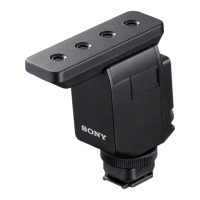
The Sony ECM-B1M is a shotgun microphone designed to enhance audio recording for compatible cameras, particularly those equipped with a Multi Interface Shoe. This Help Guide provides comprehensive instructions on its use, from identifying parts to understanding its acoustic properties and maintenance.

Function Description

The ECM-B1M serves as an external microphone that attaches to a camera's Multi Interface Shoe, providing superior audio capture compared to a camera's built-in microphone. It offers selectable pickup patterns—super-directional, unidirectional, and omnidirectional—allowing users to tailor the microphone's sensitivity to specific recording scenarios.

  • Super-directional: This pattern provides sharp directivity, primarily picking up sounds coming from the front of the camera while minimizing surrounding noise. It's ideal for focusing on a subject directly in front of the lens.
  • Unidirectional: This pattern records sounds coming from the front while minimizing those from the back. It offers a broader frontal pickup than super-directional, suitable for capturing a wider sound field in front of the camera.
  • Omnidirectional: This pattern picks up sounds from every direction, making it suitable for recording environmental sounds or including the voice of a photographer in the recording.

The microphone also features an ATT (attenuator) switch to adjust the audio recording volume, allowing users to minimize distortion for loud sounds (20dB) or amplify quiet sounds (0dB). An AUTO/MAN switch enables automatic or manual adjustment of the recording volume level, with a dedicated AUDIO LEVEL dial for fine-tuning in manual mode.

Furthermore, the ECM-B1M incorporates a FILTER switch with three options:

  • NC (Noise Cut): This function uses digital signal processing to effectively eliminate unpleasant noises.
  • LC (Low Cut): This function minimizes unwanted low-frequency noises such as wind noise, air-conditioning noise, and vibration.
  • OFF: Disables both filter functions.

A DIGITAL/ANALOG switch allows users to select the input type. When connected to a camera compatible with the digital audio interface of the Multi Interface Shoe, setting this switch to "DIGITAL" enables digital signal communication between the microphone and camera, resulting in audio recording with minimum noise insertion. For cameras without digital audio interface compatibility, the "ANALOG" setting is used.

Usage Features

The ECM-B1M is designed for ease of attachment and operation. To attach the microphone, users first remove the connector protect cap, then slide the Multi Interface foot into the camera's shoe, and finally rotate the lock dial in the "LOCK" direction to firmly secure it. Attaching the microphone automatically switches the camera's audio input from its built-in microphone to the ECM-B1M. If insertion is difficult, rotating the lock dial counterclockwise until it stops can help. To remove the microphone, the user turns off the camera, rotates the lock dial counterclockwise until it stops, and slides the Multi Interface foot out of the shoe.

The microphone's various switches and dials are clearly labeled for intuitive control:

  • Directivity selection switch: Located on the back, it allows selection between super-directional, unidirectional, and omnidirectional patterns.
  • ATT switch: Also on the back, it offers 0dB, 10dB, and 20dB attenuation options.
  • AUTO/MAN switch: Controls automatic or manual recording level adjustment.
  • AUDIO LEVEL dial: Used for manual adjustment of recording volume.
  • FILTER switch: Provides NC, LC, and OFF options for noise reduction.
  • DIGITAL/ANALOG switch: Selects the audio input type.

Monitoring the volume level meter on the camera or using headphones is recommended when adjusting the ATT switch or AUDIO LEVEL dial to ensure optimal recording levels.

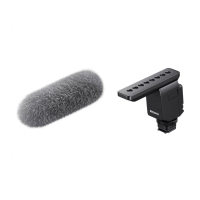
The microphone comes with a wind screen, which can be fitted over the microphone to minimize noise caused by wind or breath hitting the microphone, thereby improving recording quality in outdoor or windy conditions.

Maintenance Features

Proper care and maintenance are crucial for the longevity and performance of the ECM-B1M.

  • Protection during transport: To protect the Multi Interface foot connector from damage when carrying the unit, it is recommended to remove the microphone from the camera, attach the connector protect cap to the foot, and store the unit in its supplied case.
  • Handling during recording: Users should avoid touching the microphone or the camera excessively while recording, as operation and handling noises from the camera, lens, or the microphone itself may be recorded.
  • Voice delay: Monitoring or recording voice with the microphone of a camera may cause a slight delay of the voice.
  • Lens changing: Before changing a lens, users should ensure that no wind screen fibers are present on the surface of the lens and the camera body. If fibers are present, they should be cleaned off with a blower or similar tool before changing the lens.
  • Microphone cleanliness: If dust or water droplets are present on the microphone surface, successful recording may not be possible. The microphone surface should be cleaned before use.
  • Wind screen care: If the wind screen becomes exposed to rain or gets wet, it should be removed from the unit and allowed to dry in the shade to prevent damage or mildew.

By following these guidelines, users can ensure reliable performance and extend the lifespan of their Sony ECM-B1M shotgun microphone.

Sony ECM-B1M Specifications

General IconGeneral
Number of products included1 pc(s)
MaterialPlastic
Product type-
CertificationCE
Product colorBlack
Weight and Dimensions IconWeight and Dimensions
Weight77.3 g

Related product manuals