FCB-ER8550/CR8550(GB) D-201-100-12(1)
12
Custom Color Gain
You can configure the color gain. Use this setting when
bright color is particularly important.
The initial setting 100% (4h) can be set to range from
approx. 60% (0h) to 200% (Eh) with 15 stages.
Custom Color Phase
You can configure the color phase. The initial setting 0
degrees (7h) is adjustable between approx. −14 degrees
(0h) to +14 degrees (Eh), in 15 increments.
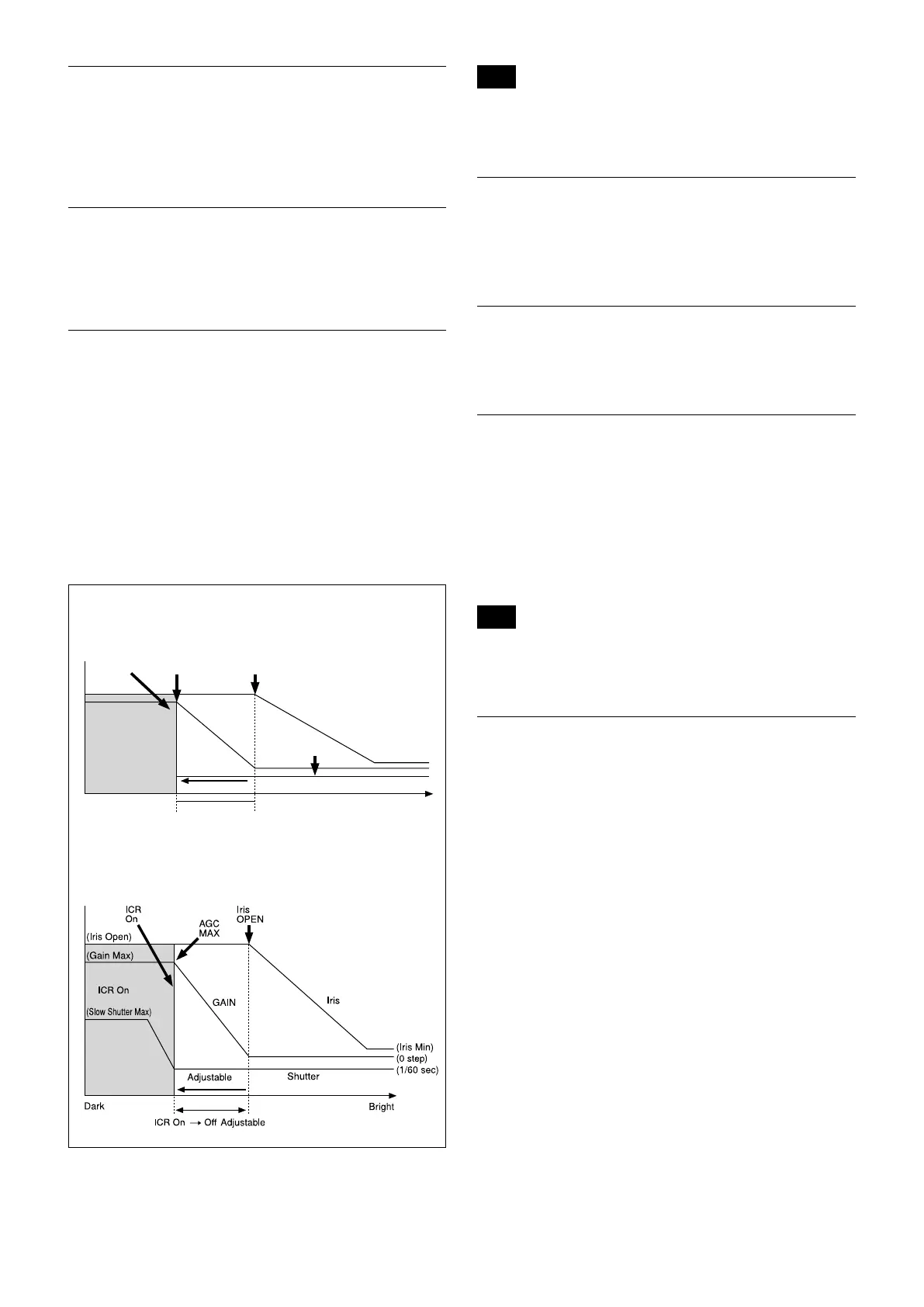
Auto ICR Mode
Auto ICR Mode automatically switches the settings
needed for attaching or removing the IR Cut Filter.
With a set level of darkness, the IR Cut Filter is
automatically disabled (ICR On), and the infrared
sensitivity is increased. With a set level of brightness,
the IR Cut Filter is automatically enabled (ICR Off).
Also, on systems equipped with an IR light, the internal
data of the camera is used to make the proper decisions
to avoid malfunctions.
Auto ICR Mode operates with the AE Full Auto setting.
ICR
Shutter
Dark Bright
AGC
MAX
Iris
OPEN
Shutter 1/60 sec
ICR Off On
GAIN
ICR On
Iris
When Auto Slow Shutter is Off (initial setting)
When Auto Slow Shutter is On
Note
Depending on the information such as brightness, etc., in the On/
Off settings condition, a malfunction may occur when the subjects
largely consisting of blue and green colors are taken.
Camera ID
The ID can be set up to 65,536 (0000h to FFFFh). As
this will be memorized in the nonvolatile memory
inside, data will be saved.
Picture Effect
It consists of the following function.
• Black & White: Monochrome Image
Image stabilizer
When the image stabilizer function is set to On, you
can obtain the image with less screen blur caused by
shaking and so on. The correction effect can be
achieved at the vibration frequency around 10 Hz. The
image stabilizer function uses the digital zoom method.
Although there are changes in the angle of view and
resolution, the sensitivity is maintained.
Note
The image stabilizer function may not work under the environment
of high frequency vibration components. When using the camera
under such environment, set the image stabilizer function to Off.
"StableZoom"
"StableZoom" is a function to perform correction using
the image stabilizer function according to the zoom
magnification and zoom the image up to approx. 24×
smoothly by combining the optical zoom with the
digital zoom. By zooming the image furthermore using
the digital zoom, the image is zoomed up to 288×. On
the wide side, the image without the deterioration in
resolution can be obtained because the digital zoom is
not used. On the other hand, the correction effect by
the image stabilizer function is maximized on the tele
side, reducing the blur.
"StableZoom" can be set to On/Off by the register
setting.


 To Next Page