FCB-ER8550/CR8550(GB) D-201-100-12(1)
13
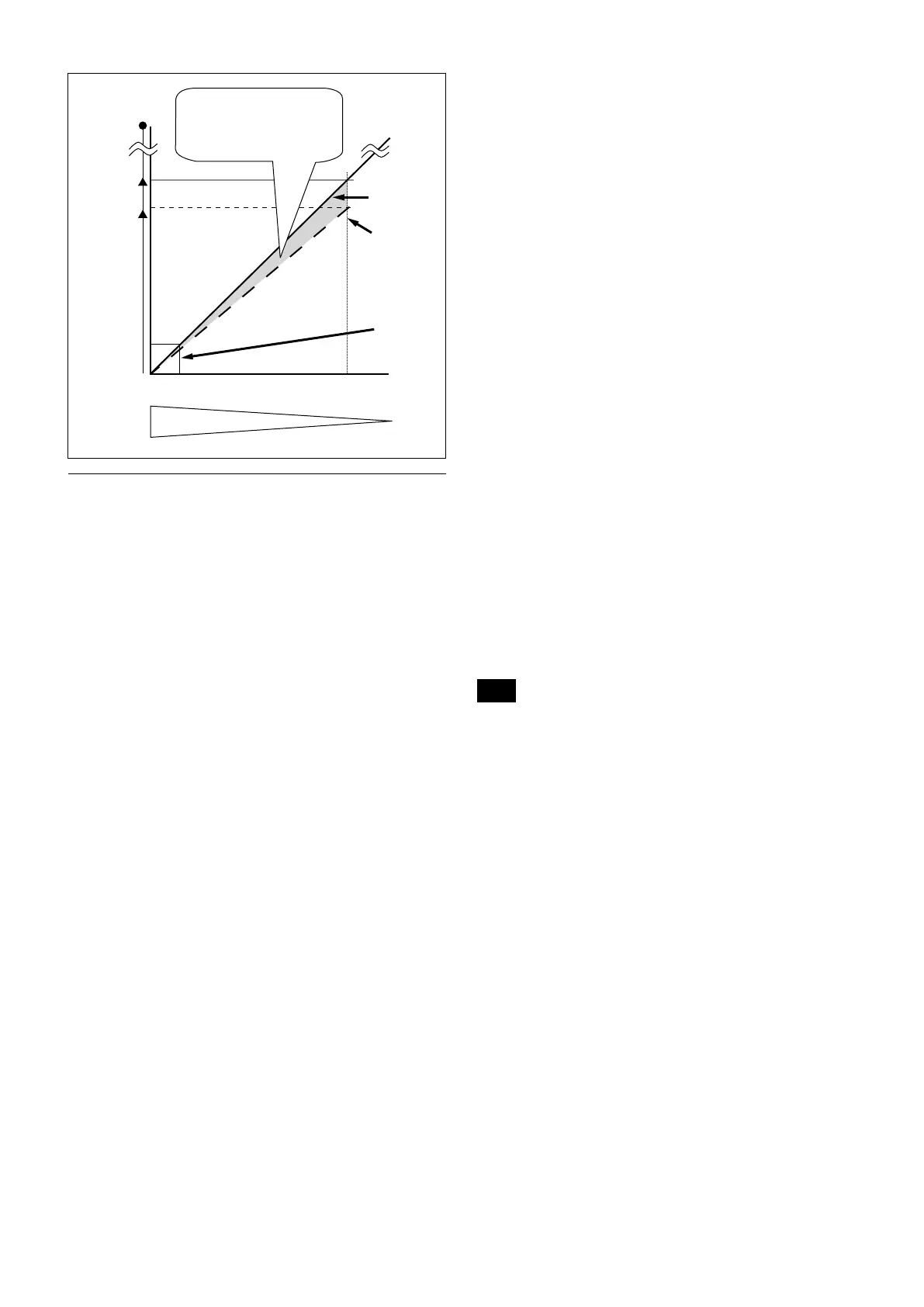
288×
20×
Zoom
magnification
Approx.
24×
wide
Angleofview・resolution
Opticalzoom
position
tele
Digitalzoom
isnotusedon
thewideside.
Opticalzoom
Digitalzoom
+
StableZoom
Correctionisperformed
fortheblurinthisdigital
zoomarea.
Others
E-FLIP
This function reverses the video output from the
camera vertically and horizontally.
LR Reverse
This function reverses the video output from the
camera horizontally.
Freeze
This function captures an image in the field memory of
the camera so that this image can be output
continuously.
Because communication inside the camera is based on V cycle,
the captured image is always the one 3V to 4Vs after the
sending of a Command. Thus, you can not specify a time
period after sending EVEN, ODD or a Command.
Electronic Pan/Tilt
In 4K (3840 × 2160) mode, crop the image at the
designated position to Full HD (1920 × 1080) and
display.
You can specify the central coordinate of cropped
images by commands. Cropped sizes cannot be
changed as it is fixed to FHD.
Memory (Position preset)
Using the position preset function, 16 sets of camera
shooting conditions can be stored and recalled.
This function allows you to achieve the desired status
instantly, even without adjusting the following items
each time.
• Zoom Position
•
Digital Zoom On/Off/Super Resolution Zoom
•
Focus Auto/Manual
•
Focus Position
•
AE Mode
•
Shutter control parameters
•
Bright Control
•
Iris control parameters
•
Gain control parameters
•
Exposure Compensation On/Off
•
Exposure Level
•
Backlight Compensation On/Off
•
Slow Shutter On/Off
•
White Balance
•
R/B Gain
•
Aperture Control
•
ICR On/Off
•
Defog
Custom Preset
As with the position preset function, the camera
shooting conditions can be stored and recalled. The
settings are recalled when the power is turned on.
For setting items, see the “Initial Settings, Custom Preset
and Backup” section on page 24.
User Memory Area
A user area of 16 bytes allows you to write data, such as
an ID for each customer, data for each system, and so
on, freely.
Note
Rewriting of memory is not unlimited. Be careful to avoid using the
memory area for such as unnecessary tasks as rewriting the
contents of the memory for every operation.
Register Setting
The camera’s initial settings can be changed by the
register setting command.
Register Setting Command:
8x 01 04 24 mm 0p 0q FF
mm: Register No. (=00 to 7F)
pq: Register Value (=00 to FF)
Register Inquiry Command:
8x 09 04 24 mm FF
mm: Register No.
y0 50 0p 0p FF
pp: Register Value
(returned from the camera)
The register setting items and No. are as follows.
For details, see “Register Setting” on page 55.
Baud Rate: 00
Communication speed can be changed.
Monitoring Mode: 72
The output mode can be set.


 To Next Page