EasyManua.ls Logo

Sony FM - User Manual

Sony FM
160 pages
Print Icon
To Next Page IconTo Next Page
Loading...
4-427-706-22(1)
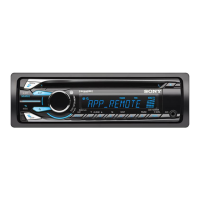
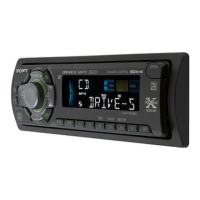
CDX-GS500R
FM/MW/LW Compact Disc Player
FM/MW/LW
Compact Disc
Player
To cancel the demonstration (DEMO) display, see page 4.
Zum Deaktivieren der Demo-Anzeige (DEMO) schlagen Sie bitte
auf Seite 4 nach.
Pour annuler la démonstration (DEMO), reportez-vous à la
page 4.
Per annullare la dimostrazione (DEMO), vedere pagina 4.
Om de demonstratie (DEMO) te annuleren, zie pagina 4.
Operating Instructions GB
Bedienungsanleitung DE
Mode d’emploi FR
Istruzioni per l’uso IT
Gebruiksaanwijzing NL

Table of Contents

Question and Answer IconNeed help?

Do you have a question about the Sony FM and is the answer not in the manual?

Summary

Getting Started and Panel Removal

Detaching and Attaching Front Panel

Procedures for removing and reinstalling the detachable front panel for security.

Main Unit Controls Overview

Location and Function of Controls

Identifies and explains the functions of buttons and controls on the main unit.

Radio Tuning and Storage

Storing and Receiving Stations

Guide to automatically storing stations using BTM and manually storing favorite stations.

CD and USB Device Playback

Playing Audio CDs

Instructions for inserting and playing audio CDs, including CD TEXT support.

Playing Music Files from USB Devices

Connect and play music files from compatible USB mass storage devices.

iPod Device Playback

Connecting and Playing an iPod;iPhone

Steps to connect an iPod or iPhone via USB and begin playback.

iPod Operations and App Remote Control

Direct iPod Operation (Passenger Control)

How to control the iPod directly from the unit using the MODE button.

App Remote Feature Overview

Overview of the App Remote feature for iPhone control.

App Remote Setup and Connection

Two-way Music Control with iPhone

Connect iPhone to enable two-way music control and access compatible applications.

Searching and Playing Tracks

Quick-BrowZer Track Search

Efficiently search for tracks by category (artist, album, genre) using Quick-BrowZer.

Advanced Track Search Functions

ZAPPIN Track Passage Search

Search for tracks by listening to short passages using the ZAPPIN function.

Sound Settings - EQ7 Presets

Selecting EQ7 Equalizer Presets

Choose from 7 equalizer curves (XPLOD, VOCAL, EDGE, etc.) or OFF.

Customizing EQ7 Equalizer Settings

Manually adjust equalizer curves by setting frequency range and volume levels.

Time Alignment for Sound Staging

Simulate a natural sound field by delaying sound from speakers based on listening position.

Sound Settings - Position and DM+

Subwoofer Settings and Setup Menu

Maintenance and Technical Specifications

Troubleshooting Guide - Core Issues

General Troubleshooting (No Power, Sound, Beep)

Solutions for common problems like no power, no sound, no beep, or erased memory.

Troubleshooting - Playback and Errors

Troubleshooting - Error Codes and App Remote

Summary

Getting Started and Panel Removal

Detaching and Attaching Front Panel

Procedures for removing and reinstalling the detachable front panel for security.

Main Unit Controls Overview

Location and Function of Controls

Identifies and explains the functions of buttons and controls on the main unit.

Radio Tuning and Storage

Storing and Receiving Stations

Guide to automatically storing stations using BTM and manually storing favorite stations.

CD and USB Device Playback

Playing Audio CDs

Instructions for inserting and playing audio CDs, including CD TEXT support.

Playing Music Files from USB Devices

Connect and play music files from compatible USB mass storage devices.

iPod Device Playback

Connecting and Playing an iPod;iPhone

Steps to connect an iPod or iPhone via USB and begin playback.

iPod Operations and App Remote Control

Direct iPod Operation (Passenger Control)

How to control the iPod directly from the unit using the MODE button.

App Remote Feature Overview

Overview of the App Remote feature for iPhone control.

App Remote Setup and Connection

Two-way Music Control with iPhone

Connect iPhone to enable two-way music control and access compatible applications.

Searching and Playing Tracks

Quick-BrowZer Track Search

Efficiently search for tracks by category (artist, album, genre) using Quick-BrowZer.

Advanced Track Search Functions

ZAPPIN Track Passage Search

Search for tracks by listening to short passages using the ZAPPIN function.

Sound Settings - EQ7 Presets

Selecting EQ7 Equalizer Presets

Choose from 7 equalizer curves (XPLOD, VOCAL, EDGE, etc.) or OFF.

Customizing EQ7 Equalizer Settings

Manually adjust equalizer curves by setting frequency range and volume levels.

Time Alignment for Sound Staging

Simulate a natural sound field by delaying sound from speakers based on listening position.

Sound Settings - Position and DM+

Subwoofer Settings and Setup Menu

Maintenance and Technical Specifications

Troubleshooting Guide - Core Issues

General Troubleshooting (No Power, Sound, Beep)

Solutions for common problems like no power, no sound, no beep, or erased memory.

Troubleshooting - Playback and Errors

Troubleshooting - Error Codes and App Remote

Sony FM Specifications

General IconGeneral
Display TypeLCD
AUX InputYes
BrandSony
CategoryCar Receiver
Tuner BandsFM
Frequency Range87.5-108.0MHz

Videos

How to change tuner mode from FM to AM using mode button in Sony car stereo

How to change from FM mode to AM mode in Sony car stereo

How to change band from FM to AM on Sony car stereo

Related product manuals