4K Media Player
FMP-X5
Configuring the internet connection
Check the network environment requirements and then connect the 4K Media Player to the internet via a wired LAN
connection.
Required network environment
LAN (100) port:
100BASE-T
(The network speed may differ depending on the network environment.)
LAN cable:
We recommend using a LAN cable that is Cat5 or higher. A normal-type cable is also recommended, as some flat-
type LAN cables are easily affected by noise.
If the receiver is used in an environment with power supply noise from electronic devices or in a noisy network
environment, use a shielded-type LAN cable.
Note
Use a router that is compatible with transmission speeds of 16 Mbps or faster to enjoy Netflix. If the transmission
speed is less than 16 Mbps, 4K content is streamed at a lower image quality.
Connection
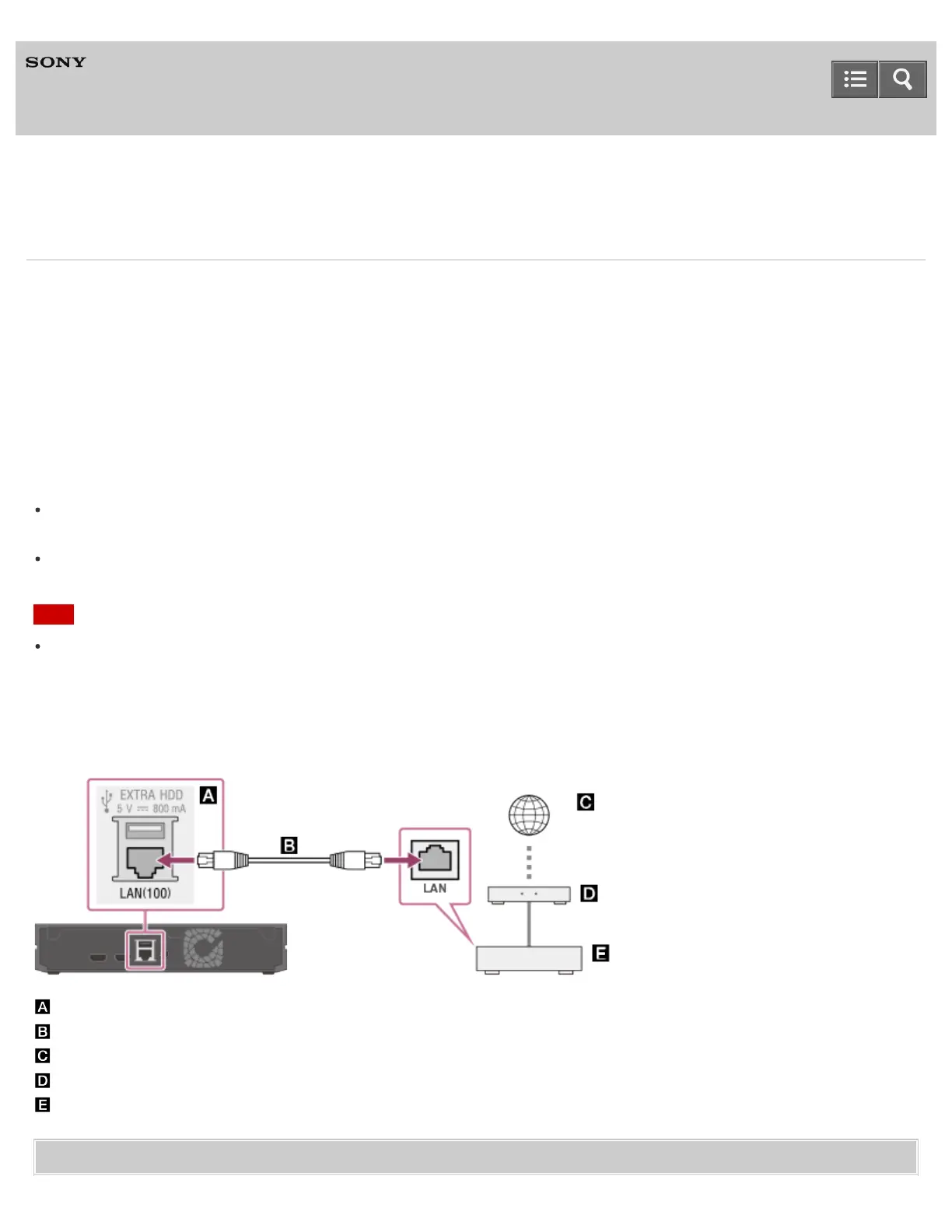
Connect the 4K Media Player to the internet via a wired LAN connection as illustrated below.
: LAN (100) port of the 4K Media Player
: LAN cable (not supplied)
: Internet
: Modem
: Router
Related Topic
Help Guide



 To Next Page