12 Tap to go to the next song, touch and hold to fast-forward the current song
13 Play or pause a song
14 Tap to go to the previous song, touch and hold to rewind the current song
15 Shue songs in the play queue
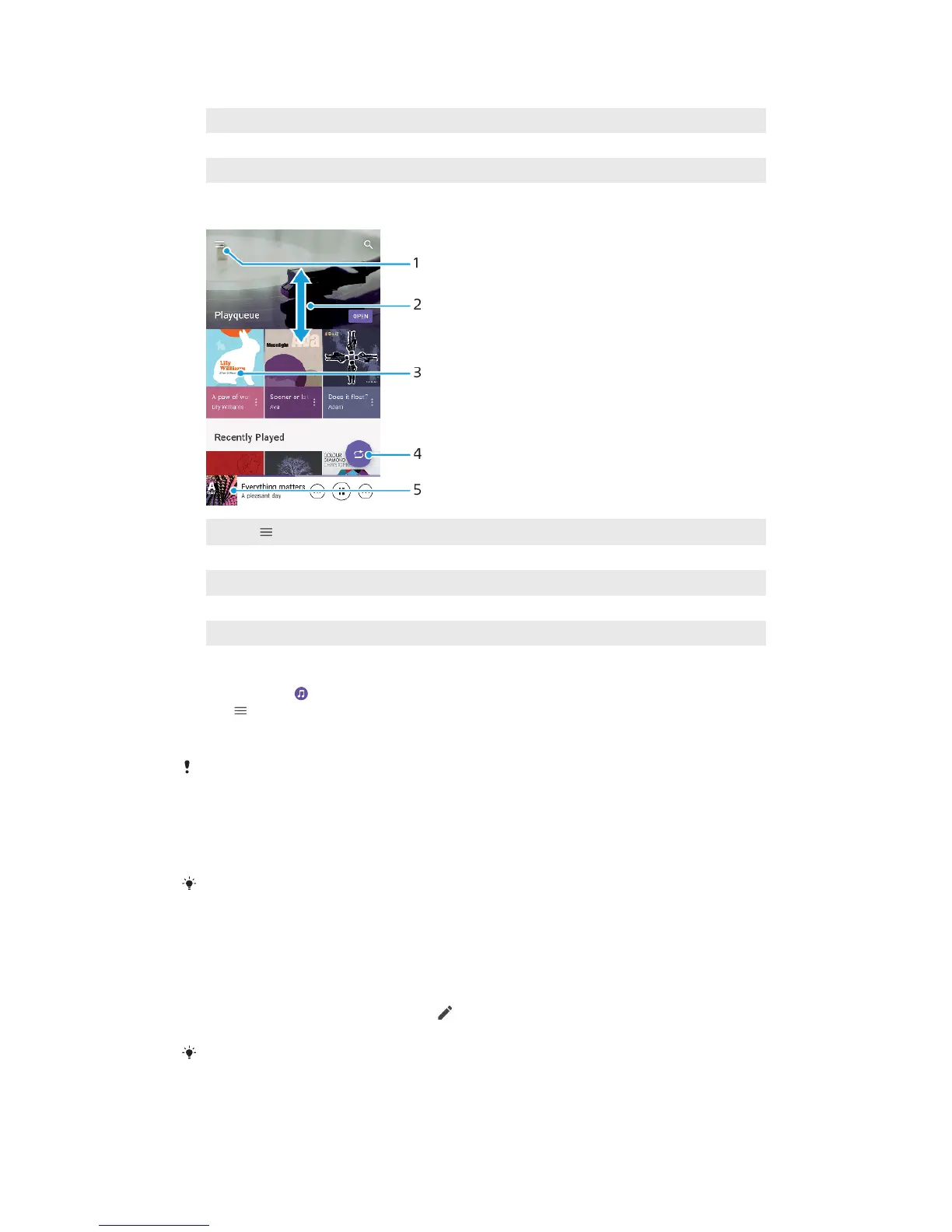
Music homescreen
1
Tap to open the Music menu
2 Scroll up or down to view content
3 Tap to start playing a song in the play queue
4 Play all songs in shue mode
5 Go to the music player screen
To play a song using the Music application
1 Find and tap .
2 Tap
.
3 Select a music category.
4 Tap a song to play it.
You might not be able to play copyright-protected items. Make sure you have the necessary
rights for the content you wish to use.
To find song-related information online
• While a song is playing in the Music application, tap the album art in the
music player screen and then tap More about this.
Online resources related to the song can include videos on YouTube™, song lyrics, and
artist information on Wikipedia.
To edit music information and download album art
1 While a song is playing in the Music application, tap the album art in the
music player screen and then tap Edit music info.
2 Edit the information as desired.
3 To set or download album art, tap
, then select an option.
4 When you are finished, tap SAVE.
You can also set album art to download automatically in the Music menu, under Settings.
To Adjust the Audio Volume
• Press the volume key up or down.
77
This is an internet version of this publication. © Print only for private use.













 To Next Page