Music
Transferring music to your device
There are two ways to transfer music from a computer to your device:
• Connect your device to a computer using a USB Type-C cable. Select Transfer files
on your device and then copy and paste or drag and drop the files using the
computer. See
Managing files using a computer
on page 40.
• You can use the Xperia™ Companion software to transfer your media files between
the computer and your device. Learn more and download Xperia™ Companion for
Windows or Mac at
http://support.sonymobile.com/global-en/xperia-
companion/
.
The Music application may not support all music file formats.
Listening to music
Use the Music application to listen to your favorite music and audio books.
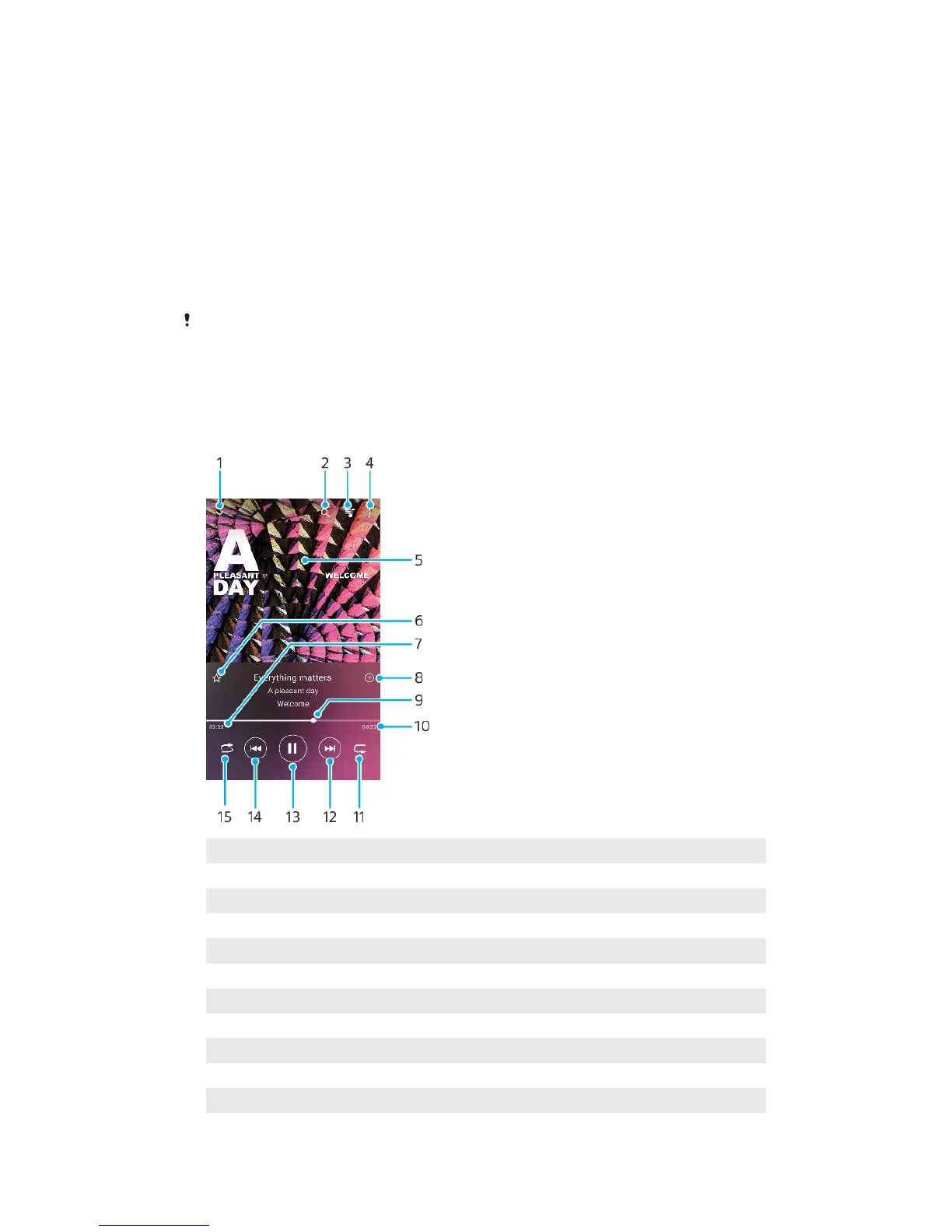
Music player overview
1 Minimize the full screen player
2 Search all songs saved to your device
3 View the play queue
4 View menu options
5 Album art (if available)
6 Add or remove a song as a favorite
7 Elapsed time of current song
8 Add a song to a playlist
9 Progress indicator—drag or tap along the line to fast-forward or rewind
10 Length of current song
11 Repeat the current song or all songs in the play queue
76
This is an internet version of this publication. © Print only for private use.








 To Next Page