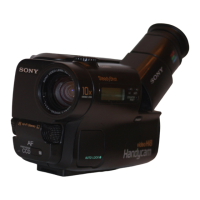
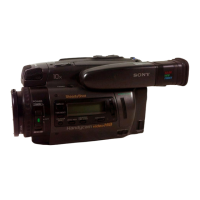
This document describes the Sony Handycam CCD-TR86/TR96/TR916 Video Camera Recorder, a device designed for capturing and playing back video with superior picture and sound quality.
Function Description
The Sony Handycam is a video camera recorder that allows users to capture life's moments and play them back. It supports both standard play (SP) and long play (LP) recording modes, with playback quality in LP mode being slightly lower than in SP mode. The camcorder features a power zoom lens, a built-in light for low-light conditions, and various picture effects. It can be powered by a battery pack, house current via an AC power adaptor, alkaline batteries (for CCD-TR86/TR96 only), or a 12/24 V car battery.
Important Technical Specifications
System:
- Video recording system: Four rotary heads, Helical scanning, FM system (SP/LP separate head).
- Audio recording system: Rotary heads, FM system.
- Video signal: NTSC color, EIR standards.
- Usable cassette: 8 mm video format cassette (standard 8 mm).
- Recording/Playback time: SP mode: 2 hours (P6-120); LP mode: 4 hours (P6-120).
- Fastforward/rewind time: Approx. 8 min. (P6-120).
- Image device: CCD (Charge Coupled Device).
- Viewfinder: Electronic viewfinder (Color).
- Lens: Combined power zoom lens, 15x (Optical), 30x (Digital). F1.4-2.4.
- Filter diameter: 1 1/2 inches (37 mm).
- Focal distance: f = 3/16 - 2/2 inches (4.1 - 61.5 mm).
- Focal distance (converted to 35 mm still camera): CCD-TR86: 1 9/16 - 23 3/8 inches (39 - 585 mm); CCD-TR96/TR916: 1 7/8 - 27 7/8 inches (47 - 705 mm).
- Color temperature: Auto.
- Minimum illumination: CCD-TR86: 0.6 lux at F 1.4; CCD-TR96/TR916: 2 lux at F 1.4.
- Illumination range: CCD-TR86: 0.6 to 100,000 lux; CCD-TR96/TR916: 2 to 100,000 lux.
- Recommended illumination: More than 100 lux.
Input and Output Connectors:
- Video output: Phono jack, 1 Vp-p, 75 ohm, unbalanced.
- Audio output: Monaural, Phono jack, 327 mV (at load impedance 47 kilohm), impedance less than 2.2 kilohm.
- RFU DC OUT: Special minijack, DC 5 V.
- LANC control jack: Stereo mini-minijack (ø 2.5 mm).
- MIC jack: Minijack, 0.388 mV, low impedance with 2.5 to 3 V DC output, impedance 6.8 kilohm (ø 3.5 mm).
General:
- Power requirements: 7.5 V (AC power adaptor).
- Average power consumption: CCD-TR86: 3.4W; CCD-TR96/TR916: 3.5W.
- Operating temperature: 32°F to 104°F (0°C to 40°C).
- Storage temperature: -4°F to +140°F (-20°C to +60°C).
- Dimensions (Approx.): 4 3/8 x 4 1/8 x 7 7/8 inches (111 x 105 x 200 mm) (w/h/d).
- Mass (Approx.): 1 lb 11 oz (780 g) (excluding battery pack, lithium battery, cassette and shoulder strap); 2 lb 3 oz (1 kg) (including battery pack NP-33, lithium battery CR2025, cassette P6-120 and shoulder strap).
- Microphone: Electret condenser microphone, monaural type.
AC Power Adaptor (AC-V16/V16A):
- Power requirements: 110-240 V AC, 50/60Hz.
- Power consumption: AC-V16: 20 W; AC-V16A: 22 W.
- Output voltage: DC OUT in operation mode 7.5 V, 1.8 A; Battery charge terminal 10 V, 1.1 A in charge mode.
- Application: Sony battery packs NP-33 (supplied), NP-60D, NP-C65, NP-68, NP-78, NP-80/80D, NP-98/98D.
- Operating temperature: 32°F to 104°F (0°C to 40°C).
- Storage temperature: -4°F to +140°F (-20°C to +60°C).
- Dimensions (Approx.): 6 5/8 x 1 11/16 x 3 inches (166 x 43 x 75 mm) (w/h/d) (including projecting parts and controls).
- Mass (Approx.): AC-V16: 15 oz (420 g); AC-V16A: 16 oz (450 g).
Usage Features
- Easy Operation: The camcorder is designed for ease of use, with buttons and settings clearly indicated.
- Charging and Battery Installation: Battery packs are charged using the supplied AC power adaptor. The charging time varies by battery model. Batteries are installed by sliding them into the mounting surface until they click.
- Cassette Insertion: Cassettes are inserted by sliding the EJECT knob, placing the cassette with the window facing out, and pressing the PUSH mark to close the compartment.
- Camera Recording: To record, set the POWER switch to CAMERA, turn STANDBY up, and press START/STOP. The camcorder supports SP and LP recording modes.
- Zoom Feature: The power zoom lever allows for variable speed zooming, with "T" for telephoto and "W" for wide-angle. Digital zoom (up to 30x) can be enabled or disabled via the menu.
- Hand-held Shooting: Suggestions are provided for stable hand-held shooting, including using the grip strap, supporting with the left hand, and placing the eye firmly against the viewfinder eyecup.
- Tripod Use: The camcorder can be mounted on a tripod for still shots.
- Checking Recorded Picture (EDITSEARCH): Allows reviewing the last recorded scene or checking recorded pictures in the viewfinder by pressing the EDITSEARCH button.
- Playback: Tapes can be played back in the viewfinder or on a TV/VCR by setting the POWER switch to PLAYER and pressing the PLAY button. The Remote Commander can be used for playback control, including still picture, picture search, and skip scan.
- Power Sources: Supports battery packs, house current (AC power adaptor), alkaline batteries (CCD-TR86/TR96 only), and 12/24 V car battery (Sony DCP-77 DC pack).
- Mode Settings: Various settings can be changed via the MENU system, including COMMANDER (on/off), BEEP (on/off), REC MODE (SP/LP), TITLE POS (center/bottom), TITLE LANG (English/French/Spanish/Portuguese), TITLE1 SET/TITLE2 SET (store own titles), D ZOOM (on/off), REC LAMP (on/off), AUTO DATE (on/off), CLOCK SET, and DEMO MODE (on/off).
- Date and Time Recording: The date or time can be recorded with the picture by pressing DATE or TIME.
- START/STOP Mode: Offers normal start/stop, ANTI GROUND SHOOTING (records only while button is pressed), and 5 SEC (records for 5 seconds automatically).
- Fade-in/Fade-out: Provides professional-looking transitions by pressing the FADER button.
- Picture Effect: Includes MOSAIC, SOLARIZE, B&W, SEPIA, and NEG. ART effects.
- Wide Mode Function: Allows recording in CINEMA (black bands top/bottom) or 16:9FULL (horizontally compressed for wide-screen TVs).
- Manual Focus: Allows manual adjustment of focus for specific shooting conditions.
- Backlight Function: Compensates for backlighting to ensure subjects are not too dark.
- PROGRAM AE Function: Offers Sports mode, High-speed shutter mode, and Twilight mode for different shooting situations.
- Built-in Light: Provides illumination for shooting in dark environments, with ON, AUTO, and OFF settings.
- Superimposing Titles: Users can select from eight preset titles or create two custom titles (up to 22 characters) to superimpose on the picture.
Maintenance Features
- Moisture Condensation Prevention: If the camcorder is brought from a cold to warm place, moisture may condense. The camcorder is equipped with moisture sensors and will indicate condensation. To prevent damage, eject the tape, turn off the camcorder, and leave the cassette compartment open for at least one hour. To prevent condensation, place the camcorder in a plastic bag when moving it between temperature extremes.
- Video Head Cleaning: If playback pictures are noisy or hardly visible, the video heads may be dirty. Clean them with a Sony V8-25CLH cleaning cassette (not supplied). Do not use commercially available wet-type cleaning cassettes.
- Camcorder Operation Care: Operate with specified voltage (6.0 V battery or 7.5 V AC adaptor). Avoid solid objects or liquids entering the casing. Handle with care, especially the lens. Keep the POWER switch OFF when not in use. Avoid wrapping the camcorder during operation to prevent overheating. Keep away from strong magnetic fields.
- Built-in Light Care: Avoid knocking or jolting the built-in light. Do not leave it on while resting on surfaces to prevent fire or damage.
- Tape Handling: Do not insert anything into the small holes on the cassette.
- Camcorder Cleaning: Clean the lens with a soft brush or cloth. Clean the body with a soft, dry cloth or a cloth lightly moistened with mild detergent solution. Do not use solvents. Prevent sand or dust from entering the camcorder.
- AC Power Adaptor Care: Attach battery pack firmly. Place battery pack on flat surface during charging. Unplug when not in use. Do not operate with damaged cords. Do not bend the cord forcibly or place heavy objects on it. Keep metallic objects away from connecting plate. Keep metal contacts clean. Do not disassemble or apply mechanical shock. Keep away from AM receivers and video equipment during use. Avoid extreme temperatures, dust, humidity, or vibrations.
- Dry Battery Care: Insert batteries with correct polarity. Dry batteries are not rechargeable. Do not mix new and old batteries or different types. Remove batteries if not used for a long time to prevent leakage. If leakage occurs, wipe liquid carefully and wash skin/eyes with water if contact occurs.
- Rechargeable Battery Pack Care: Remove battery pack after use and store in a cool place. Charge right before use. Battery life is shorter in cold environments. To save power, turn STANDBY down when not recording. Replace battery pack if it discharges quickly after full charge. The remaining battery indicator on the camcorder may differ from the battery pack's own indicator. Charge batteries at 50°F to 86°F (10°C to 30°C). Use Sony batteries. Brand-new batteries need a full charge. Recharge after long storage.
- Lithium Battery Replacement: Replace with Sony CR2025 or Duracell DL-2025 lithium battery when the indicator flashes. Keep out of reach of children. Wipe with a dry cloth. Do not hold with metallic tweezers. Insert with positive side facing out. Do not recharge, disassemble, or dispose of in fire.
- Shoulder Strap Attachment: Attach the supplied shoulder strap to the hooks.
- Remote Commander Battery: Insert two AA (R6) batteries matching polarity. Batteries last about 6 months. Remove batteries if not used for a long time. Aim the Remote Commander at the remote sensor within 16ft (5m) and a 30-degree angle. Keep remote sensor away from strong light sources. Ensure no obstacles between remote sensor and Remote Commander.

 Need help?






 To Next Page
 General