then restart HAP Music Transfer. For details on how to quit the applications, refer
to the operating manual of each application.
Some routers are equipped with a function (privacy separator) to prohibit
communications between Wi-Fi terminal devices (such as a computer). Check that
the function is disabled.
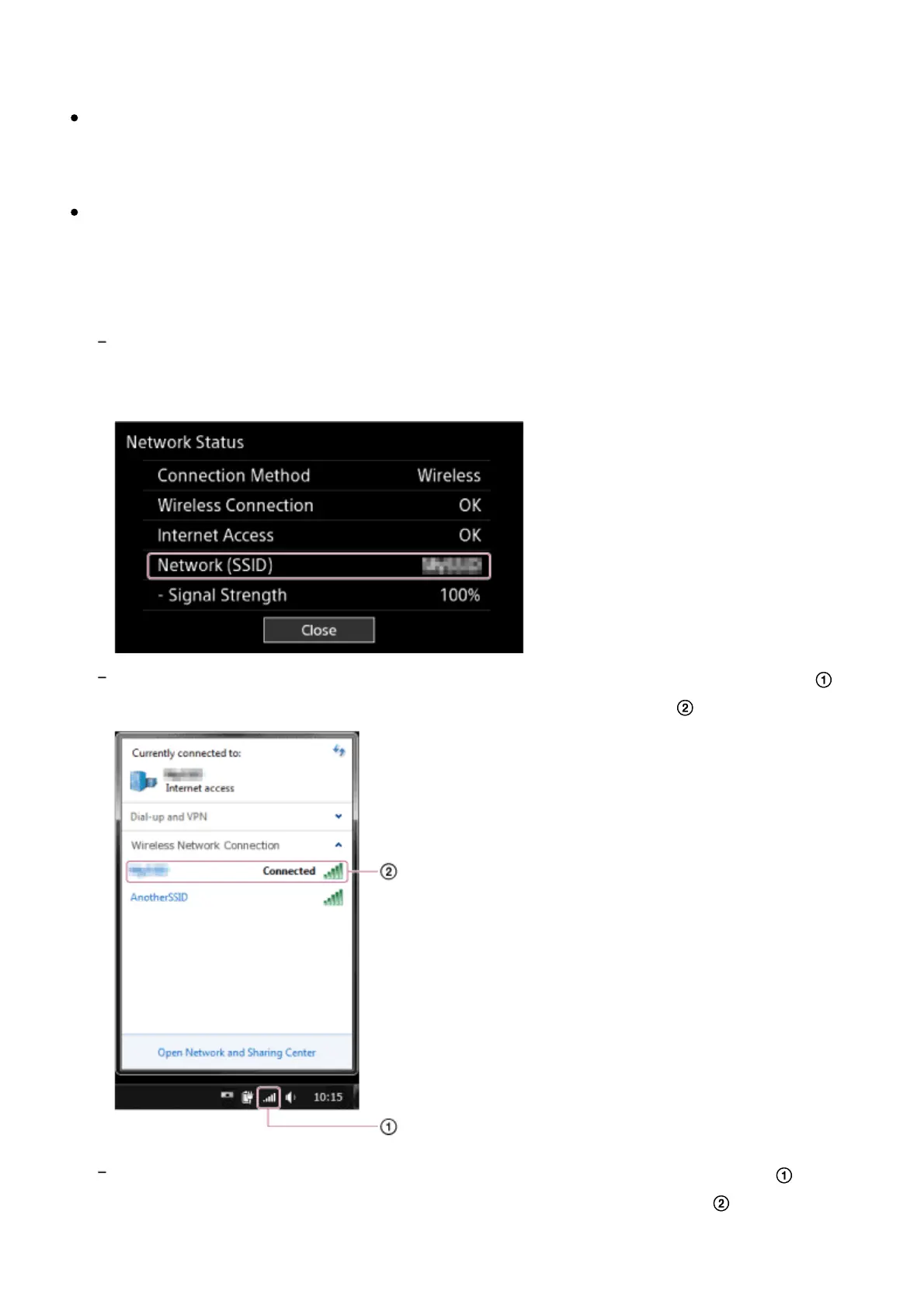
Check the network SSID of the HDD AUDIO PLAYER and the computer. When
network SSIDs are different from each other, the network separation function may
be enabled on your router. Reconnect the HDD AUDIO PLAYER and the
computer to the same SSID.
To check the network SSID of the HDD AUDIO PLAYER, select [Settings] - [Network
Settings] - [View Network Status] on the Home screen. The network SSID of the HDD
AUDIO PLAYER is displayed in [Network (SSID)].
To check the network SSID of a Windows computer, click the Wi-Fi connection icon ( )
on the task bar, and then check the item displayed as “Connected” ( ).
To check the network SSID of a Mac computer, click the Wi-Fi connection icon ( ) on the
menu bar, and then check the item on which a check mark is displayed ( ).



 To Next Page