EasyManua.ls Logo

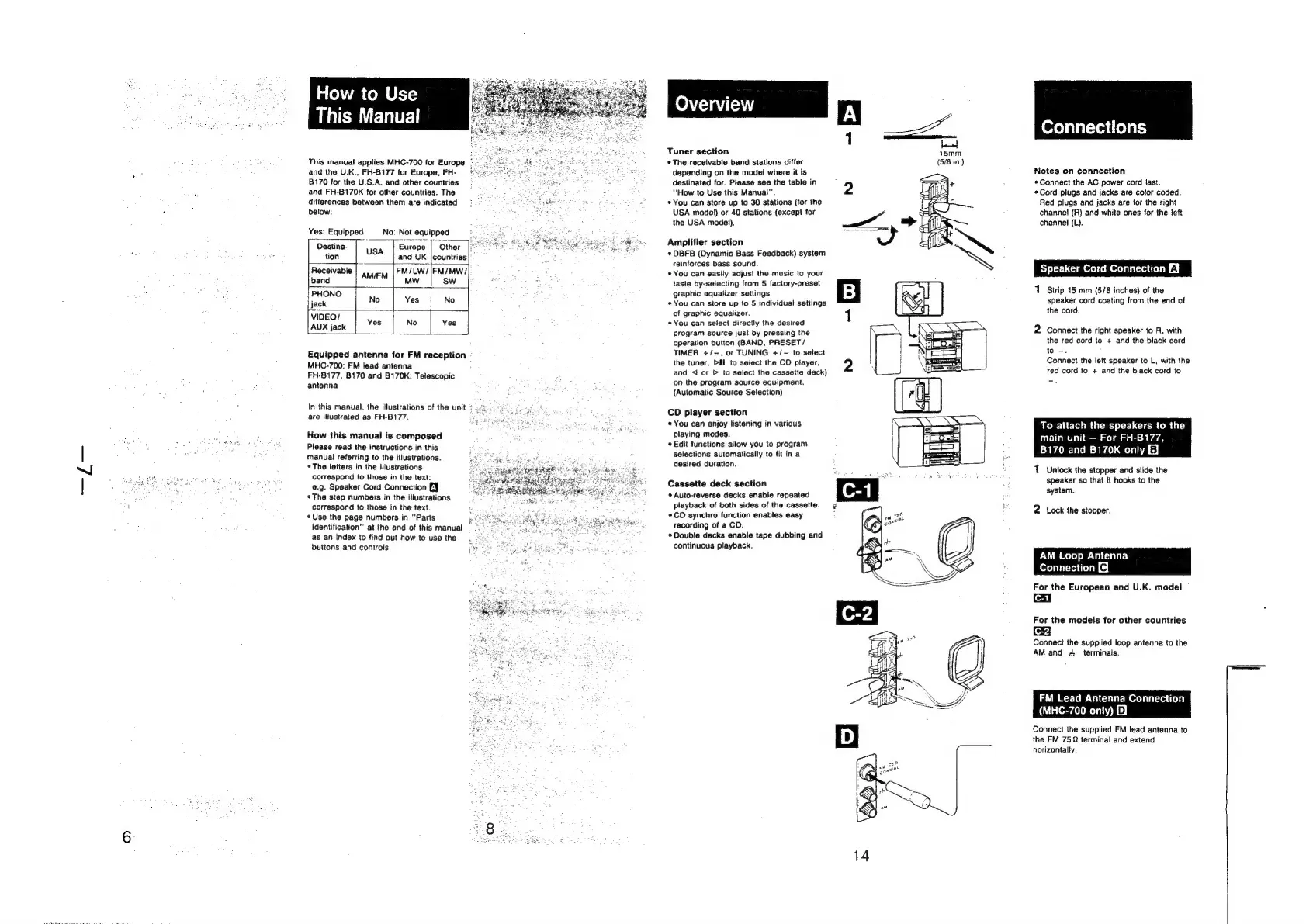
Sony HCD-H700 - How to Use This Manual; Overview; Connections

Sony HCD-H700
91 pages
Print Icon
To Next Page IconTo Next Page
To Previous Page IconTo Previous Page
Loading...
How
to
Use
This
Manual
This
manual
applies
MHC-700
for
Europe
and
the
U.K.,
FH-8177
for
Europe,
FH-
B170
for
the
U.S.A.
and
other
countries
and
FH-B170K
for
other
countries.
The
differences
between
them
are
indicated
below:
Yes:
Equipped
No:
Not
equipped
Destina-
,
:
|
Europe “Other
tion
USA
and
UK
|countries
Receivable
FM/LW/|FM/MW/
band
AMIFM
i
mw
|
sw.
oly
PHON
[jack
°
No
Yes
No
VIDEO/
AUX
jack
Yes
No
|
Yes
Equipped
antenna
for
FM
reception
MHC-700:
FM
lead
antenna
FH-B177,
B170
and
B170K:
Telescopic
antenna
In
this
manual,
the
illustrations
of
the
unit
are
illustrated
as
FH-B177.
How
this
manual
is
composed
Please
read
the
instructions
in
this
manual
referring
to
the
illustrations.
The
letters
in
the
illustrations
correspond
to
those
in
the
text:
€@.9.
Speaker
Cord
Connection
EY
¢The
step
numbers
in
the
illustrations
correspond
to
those
in
the
text.
«Use
the
page
numbers
in
‘‘Parts
identification”
at
the
end
of
this
manual
as
an
index
to
find
out
how
to
use
the
buttons
and
controls.
a,
,
Tuner
section
45mm
°The
receivable
band
stations
differ
(5/8
in.)
depending
on
the
model
where
it
is
destinated
for.
Please
see
the
table
in
“How
to
Use
this
Manual’.
2
*
You
can
store
up
to
30
stations
(for
the
USA
model)
or
40
stations
(except
for
the
USA
modei).
Amplifier
section
*
OBFB
(Dynamic
Bass
Feedback)
system
reinforces
bass
sound.
*
You
can
easily
adjust
the
music
to
your
taste
by-selecting
from
5
factory-preset
graphic
equalizer
settings.
*You
can
store
up
to
5
individual
settings
of
graphic
equalizer.
«You
can
select
directly
the
desired
program
source
just
by
pressing
the
operation
button
(BAND,
PRESET/
TIMER
+/-,
or
TUNING
+/-
to
select
the
tuner,
Dal.
to
select
the
CO
player,
and
<I
or
D
to
select
the
cassette
deck)
on
the
program
source
equipment.
(Automatic
Source
Selection)
CD
player
section
*
You
can
enjoy
listening
in
various
playing
modes.
*
Edit
functions
allow
you
to
program
selections
automatically
to
fit
in
a
desired
duration.
Cassette
deck
section
*
Auto-reverse
decks
enable
repeated
playback
of
both
sides
of
the
cassette.
*CD
synchro
function
enables
easy
recording
of
a
CD.
*
Double
decks
enable
tape
dubbing
and
continuous
playback.
Connections
Notes
on
connection
*Connect
the
AC
power
cord
last.
«Cord
plugs
and
jacks
are
color
coded.
Red
plugs
and
jacks
are
for
the
right
channel
(R)
and
white
ones
for
the
left
channel
(L).
aker
Cord
Connecti
1
Strip
15
mm
(5/8
inches)
of
the
speaker
cord
coating
from
the
end
of
the
cord.
2
Connect
the
right
speaker
to
A,
with
the red
cord
to
+
and
the
black
cord
to
-.
Connect
the
left
speaker
to
L,
with
the
red
cord
to
+
and
the
black
cord
to
To
attach
the
speakers
to
the
main
unit
For
FH-B177,
8170
and
B170K
only
E}
1.
Unlock
the
stopper
and
slide
the
speaker
so
that
it
hooks
to
the
system.
2
Lock
the
stopper.
AM
Loop
Antenna
Connection
@
For
the
European
and
U.K.
model
C-1
For
the
models
for
other
countries
Connect
the
supplied
loop
antenna
to
the
AM
and
7
terminals,
FM
Lead
Antenna
Connection
(MHC-700
onty)
2)
Connect
the
supplied
FM
lead
antenna
to
the
FM
752
terminal
and
extend
horizontally.

Related product manuals